It started out simple enough with semalt and buttons-for-websites. Then the ilovevitaly attacks began. Pretty soon Ranksonic began mocking us with fake events and organic search terms. Before we knew it there was a full-frontal assault of fake referral spam masquerading as legitimate website visitors compromising the accuracy of our Google Analytics reports. We all knew Google was working on it, a definitive solution just never came.
The problem was, and still is, most marketers don’t know what referral spam is, how to spot it, or how to remove it. This presents a major problem when businesses and marketers begin using these inaccurate Google Analytics reports to make conversion rate optimization decisions on A/B tests, landing page optimization, and more.
Worse yet, many marketers are unknowingly presenting traffic numbers to bosses and stakeholders that could be off by up to 60%!
Thankfully, there are a few proven strategies to eliminate Google Analytics referral spam. In this article we’ll discuss what referral spam is, how to identify it in your reports, and I’ll show you a few tried and true methods to clean up historical reports and prevent referral spam from effecting reports in the future.
What Is Referral Spam?
The majority of referral spam never actually visits your website which is why some marketers refer to it as “Ghost” spam. Even though this traffic never visits your website it still appears in your reports as legitimate traffic affecting total sessions, bounce rate, time on site, conversion rates and more.
On a major website where hundreds of thousands of sessions are recorded on a daily basis this traffic isn’t a major concern. On small business websites, this traffic can account for over 60% of daily sessions which causes major problems in month-to-month reporting, A/B testing, or other conversion rate optimization tests.
If this traffic never visits your website, why does it show up in Google Analytics? Google provides a developer tool called the Measurement Protocol. Among other legitimate uses, this allows developers and businesses to track behavior of their customers from a wide variety of different offline data sources and send that raw data to their Google Analytics account.
Unfortunately, this also opens the door for crafty spammers to force raw data into Analytics accounts by randomly attacking UA tracking codes, completely bypassing the website.

How Do I Identify Referral Spam?
There are a lot of ways to identify referral spam but the quickest is to review your traffic reports by clicking Acquisition > All Traffic > Source/Medium.
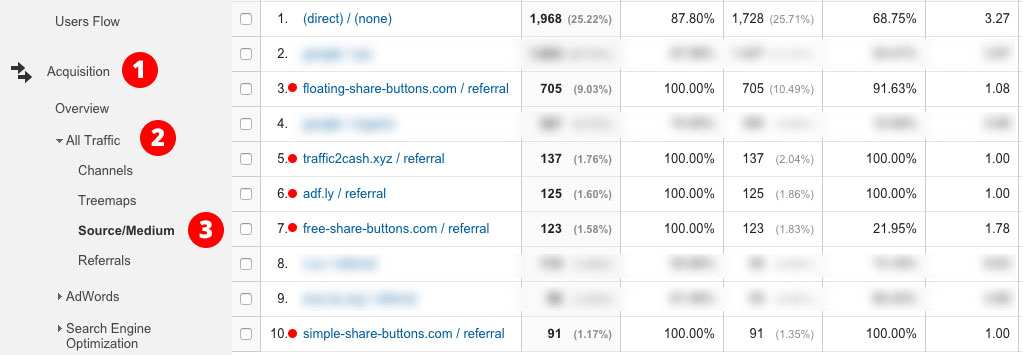
If the referring domain URL isn’t a big enough giveaway of the traffic source being spam, simply visiting the URL should remove all doubt.
Though some of these spammers have gotten more sophisticated, looking at % New Sessions, Bounce Rate and Pages/Session metrics are also a good indication. These metrics will usually be 100%, 100% and 1.00 respectively, another sign that this traffic never visits the website.
How Do I Remove Fake Traffic From Google Analytics?
Let’s be honest, there are thousands of blogs on this topic. Many are out of date, a lot include workarounds that simply don’t work, and others only eliminate some of the spam. What I’m going to outline below will work 100% of the time on new and old accounts. The only catch is you will need to update these filters as new spam domains continue pop up. Unfortunately, until Google provides a solution, there is no permanent “set and forget” fix for this.
Let’s get started.
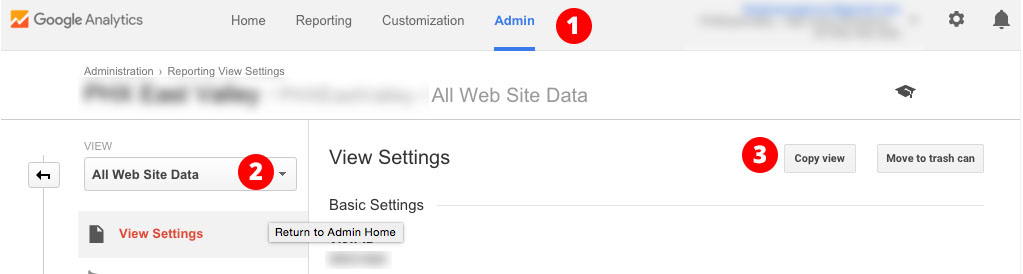
My first recommendation, and I strongly recommend this, is to create a copy of your existing view. This copied view will remain untouched and unfiltered. This is a good safety net in case one of your filters begins filtering out legitimate website traffic.
To copy your primary view, click the Admin tab, select the view you’d like to copy and click Copy View.
The first three filters we’re going to add will block all future traffic from domains which are currently known to send referral spam.
To add our first filter click the Admin tab, select your Filtered View, click Filters, and enter a name for your filter keeping in mind there will be several.
Now this step is very important. You must select Exclude and choose Campaign Source. Many people fail to choose Campaign Source and can’t figure out why their filters aren’t working.
In the Filter Pattern field, copy and paste the string below:
dailyrank|100dollars-seo|semalt|anticrawler|sitevaluation|buttons-for-website|buttons-for-your-website|-musicas*-gratis|best-seo-offer|best-seo-solution|savetubevideo|ranksonic|offers.bycontext|7makemoneyonline|kambasoft|medispainstitute
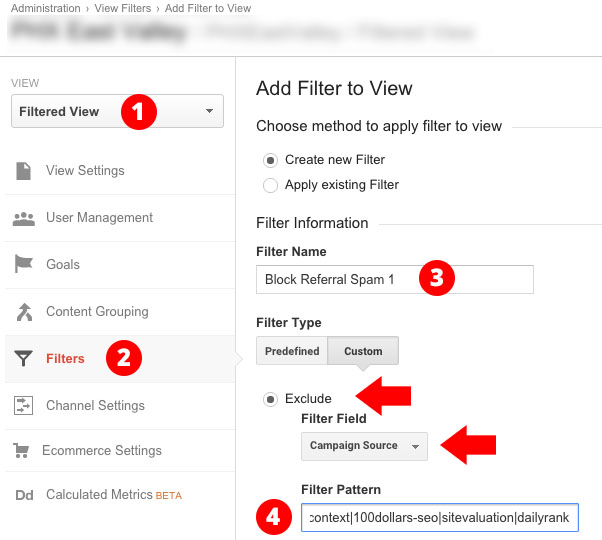
Since there is a character limit to the Filter Pattern field, we need to create a second filter the same as the first, except in the Filter Pattern field paste:
127.0.0.1|justprofit.xyz|nexus.search-helper.ru|rankings-analytics.com|videos-for-your-business|adviceforum.info|video—production|success-seo|sharemyfile.ru|seo-platform|dbutton.net|wordpress-crew.net|rankscanner|doktoronline.no|o00.in
… and a third filter like the previous two using:
top1-seo-service.com|fast-wordpress-start.com|rankings-analytics.com|uptimebot.net|^scripted.com|uptimechecker.com
The fourth and final filter we are going to create is a Hostname Filter. I mentioned that the far majority of this traffic never actually visits your website, thus, it never requests your actual hostname which is the URL used to reach your website (typically your domain name).
This can be seen in your Network report by clicking Audience > Technology > Network and selecting the Hostname tab.
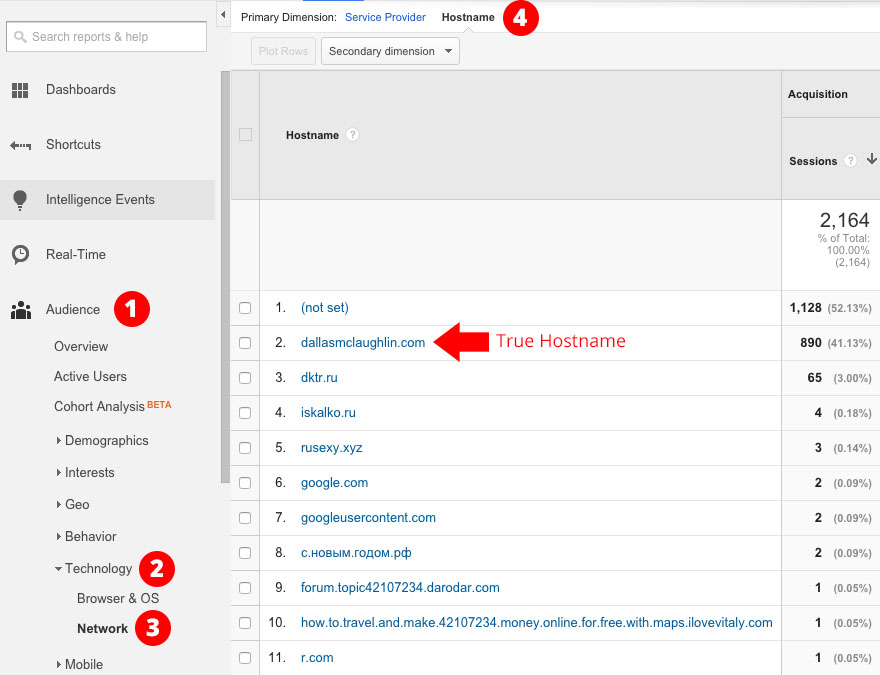
Any traffic in the above screenshot that is not visiting my actual URL is spam. Almost 60% of all traffic! The Hostname Filter eliminates this spam from your reports by including only the traffic that reaches your website by requesting your actual domain name.
You create this filter much like the previous three. The difference here is you must select Include, choose Hostname for the Filter Field and enter your hostname in the Filter Pattern.
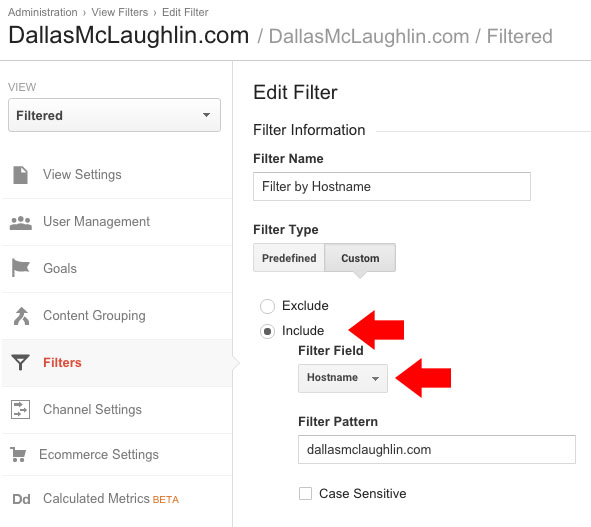
Congratulations! These four filters have just eliminated 99.9% of all referral spam from your future reports! Routinely adding new domains to the referral spam filters will keep this traffic under control and keep your future reports clean.
How Do I Clean Old Google Analytics Reports?
While the above mentioned filters will only fight future referral spam, you can still remove spam from historical reports using a single Custom Segment.
You can create a Custom Segment from any report, but I’d recommend going to Acquisition > All Traffic > Source/Medium. Once there, click + Add Segment > + New Segment.
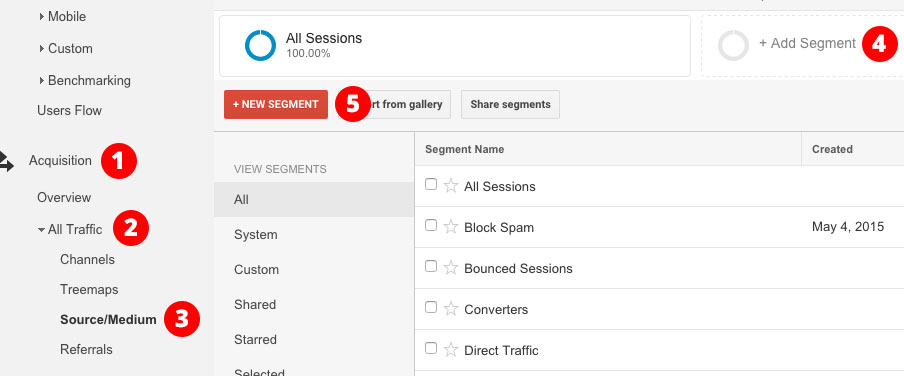
Essentially we’re just going to recreate the four filters we created above, but as a single Custom Segment.
Click Conditions, and on the first filter select Hostname > Matches Regex and enter the hostname(s) you used in your fourth filter above.
Now we want to click the + Add Filter button.
Custom Segment filters default to ‘Include’, but it is very important that your second set of filters be changed to ‘Exclude’.
In the set of drop downs select Source > Matches Regex and paste the same list of spam domains from the first filter you created. Click the OR button and repeat this filter two more times with the respective list of spam domains.

If the Custom Segment you created matches the screenshot above you’ll notice the circular graph to the right reflect a smaller amount of traffic. This is the amount of site traffic that remains after all referral spam has been removed.
Once you save this filter, you can apply it to any report and any time frame.
Taking The Fight To The Spammers
Nothing can compromise an otherwise successful A/B test quite like inaccurate reporting. With these four filters created and your Custom Segment applied, you can ensure that the data you are basing important marketing decisions on is truly accurate.
Until Google releases a definitive solution to referral spam, bookmark this article and reference this as the most accurate and up-to-date guide on how to finally remove Google Analytics referral spam from your marketing reports.
About the Author: Dallas McLaughlin is a Digital Marketing Specialist at The James Agency, a full service advertising agency in Phoenix, Arizona. He blogs frequently at DallasMcLaughlin.com about Search Engine Optimization, Pay-Per-Click, and Social Media Marketing trends. If you have any questions, you can tweet him directly at @BossDJay.


 Unfortunately there are many distractions–both inside and outside of your business–that can cause you to lose focus from the target objective. Taking too long to make that first sale, delaying a product release due to feature bloat, exploring any of the hundreds of social media tools
  When you start working on a company it’s easy to become overwhelmed, especially if it’s your first venture. Having great ambitions is a good thing, but in order to accomplish greatness there are smaller steps to be taken. Set an objective that is significant, yet attainable. Once you reach that objective you’ll feel empowered to reach the second objective, and so on. –
 Don’t quit! First-time entrepreneurs encounter so many obstacles, but so do successful ones. The key is to understand that every problem has a solution, and to be successful you need to push past every obstacle and setback with more gusto and positivity each time. Successful entrepreneurs will never give up, and continue to fight. Be smart, make good decisions, and solve problems. –
 Starting something new is inherently difficult; otherwise, it would already exist. You can either have a can-do attitude that enables you to take on challenges and thrive, or you can lose steam and the next challenge will topple over you like a wave. A lot of first-time entrepreneurs think that they need to work on their startup 24/7 when ultimately that is unsustainable. –
 As a first-time entrepreneur, you will make mistakes and run into obstacles as part of your learning experience. The mental battles you will incur can be overwhelming and will make you
  It’s easy to go online and read about other entrepreneurs’ success wherever you go. This is because no one likes to talk about the failures and endless hours of blood, sweat, and tears it took to get to where they are today. The biggest threat to first-time entrepreneurs is thinking that success comes easy. –






 Dipping your toes into the public speaking arena can be daunting. To reduce stress and anxiety of public speaking, look for opportunities to be a panelist. A panel discussion can provide you with an opportunity to speak publicly without making you the sole focus of the discussion. This gives you time to think about what you are going to say and it builds your confidence.–
  There are countless charitable organizations out there that would love to hear the advice and wisdom of an entrepreneur. This isn’t only an excellent life practice, but also is a great way to dip into public speaking. You can start with smaller groups to gain confidence, and you’ll avoid the stress factor because these groups are happy just to have you there.–
  If you’re just getting started with public speaking, it’s up to you to seek out your own opportunities. Look at conferences in your field and apply to present. Reach out to podcasters and get yourself interviewed. You might also try hosting and recording an online webinar on your topic of expertise. Even if the audience is small, you’ll get practice, and you can use the recording as sample work.–
 Joining a nonprofit board is a great way for entrepreneurs to practice their public speaking skills. Nonprofit board members are regularly called upon to present to diverse audiences on various stages, from board meetings to donor presentations. It’s a low-stress environment that offers ample opportunity to make mistakes and improve your public speaking skills.–
  Spend some time watching Steve Jobs pitch–what he conveyed was almost second to his showmanship. He spent days practicing his scripts and setting each stage for his performance and audience. Engage your audience with pauses and changes of tone and speed. Video yourself and see what needs work, then refine and rehearse.–
  Speaking to college kids is a great way to give back while getting experience in front of crowds. Start by reaching out to your own alma mater or schools in your area. You’ll almost certainly
  Public speaking is always nerve-wracking, but if you practice, it gets a little easier. When you have in-depth knowledge of what you are talking about, it is much easier to feel confident when speaking in front of a crowd.–
  Toastmasters International is an organization that is focused on the goal of improving members’ leadership skills and public speaking. There are over 15,000 clubs in over 130 countries, and many are targeted toward entrepreneurs. Joining a club is easy, and at meetings you can start giving prepared or impromptu speeches right away and receive valuable feedback in a non-hostile environment.–
