Thursday, 7 April 2016

5 Content Distribution Metrics Your Marketing Team Should Be Obsessing Over

Output is seductive. It feels great to crank out lots of content and call your strategy a success.


But prolific doesn't always mean effective. Marketers must resist the allure of vanity metrics to ensure their content actually resonates with their intended audience.


Consumers' social feeds and dashboards are flooded with content from colleagues, friends, family, and the high school sweethearts they stalk on social media. A brand might publish stellar long-form articles, but what's the point if people ignore its posts and just keep scrolling?


To cut through the noise, marketers must track and measure the right data and up their distribution games. They need to focus on metrics that reveal which subjects to cover, where to publish, and when to share for maximum impact - not just ones that revolve around page views and traffic.


The Uselessness of Vanity Metrics


Let's be honest - we all love vanity metrics. Racking up likes, follows, page views, and subscriber tallies seems to validate our hard work. If people like our posts on Facebook, we must be doing something right.


Right?


Well, not necessarily. Most of these popular metrics don't accurately reflect ROI.

social-shares-on-a-blog


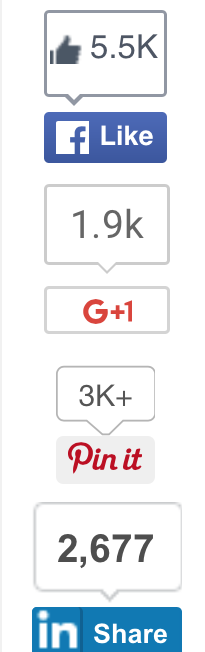
Big numbers for a blog post, but does it actually do anything for the business?


Marketers often tout web traffic as the No. 1 metric to monitor, but traffic is deceptive, and it often raises more questions than it answers. Who are all these people visiting your site? You might see a million hits a day, but they're worthless if they're coming from the wrong people.


Search engine rankings can also cloud your thinking, leading you to become overly consumed by thoughts of “Are we on the first page?” “Are we moving toward the top of Google's search results?” and “Are we trending in the right direction on Bing?”


Depending on which keywords and search terms relate to your business, obsessing over SEO rankings could be a huge time-waster. If only a few hundred people find your company through search engines, you're spending way too much time, money, and effort fighting a battle that's not worth winning.


The Distribution Data You Need


Without distribution data, creative decisions are tough to quantify. Design, layout, and copywriting choices all tend to rely more on intuition and gut instinct than hard data.


Content distribution, on the other hand, is a numbers game that should drive your creative. Once you complete a masterpiece, its distribution data should dictate the how, when, where, and why of your future content projects.


Focus on the following distribution metrics to best reach your goals:


1. Sharing


Likes may validate your message, but shares are what actually distribute it and help it become viral.


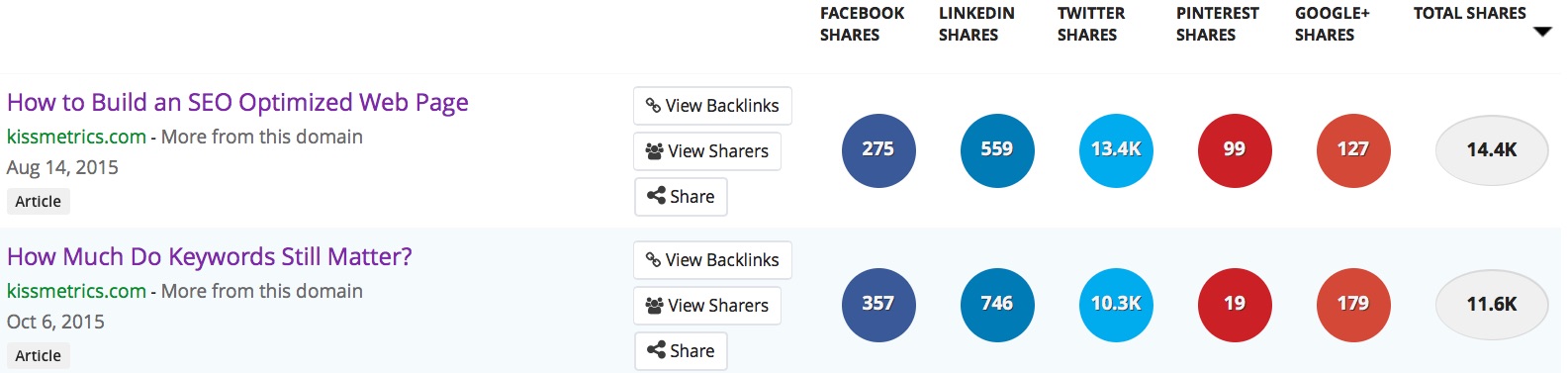
People share content when it's useful, entertaining, informational, and relevant to their overall interests. Use Buzzsumo or another social metrics tool to analyze social shares based on content type. Buzzsumo will also tell you where your content has been backlinked and how many people it's reached through outside platforms.

buzzsumo-kissmetrics


Widespread sharing is an excellent indicator that you're producing the kind of content your audience craves. Build future articles, blog posts, videos, and other materials around the themes that attract the most attention.


2. Share of voice


People who create and share positive content about your company without being asked to do so are your bonus brand ambassadors. Scour the web for this material, and recognize it on your social accounts. Show your appreciation by sending the content creators a personalized thank-you message. You can even consider inviting them to company events, asking them to review products as beta testers, or including them in any other activity that makes them feel like VIPs.


At the other end of the spectrum, don't ignore your haters; hug them. When people write negative reviews, they usually don't expect to get a response from the company they're complaining about. However, if the company does interact with them, empathize with their struggle, and perhaps offer gifts or incentives to offset their hardships - they'll be much more likely to change their negative opinion.


3. Conversions


Conversions happen when prospects respond to your call to action. Opening an email, clicking a CTA link in that email, and filling out a registration form on a landing page are all conversions. But, of course, buying your product is the ultimate conversion.
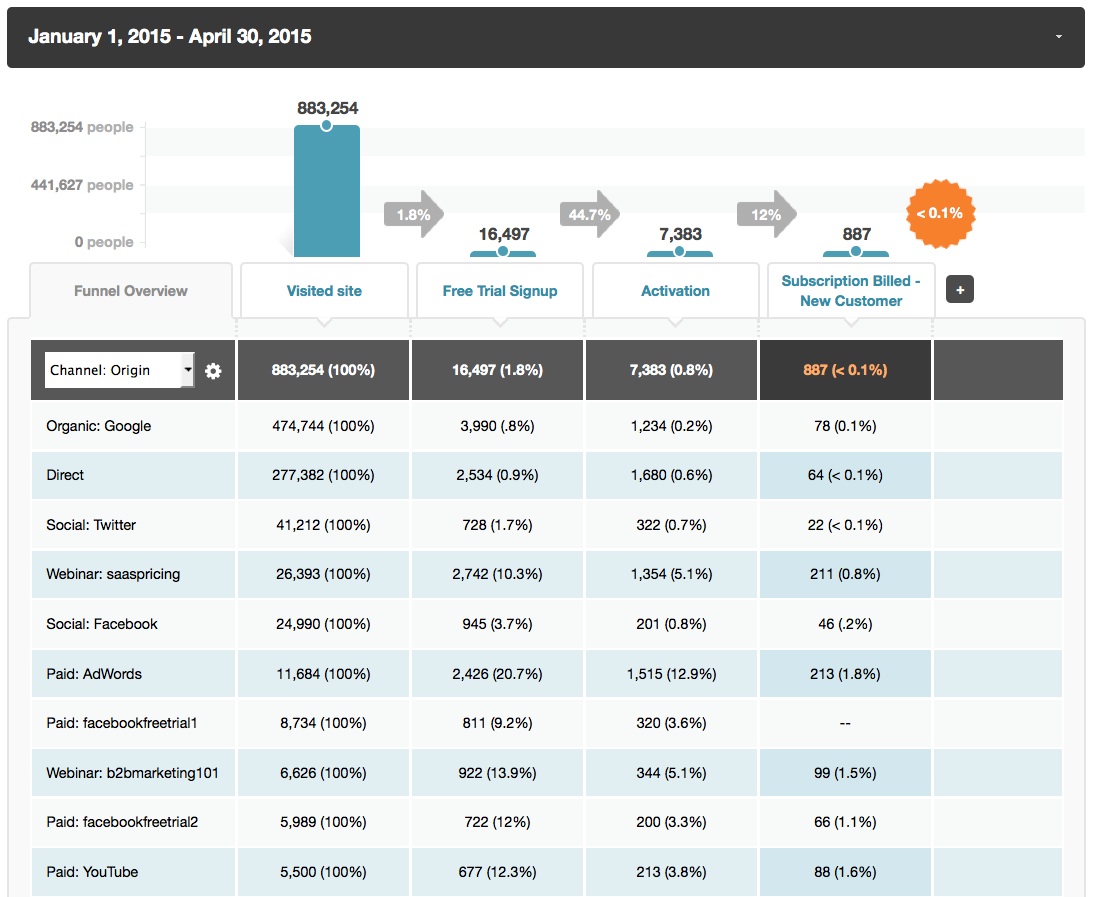

funnel-report-b2b-saas-segmentation-channel-origin-example-kissmetrics-post


Which campaigns are sending you the highest conversions?


Use your content to lead prospects further into the conversion funnel by educating them about your company or by inviting them to download in-depth gated content. You'll get their contact information, and they'll benefit from your ideas. It's a win-win, and it's one step closer to conversion.


4. Retention


There's a fine line between vanity retention metrics and true retention metrics.


The ones you should be tracking are those in which customers exchange personal data for your content or products. The average buyer requires seven touchpoints before he's ready to buy from a brand (known as the Rule of Seven), and content is a great way to demonstrate and reassert your value during this process. Metrics that share or create new content are much better than likes or hearts.


5. Sales pipeline impact


This measurement indicates how much of the sales pipeline has been influenced by one or more pieces of content. You can focus on single articles, a group of pieces, or all content collectively, but the bottom line is the same for each scenario: If your content marketing and distribution aren't impacting the sales funnel, your efforts are being wasted.


Sales pipeline impact metrics should indicate how much money you've earned in potential opportunities and actual sales as a result of your content. Products like Kissmetrics (see how Kissmetrics can tie content to revenue), Marketo, and Salesforce are able to assess how much pipeline a piece of content has generated.


Conclusion


With so much content being pumped into your customers' feeds, distribution is now the code to crack. It's not about who produces the most content; it's about who can get it in front of the right eyes.


About the Author: Russ Fradin is a digital media industry veteran and an angel investor with more than 15 years of experience in online marketing. He is founder and CEO of Dynamic Signal, the leading platform for empowering employees to be effective brand advocates. Learn more here.


Wednesday, 6 April 2016

The Evolution of 'Table Tech'–Changing the Way Restaurants Do Business

FinTech, Health Tech, and AgTech. Seems like there is a name given for every niche and the technology associated with it. Yes, technology is continuing to shape our world, but enough with the names already.


Every time an industry comes up with disruptive technology, there is a special name associated with it. One industry that doesn't seem to have yet adopted its name is hospitality management, specifically restaurants. So what do we call it?


GreasyTech? TableTech? Who knows–maybe I'll get credit for coining the phrase.


Regardless of the name you want to choose, I have seen quite a bit of change in the restaurant industry to warrant laying it out in this article. Several brands have been making changes in the way we will eat out in the future (as evidenced by the changes that are being made in the present).


That change? Kiosks and tablets being used to process financial transactions and track everyday business operations.


Numerous publications have taken notice of this trend in restaurant technology as of late, including Fortune that did an in-depth piece back in October 2015. Seems like many operators are waiting to see how things pan out, but for now, I would advise they take notice of how kiosks and tablets are shaping the industry.


The Olive Garden Solution to an Old Problem


Moving to Southern California is one of the best decisions I have ever made. Aside from the weather and the people, it has an unlimited supply of stores and restaurants. No more going down to the small local diner (unless you want to) simply because it is the only ticket in town.


Despite the choices available, my family loves Olive Garden. Unfortunately, it is one of the most difficult places to get into due to its popularity. If you are lucky enough to go at a non-busy time, you should only expect an hour wait. The local one I visit has a huge seating capacity, but no matter how many people they hire, there is always a wait.


So what are they to do?


About a week ago I found it very interesting to see an electronic device–kiosk–at the table for the kids to play games. While it was a great way to keep them quiet until the food came (another 30 to 40 minute wait), I quickly discovered that management found a way to help speed up the overall dining experience. This kiosk not only contained games to keep the kids busy, but also served other purposes:


  • Speeds up the ordering process. (It allows customers to put in an appetizer order before someone even comes to serve their drinks.)

  • Allows for quicker table turnover. (If you don't want to wait for your bill, it is right there on the device which can be paid immediately–it even prints you a receipt.)

  • Creates an additional source of revenue. (Some games are premium purchases.)


From experience I can tell you that the money is in the “table turn.” If you own a restaurant, the goal is to turn a table as quickly as possible (get the people out the door, clean the table, then seat the next person). The more “table turns” you have in a night, the more revenue you will generate.


After doing more research, I found that Olive Garden was not the first to move in this direction (although they were the place I experienced it). Chili's was one of the first restaurant chains to employ the “kiosk” technology. In 2014, it began using them in all 823 of its restaurants, supplied by the company Ziosk which is considered one of the leading brands in kiosk technology for restaurants.


The In-N-Out Way of Speeding Things Up


In-N-Out Burger! Never heard of it before a local talk show host in South Bend began complaining that he missed his favorite burger place (he moved from Las Vegas). To me, it was just any other name. If it wasn't national, then it must not be good enough to expand.


Well, that's not necessarily the case (take White Castle, for instance). I also learned after moving here that there are many locations throughout the Southwest. My first In-N-Out experience came when I traveled to California to take the bar exam. I have to say that it is very addictive and would recommend people staying away unless they want to become regulars.


What shocked me (and still does) is how busy each location can be. Despite having numerous locations within miles of each other there are long lines in the drive-thru that often lead out to the busy street. The line moves fast as the menu is limited (kind of like a McDonald's in the '50s) but there is always an issue with traffic.


So how does In-N-Out tackle the problem? Tablet ordering.


In order to speed up the drive-thru process, they have one person in line who walks up to cars and takes orders. This helps eliminate any gaps between the order window and the service window that can be caused by kitchen delays, large orders, and slow paying customers.


Once the order it taken by tablet, it syncs with the software inside the store. When you get to the window, your order is on the POS screen and a cashier can then take your payment. The order is already being processed by the kitchen who also received a copy when it synced from the tablet in the drive-thru.


One of the companies that supplies the technology to make this work is mStream. It combines the ability to take orders, receive payment, run reports, and manage the employees using the software.


Mobile Payment Processing–Simple But Effective


In the age of technology, cash is only a last resort. If it weren't for parking meters and vending machines, we wouldn't really need it at all (although many of those are starting to accept electronic payment as well).


It has become difficult for people to accept electronic payments when on the fly. A great example is the food truck industry. Yes, mobile restaurants.


In order to process payments, you used to need a phone connection (modem) or access to the Internet. Now with advances in technology, you can use 3G and 4G connections to accept payments. While this may not seem like much of an advancement, it really has helped restaurants advance their businesses.


Square.com has revolutionized the way electronic payments are processed. This company was able to disrupt the industry, even though PayPal had a huge hold on the market. In fact, PayPal has actually modeled some of its most recent offerings (e.g., PayPal Reader) after the Square business model.


Mobile payment processing helps more than food trucks. Think of your last St Patrick's Day celebration. When you go to the beer tent in the parking lot of the local F.O.P., you don't see access to the Internet, let alone electrical access for a POS terminal. Everything is processed electronically on a tablet or smartphone.


These type of payments are good for those who have off-site services such as catering, or special events like tent parties. You don't need actual POS software to use apps like Square or PayPal. You simply enter the amount and swipe a card. While Square and PayPal don't supply as much detailed tracking information as companies like mStream, they are still simple but effective solutions when you need it only a few times out of the year.


Think of it. What happens next time you go to a food show as a vendor and are unable to accept payment? You need a way to recoup your vendor fee and are leaving money on the table if you cannot accept payment on the spot.


What's Next for TableTech?


Do you like how I used the new coin phrase in the heading? Fingers crossed.


According to Harvard Business Review, many people are reluctant to use the new technology. There is the “I am not paying to order my food on a kiosk” attitude, and rightfully so.


I go to a restaurant to relax (as much as possible with a 2 and 8 year old), and doing more work just doesn't excite me either. As such, I share others' sentiment in not wanting to do more work.


However, I actually believe that people will start to use it more when they see the benefits. For example, when you are waiting 15 minutes before you even see a server to order drinks, it would be nice to have your appetizers arrive at the same time. And when your 2 and 8 year old decide they are going to start tearing up the place, paying and leaving immediately is always a great option.


As more and more people become familiar and begin to use the technology, I believe you will see it implemented in more restaurants. I don't think the wait staff will be replaced with robots any time soon, but who knows what will be next in the world of TableTech.


The post The Evolution of 'Table Tech'–Changing the Way Restaurants Do Business appeared first on AllBusiness.com

The post The Evolution of 'Table Tech'–Changing the Way Restaurants Do Business appeared first on AllBusiness.com.


The Biggest Mistake Most Companies Make During a Website Redesign (And How to Fix It)

Let's get straight to the point. A website redesign is no small undertaking. Every team, from developers/IT and design, to marketing and sales, has to be on board and understand what's expected of them. Everyone contributes. But in the midst of inevitable page or section additions and improved navigation menu and other major changes, one small but nevertheless vital point is often pushed by the wayside.


Analytics.


It's easy to understand why. After all, you're redesigning layouts and shifting pixels around - you've done everything but put up a “please excuse our digital dust” sign. Restructuring and reorganizing are messy, and it can be incredibly tempting to want to pause your analytics while you're reorganizing and rebuilding.


Don't do it.


The fact is, you can gain some very important information by leaving your analytics on and collecting data during your redesign.


“Why would I want to do that?” You may be asking.


It's completely understandable that you'd want to wait until the new redesign is polished, shiny and ready to roll out before flipping the switch on your analytics again and then keenly watching your visitors interact with your site, but in doing so, you'd be doing a huge disservice to them. If you're running a seasonally-focused business, you'd also be missing out on year-over-year data to determine particular seasonal trends that could affect design tests (such as putting up holiday-related images over Christmas).


Why Leave Analytics On During a Redesign?


website-redesignLeaving analytics on during a website redesign can give you valuable insights you may not otherwise get


During a redesign, restructuring or rebuilding of your site, leaving analytics on can give you some juicy, revealing information you may not otherwise get after “the big reveal”. For example, let's say you unveil a brand new navigation structure for your menu. Preliminary tests have shown that this new menu is better organized, mobile responsive and easy to use.


But when it all rolls out, things go south in a hurry. Users struggle to find what they're looking for. Stuff isn't where it used to be, and they're frustrated. They try the site search, but partially due to the redesign process, it may not be performing as well as before.


Had you left analytics on during this time and split tested your navigation menus, you would have captured valuable insights on the user's experience (and frustration) with the menu (and the subsequent migration toward search) - taking you back to the drawing board to find a way to blend the best features of the old menu with the responsiveness of the new. You'd have saved time, and most importantly, saved sales.


But navigation and layout aren't the only potential casualties of a redesign. There's also the issue of what's happening behind the scenes.


Making The Right Impression


analytics-onLeaving analytics on can also help you get better results from split tests during a redesign


You may feel the temptation to shut off analytics during a redesign because you want to make the right impression with your customers. After all, no one wants to see a half baked website. But by split testing the traffic between old and new, you can again learn what's working and what isn't. You can use features like heat maps to see where traffic is dropping off and where the user's attention is primarily focused. And if it's not where you'd hoped, you can make adjustments on-the-fly.

Remember that best practices seldom apply broadly to every product or industry. What works well even for your competition may absolutely crush your own conversion rate. Your analytics will give you the raw data that shows you how well a proposed design change works for you, then you can tweak and refine it to improve it further.


What to Measure for Best Results


Print


So if you leave your analytics on – what exactly do you measure during the building and rollout phases of your redesign? Well, it's not much different than the key metrics you should be measuring ordinarily:


User Engagement – How your users interact with your site. You'll want to focus on incremental conversion here – monitoring the click-through path step-by-step to see where customers may be dropping off in the process. Social media referrals may also affect the degree of engagement and interaction on your site.


Conversion Rate – Many people know that the “conversion rate” is important, but they're not sure why. Essentially, conversion rate is the number of people who take a specific action on your site that you want them to take - whether it's signing up for a subscription or proceeding to checkout. Your conversion rate is affected by many variables, but a redesign is one of the biggest overarching changes possible.


It's entirely possible that your conversion rate could drop initially after a redesign, as customers and visitors alike get accustomed to the changes, but then rise slowly and steadily - showing that the changes you've made are indeed working as intended. What many people don't know about conversion rates is that you can specify various paths that consumers can take to get to the end result – and then judge those paths according to how much of an ROI they bring you. Ideally you'd also get a view into the types of customers who are converting - are they at a higher pricing plan or average spend, for example?


In short, you can see what's working and what isn't - letting you concentrate your efforts on the stuff that works, while trimming the stuff that doesn't. Over time, this leads to a better, laser-focused trail of what resonates with your target audience and keeps bringing them back.


The bottom line is this: when it comes to analytics, leaving them on even during the midst of a website restructuring can provide unusual details, user behavior insights or patterns that you may not ordinarily see. Making these kinds of course corrections in the middle of a redesign (rather than scrambling after the fact to pick up all the pieces) saves time, money and effort in the long run.


Share Your Results with Us!


Have you recently redesigned your site or made it mobile responsive? Did you leave analytics on during that time? What interesting data did you collect? Anything in particular stand out? It's amazing what you can learn, even during an “under construction” phase. We'd love to hear your results and stories. Share your thoughts in the comments below!


About the Author: Sherice Jacob helps business owners improve website design and increase conversion rates through compelling copywriting, user-friendly design and smart analytics analysis. Learn more at iElectrify.com and download your free web copy tune-up and conversion checklist today! Follow @sherice on Twitter, LinkedIn or Google+ for more articles like this!


Tuesday, 5 April 2016

SearchCap: Google local pack mini reviews, DuckDuckGo scores & more

Below is what happened in search today, as reported on Search Engine Land and from other places across the web.

The post SearchCap: Google local pack mini reviews, DuckDuckGo scores & more appeared first on Search Engine Land.


Please visit Search Engine Land for the full article.


Could Your Company's Social Media Policy Land You in Legal Hot Water?

According to 2015 Pew Research Center data, nearly two-thirds of American adults (65%) use social networking sites. That's an increase of 7% since 2005.


With so many people using social media-and the accessibility of it via an array of mobile devices-it's understandable why business owners have concerns about employees spending more time making status updates and “liking” cute kitty videos than doing the work they're hired to do.


Although protecting your small business from lost time and brand damage done by employees on social media is important, you need to approach creating a social media policy with care. While you're protecting your business, you also need to heed the rights of your employees, so your social media policy doesn't put you in legal hot water.


When crafting (or reviewing) your company's social media policy, here are a few things to keep in mind:


In addition, the Federal Trade Commission has rules on what's required in the way of disclosures for endorsements, promotion, reviews, and other circumstances where there are incentives for mentions of your business on social media.


You need to be aware of legislation at the state level, as well. According to the National Conference of State Legislature, 23 states have enacted social media-related laws that apply to employers.


  • You may need two policies. I know, as if creating one weren't enough! But you will cover all bases by creating a “general” policy for the majority of your employees and one specifically for employees who manage your business's social media accounts. Team members who have the responsibilities of posting to and monitoring your accounts will require some flexibility. They'll also need additional direction in the way of an internal strategy for how to represent your brand. As a complement to your social media policy, consider developing style guide to ensure your team is using industry terminology, product names, and other communication elements correctly.


  • Clarity and understanding matter. Make sure your policy clearly explains your expectations regarding behaviors on and uses of social media, including acceptable use of social media during work hours. Remember, however, your rules can't go against your employees' freedom of speech or violate laws that your state may have enacted. Also, be willing to answer your employees' questions about your social media policy. It's critical that they understand it completely to better ensure they'll abide by it.


As a business owner, I relate to your struggles with creating a social media policy that gives employees some freedom while it guards against lost productivity and damage to your brand.


Realize that too tight a policy could result in employees using social media behind your back, possibly sneaking extra breaks or spending more time in the restroom. At CorpNet, I promote social media use and encourage my team to be a voice for my company. I give my staff the liberty to use social media, in accordance with a set of defined rules, in our office. Provided they don't take advantage of that freedom, it's a win-win situation.


A social media policy can be an essential part of your business's communications policy and a key element within your employee handbook. It requires some effort, but it can help set expectations and alleviate confusion and misunderstanding. As you're drafting yours, consider consulting a human resources professional and/or an attorney to ensure your policy both protects you and follows the law.


The post Could Your Company's Social Media Policy Land You in Legal Hot Water? appeared first on AllBusiness.com

The post Could Your Company's Social Media Policy Land You in Legal Hot Water? appeared first on AllBusiness.com.


Effective SEO for All Stages of the Conversion Funnel

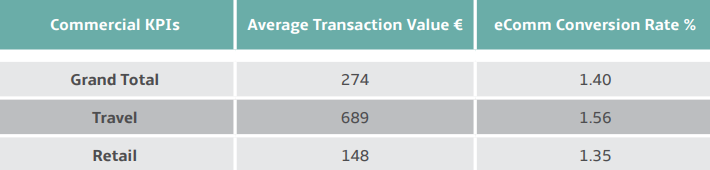
In 2013, the data scientists at Wolfgang Digital set out to answer one of digital marketing's greatest questions: What is the average conversion rate?


The answer, according to 56 million visits to 30 different websites, is 1.4%.


wolfgang-digital-average-conversion-rate


How does your site measure up? Do you think you could you do better?


Optimize each stage of your conversion funnel, and yes, you probably could.


What is a conversion funnel?


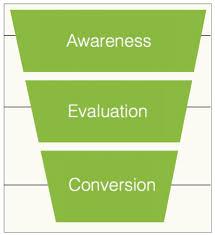
A conversion funnel is a way of visualizing the stages that prospects go through before they convert. It's called a funnel (rather than a tunnel), because the inverted shape represents how prospects drop off along the way to converting.


How many stages a funnel has will depend on who you ask, but for the purpose of this article, I'm going to keep things simple and talk about a three-stage funnel: top (awareness), middle (evaluation/research), and bottom (conversion).


stages-of-conversion-funnel


Most visitors to your site will arrive at the “awareness” stage. Your visitor numbers will drop off as they move closer to the “action” (conversion) stage.


Barring a few exceptions (Amazon for instance, where Prime visitors convert at 74%, and non-Prime visitors at 13%), only a fraction of those who visit you at the “awareness” stage will go on to convert – the 1.4% mentioned above, to be precise.


Rethinking how you use SEO to support your site at each stage of the funnel can get those visitors that make it past the awareness stage that much closer to taking action.


Top Of the Funnel


At the top of the funnel (TOFU), you are trying to capture potential customers at the “awareness” stage.


At this point, the customer has realized they have a problem, and they are searching the web looking for a solution. They may go on to make a purchase; they're just not quite sure what they want to buy, or when.


Yet.


Think of it like the modern-day version of window shopping.


Window-shopping-wikipedia


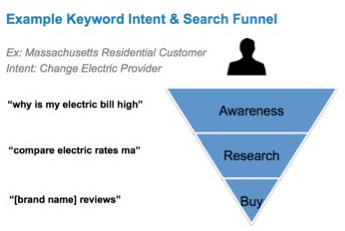
If you want to capture these potential customers (and why wouldn't you?), you need to provide content that's geared around the type of search queries that are asked at this early stage.


example-keyword-intent-and-search-funnel


The goal is to answer these queries in the hopes that your content will rank in the SERPs and bring searchers to your site. This means setting commercial intent aside, and focusing on query-based keywords. There are a number of tools that can help you to do this.


Most marketers' go-to keyword research tool is Google's own Keyword Planner, but let's forget about that for a moment. It's very useful, but it's also very commercially-minded.


Optimizing your site for customers at the awareness stage entails uncovering longer-tailed phrases that lack the search volume needed to appear in Keyword Planner.


Answer the Public, Ubersuggest, and Infinite Google Suggest are all free, effective tools for identifying long-tailed phrases that customers search for early on in the buying cycle.


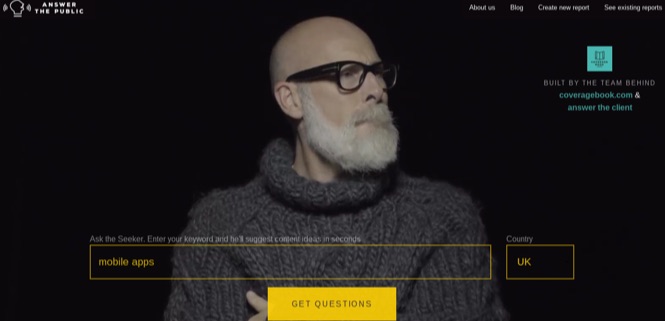
So you can begin to understand the sort of information available through these tools, head over to Answer the Public and enter a relevant head search term in the search box.


For the purpose of this exercise let's pretend we own an app design agency. We'll call ourselves “App Design Inc.”


This means I'm going to want to find out what sort of questions companies are asking about application design, so I might search for a phrase like “mobile apps”.


answer-the-public-mobile-apps


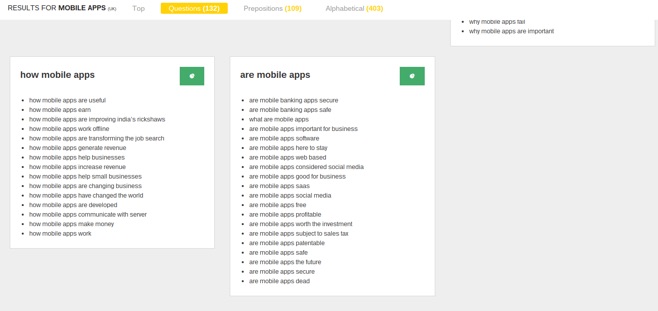
This search has brought back 132 questions in total. Many of them are pretty useless to me at this time, but many more could easily be worked into content that targets companies who are curious about mobile applications and eager to find out more.


mobile-apps-queries


The sort of phrases I'm looking for at this stage are things like:


  • How mobile apps help generate revenue

  • How mobile apps help small businesses

  • Are mobile apps worth the investment


These are all questions that are likely to be asked by companies who know mobile apps are popular right now and that there's a reason why – but that's it. In other words, questions that companies right at the top of the funnel will be seeking answers to.


In addition to tools built specifically to assist with keyword research, sites that are geared around users asking and answering questions can provide invaluable TOFU inspiration, too: think Quora, Reddit, and even Yahoo Answers.


Middle Of the Funnel


Customers who move past the awareness stage and into the middle of the funnel (MOFU) are getting pretty serious about making a purchase; they just haven't decided exactly what they're going to buy, or who they're going to buy it from.


If the “top of the funnel” is equivalent to window shopping, then the “middle of the funnel” is equivalent to heading to the mall knowing you want to buy a sharp pair of pants – you just don't know which pair, or where you're going to buy them from.


keyword-intent-search-funnel


Customers at this stage are extremely valuable. They're keen to purchase something you offer. You just need to find a way to get yourself in front of them.


Adding content to your own site remains an effective way to do that, although the keywords you target will differ, as might the format you use to present the content.


Customers at the middle of the funnel are researching their options. They want to buy a sharp pair of pants, but first they want to see what different styles of pants are available, and how prices and value compare.


This could mean writing a blog post that targets relevant search terms, or optimizing existing landing pages to capture a wider variety of phrases. Since we're moving into the buying stages of the funnel here, I'd probably use a mixture of long-tail keyword tools and Keyword Planner to help me pinpoint the right words and phrases to include.


We'd be looking for things like:


  • Who develops mobile apps

  • What mobile apps are popular

  • What mobile apps are needed


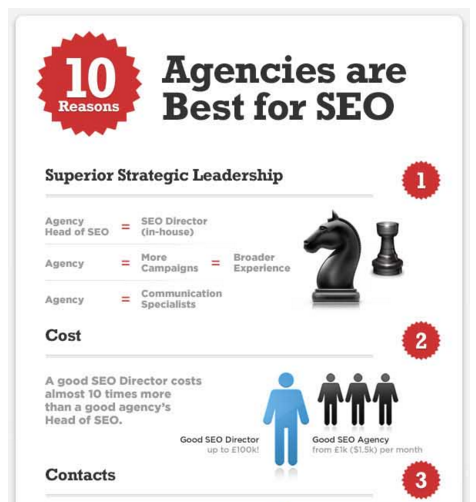
Other content formats that work well at this stage include infographics (as seen in the example below), checklists, and comparison blog posts (articles that pit your product directly against your competitors').


10-agencies-best-for-seo


Image Source


Just remember to pay attention to keyword usage on the page and in your metadata, regardless of the type of content you're creating.


Another great way to capture middle-of-the-funnel searchers involves heading outside the safety of your own site. Instead of waiting for customers to come to you, you go where your customers already are.


Writing guest articles for big-name sites and publications is an awesome way to build your profile and get your brand in front of your target audience. Why do you think I do this? It's not just for fun (even though I enjoy it).


The trick here is to target the right audience without being self-promotional. You want to educate and inform, to give people all the information they need to make their own decision.


Keywords are important here, too – even more so if the publications you're contributing to have the domain authority to rank more easily for key terms than your own site. Use that authority to your advantage.


Bottom Of the Funnel


At the bottom of the funnel (BOFU), you have visitors that are seriously considering making a purchase from you – they just need a little persuading in order to push them over the edge.


To stick with the shopping-for-pants analogy, the BOFU is equivalent to a fitting-room assistant telling you how great you look (as you try on the most expensive pair, naturally).


At this stage, keyword tools become somewhat less important. Prospects at the bottom of the funnel know you exist and may have visited your site multiple times. Your job is to do that last little bit of convincing that persuades them to buy.


At this point, your on-site search becomes a goldmine of data. What questions are visitors to your site trying to get answered? If you've already answered these questions, make the answers easier to find. Create new content for questions which haven't yet been answered.


Returning to our App Design Inc. example this might include questions like…


“How much do you charge for app design?”

“How long will my app take to complete?”

“What happens once my app has been built?”


Beyond your on-site search data, reviews, testimonials, and case studies all make excellent forms of BOFU content – especially when it's been crafted from some in-depth competitor research.


keyword-intent-bottom-of-funnel


At the BOFU, you're likely to be up against one or two rival companies. If you want to ensure visitors wind up choosing you, you need to be analyzing your competitors' BOFU content and creating your own content that's a (big) cut above it.


If they have written testimonials, you should be making video testimonials. If they've crafted a case study that shows how their product helped a customer cut costs by 40%, find and feature a case in which your product helped a customer cut costs by 50%.


This is where the competition really gets tough, but luckily, it's the simplest round to win – you just have to create content that's better than everything else you're up against.


Beyond Keywords


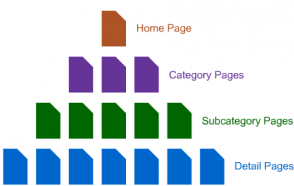
There's a lot more to optimizing the conversion funnel than just using the right keywords. App Design Inc. would be analyzing their site architecture to ensure there's a clear path for visitors to follow through each stage of the funnel.


website-architecture


They would be using analytics to identify where in the funnel customers leave the site, and will use this information to make changes that will help boost the number of visitors that remain and move closer towards converting.


They will be monitoring user behavior on key pages and adapting content accordingly.


They'll also be executing strategies to gain links and will make the most of the site's internal linking structure to ensure link equity flows freely to critical awareness, comparison, and conversion pages.


On-site and technical SEO plays a key role in optimizing a conversion funnel, as it does in optimizing any element of a site.


The trick to designing a site that's built to capture and convert visitors at all stages is a strategy that combines keyword-driven content with a technically-sound website.


Do you agree? If you have anything to add on how to effectively optimize a conversion funnel, share your thoughts in the comments below:


About the Author: Aaron Agius is an experienced search, content and social marketer. He has worked with some of the world's largest and most recognized brands to build their online presence. See more from Aaron at Louder Online, their Blog, Facebook, Twitter, Google+ and LinkedIn.