Thursday, 14 July 2016

4 Tools to Turn Your WordPress-Powered Website into a Growth Engine

Today, over one-third of all websites use WordPress for infrastructure and content management, making it the world's most popular site building platform.


Perhaps the biggest reason for this level of market penetration is WordPress's versatility. It can become almost anything you want it to be, a type of blank canvas for the digital work of art that is your branded online presence.


It doesn't matter what design element, user interface module or back end tool you can think of. Thanks to the vibrant community of WordPress developers (it's open source, after all), there's probably an existing plugin that can do what you have in mind. And if there isn't, you can have one built for you. Because the platform has emerged as the industry standard, WordPress's plugin developer ecosystem is expansive and growing. It allows millions of developers worldwide to create exceptional applications and tools that integrate into WordPress sites to give them added functionality.


For businesses, this means that your website can become one of your most powerful engines of growth – whether you are on a mission to grow exponentially (viral growth), retain customers (sticky growth), or bring in customers through advertising (paid growth). You can use the WordPress framework, along with whatever set of third-party components you like, to make your site work for you in ways that were impossible even just a few years ago.


However, with great choice comes great paralysis. It can be hard to know what WordPress plugins are best for the specifics of your situation. At the time of writing, the WordPress plugin marketplace is home to some 45,312 options, and that's before we count the thousands of standalone SaaS tools that integrate with WordPress sites from beyond the confines of your host servers.


To get you started in the right direction, here are four tools that can help turn your WordPress website into a powerful growth engine.


1. Drive Traffic Back to Your Site Using Start A Fire


If your brand is active online, chances are you share content from other brands as well as your own. This is true when it comes to outbound links in your blog content, and it's true when it comes to your social media channels.


Curating great third-party content that's relevant to your audience is one of the most effective ways you can position your brand as a leader in your niche, because it helps to cultivate the impression that you've got your finger on the pulse of your industry. And when you're a trusted go-to hub of valuable information, people will want to keep coming back for more of what you're serving up.


The disadvantage of using curated third-party content, though, is that you're essentially asking your audience to click out of your owned web property to go to someone else's, which means they may never return to your site. Have you ever thought about how much of your potential audience you're essentially sending away?


Now imagine being able to drive those clicks to others' sites back to your own content, because with Start A Fire, you can do just that.

start-a-fire
Image Source


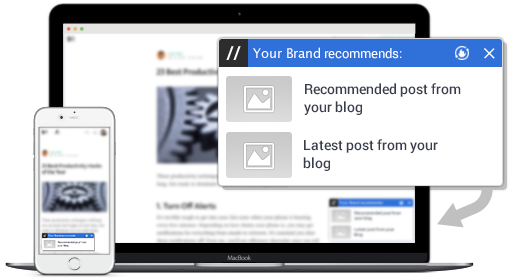
Start A Fire is a tool that allows you to add your own floating recommended links box, called a “badge,” to any URL you share. This means that whenever someone clicks on a link on your WordPress blog to a third party site, they'll have a reminder to come back your site when they're finished.


And Start A Fire-enabled short links can be shared anywhere, so you can even drive your social media traffic back your site after they've clicked on a link in your feed. Click on the link in the tweet below to see it in action.


If you click the link, you'll be taken to this page which includes this widget:


start-a-fire-social-widget


In addition to the WordPress plugin, marketers can integrate Start a Fire with their social media dashboards and email marketing platforms, so that every link shared has your custom badge on it.


Start A Fire is a free tool, with premium features available via custom pricing for agency and enterprise accounts.


2. Convert with Content Using Content Upgrades Pro


You could probably start a whole new business with the amount of time you spend researching, curating, creating and promoting content. Yet our content isn't working nearly as hard for us as it could at converting viewers into subscribers and customers.


Content Upgrades Pro is a plugin that promises to use your content to “turn up to 59.2% of your visitors into email subscribers.” How do they do that? This clever plugin allows you to offer a “content upgrade” to your WordPress blog posts – a piece of extra content that you offer within your article, but people can't get access to it unless they opt-in with their email address. It's analogous to gating resources behind a lead capture form, except that with content upgrades, the audience is all the more likely to convert, because they're already enjoying a taste of the premium content on offer.


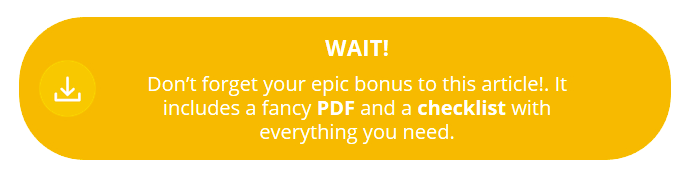
This way it works is simple. You simply add a bonus “Fancy Box” to your WordPress content using the plugin, which triggers a popup requesting the visitor's email address. Once they enter and click through to access the bonus content, the plugin redirects them to a download page or sends them an email. At the end of the day, they get more of the content they crave, and you get another qualified subscriber. It's a win-win.

content-upgrades-pro


So what qualifies for content upgrades? Anything you want! It could be an expanded version of the article your audience is reading, with more details or extra points, or maybe a PDF version for easy reference in the future. Or better yet, a totally separate but equally relevant offer, such as a free checklist, e-book or guide on the topic, which you can offer on multiple articles at once. The choice is yours.


Content Upgrades Pro is available for $57 as a one-time licensing fee for a single website, or $77 for up to five sites.


3. Give Your Site Superpowers with SumoMe


Alright, so including SumoMe on this list was a bit of an underhanded move on my part, because even though it's one package, it comes with more than a dozen extremely powerful add-on tools that add great functionality to your site.


From its heat maps, which tell you where your website visitors are clicking (or not), to its free exit intent popup email list builder, which promises to increase your email signups by 20% daily, SumoMe provides a well-curated group of useful apps, all aimed at growing your website traffic and increasing conversions.
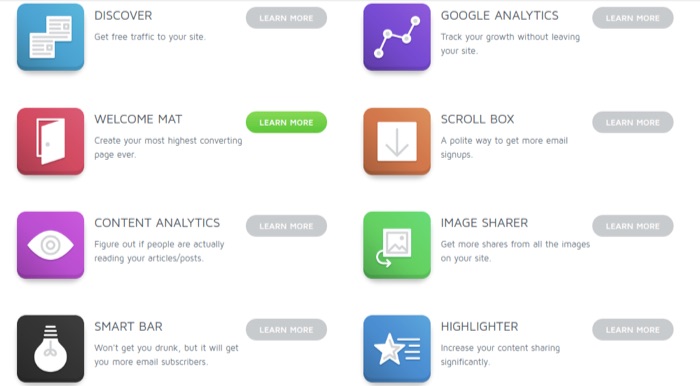

sumome-tools


Seeing a grid of this many tools may be a little overwhelming for someone just starting to explore the world of WordPress plugins. But don't worry – you don't have to use all the tools they offer. Just the ones you need, and you can add more as the need arises. Additionally, SumoMe walks you through the setup process for each, and provides great tips and tricks for optimization.


And if you ever need some inspiration or ideas on how to make use of the tools for your website, they provide a great showcase library of how some of their top customers are using these tools and the results they get.


SumoMe is available in a robust “free forever” version, with paid plans ranging from $20 to $119, depending on your features and traffic volume.


4. Make Your Numbers Count with Kissmetrics


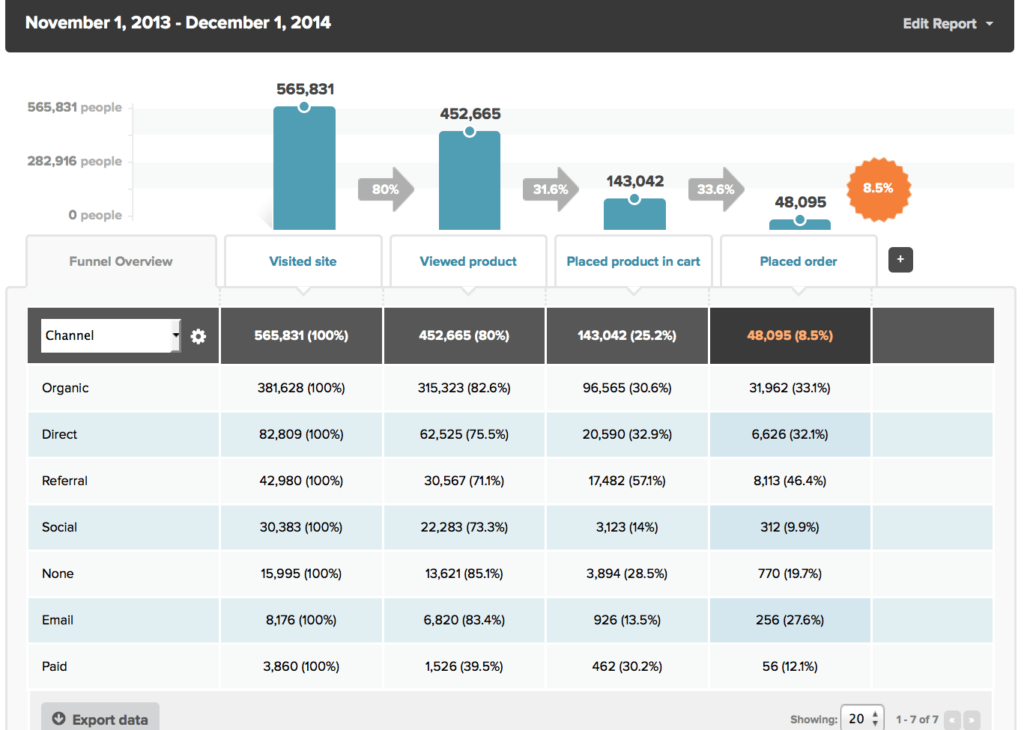
There's no way we could talk about growth-enabling tools and plugins and leave Kissmetrics off the list. The company has spent years crafting the ultimate analytics platform to help WordPress users (and non-WordPress sites) with all levels of expertise to dig deep into their metrics, to learn what's happening with their sites, and to discover ways to optimize the onsite experience.


What makes Kissmetrics different from the standard analytics platforms available is its emphasis on the end consumer. Instead of just focusing on metrics like pageviews and bounce rates, which is the realm of Google Analytics, Kissmetrics tracks individual users to help you understand and segment your audience so you can create better content and onsite experiences for success.


Any business that aims to convert customers through their WordPress site and wants to know who their visitors are, where they're coming from and how to get more of them to convert, should be using Kissmetrics.

ecommerce-funnel-channel-segmentation-kissmetrics-1024x730


Along with the standalone tool, Kissmetrics offers a standard plugin for WordPress, which allows you to track data and view the results directly on the back-end of your site.


And to top it all off, the Kissmetrics Blog that you're reading is one of the best sources of high-quality, consistent, relevant content about the latest in analytics, online marketing and website development. So you can always be sure that you have an ally that's just as invested in getting the best, most current information to help you succeed.


Kissmetrics pricing starts at $120 per month.


A Time for Growth


Once they're set up, the tools listed here are all more or less capable of working behind the scenes. Once you let them get to work, they'll require very little maintenance, but they'll provide massive results. You can't ask for much more.


While I've only provided four of the most beneficial tools and plugins that I'm familiar with, remember that there are thousands of options to choose from that can help develop your site into the growth machine it has the potential to become, and even more being developed daily. Keep looking out for that next great app that will help you even further in your growth journey.


About the Author: Nadav is a veteran online marketer and the Founder & CEO of InboundJunction, an Israel-based content marketing company. Nadav helps well-known brands in boosting their online visibility through PR, SEO and Social Media.


Tuesday, 12 July 2016

Survival Tactics for Traveling Salespeople

Sales and travel often go together. However, nowadays the glamour of air travel is gone–even driving can be tedious.


Being on the road doesn't have to be a source of sales frustration. There are ways to manage your travel so that you actually sell more instead of feeling worn out.


Eliminate steps.


The need to travel starts when you have to make an appointment with a prospect or customer. Too many salespeople think that the time to make the appointment is after their last sales call. Why not schedule your next appointment when you're concluding your current appointment?


You know how much time you've allocated to each of your major accounts. You should also know if you plan to make a sales call monthly, quarterly, or annually with that account. What I've found is that availability doesn't often change–hopefully your business experience is the same.


Think about it. Do you know when you are going to take your vacation? Isn't it already on your calendar? In the same way, regularly scheduled meetings should be already blocked off on your calendar. Your customers are the same.


At your next sales call, ask your customer to get out his calendar before you leave. Suggest when the next meeting should be; schedule it right then and there. You've just saved yourself some time by not having to call later to schedule the next meeting –and you've saved yourself the frustration of trying to reach someone later on.


Simplify your preparation.


You should already know what items you need to take with you while you're on the road. They can range from chargers to sales materials to clothing and toiletries. Put duplicates of your chargers in your suitcase that you use to travel. Why waste the time having to look for a charger? Yes, it costs more to buy the chargers, but it's simpler to avoid having to pack and perhaps forget what you need.


Write a clothing checklist. You know what you need for a road trip of two days, three days, or more. If each item is listed on the checklist, you can use the checklist to avoid forgetting the most important items. Yes, I left for a trip without my suit jacket once. A checklist would have eliminated that problem.


Think of a travel wardrobe. Most customers aren't looking at your clothes and they certainly won't remember what you wore if it was clean and neat. Dark clothes (think slacks and skirts) don't show dirt as easily. Try to find separates that can be worn in multiple ways. A dark skirt can be paired with a blouse, a suit jacket, or a sweater. For women, bring the shortest, simplest jackets that you have–they take less room to pack. If you know that these are the items you'll wear on the road, fold them and store them in your suitcase. Now you're already packed.


Toiletries should always be packed. Get duplicates or fill smaller bottles with the liquids you need and keep them filled. Send yourself a text or reminder to fill any items that you use up while you travel. That way when you return home you will immediately replenish what you have used. Your next trip will be more pleasant when you haven't forgotten something important and have to go out and buy it.


Travel less.


This needs to be said: Do you really need to take that trip? Could you accomplish your objective on the phone? Sometimes people travel just because they've always done it that way. Always be vigilant about making trips to customers who are respectful of your time and where you have a valid sales objective to accomplish. Perhaps the trip isn't even necessary. You need to make that decision.


Road travel isn't going to get any easier in the near future unless you consider TSA PreCheck. Regardless, it's always important to do planning so you don't make your travel any more difficult than it needs to be.


The post Survival Tactics for Traveling Salespeople appeared first on AllBusiness.com

The post Survival Tactics for Traveling Salespeople appeared first on AllBusiness.com.


Data-Driven CTAs for Each Stage of Your Sales Funnel

The topic of conversion optimization often revolves around the call to action, with recommendations for improving conversions pointing to variations in shape, size, color, placement on page, copy, etc.


That said, one factor that's often neglected – with sometimes dire consequences – is the relevance of the call to action to the stage of the sales funnel, or what point your audience is at in the buyer's journey.


When your call to action doesn't match the intent of your audience, you're going to see a sharp decline or limited lift in conversions for a given piece of content or landing page.


The Basics of the Call to Action


The call to action (CTA) is an instruction you give to your audience to provoke an immediate response and get them to take action.


That action can be a lot of things: a request to download an eBook, opt-in to an email list, sign up for a webinar, register for an event, purchase a product, take a live demo/product tour, read another article, share, comment, etc.


In some cases marketers will utilize multiple calls to action; however, best-practices state that it's best to only use one call to action to eliminate the paradox of choice. This focuses the audience on that single action you want them to take, rather than split their attention.


Not all CTAs are created equal; it's not enough to just slap a brightly colored “click here” button throughout your funnel. Not only are various elements crucial to the effectiveness of a call to action, but the performance of your CTAs will vary based on their placement throughout the buyer's journey.


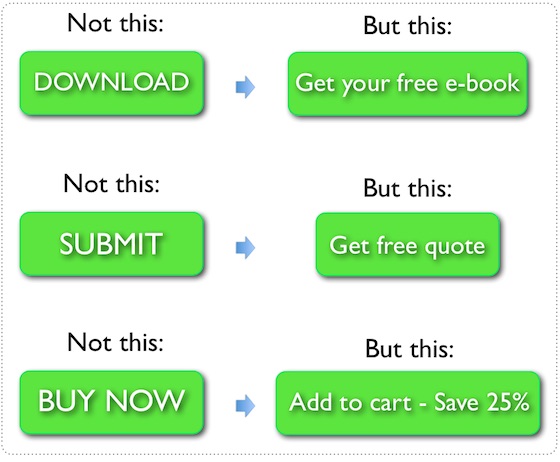
Here's some generic CTAs turned better by focusing on benefits the visitor gets by clicking the CTA:


cta-copywriting
Image Source


A CTA can be placed virtually anywhere in and around your content, but your call to action can't just be placed haphazardly in your sales funnel.


Crafting an Effective Call to Action


Creating an effective call to action starts with the little details. It's easy to create a call to action, but it's far harder to create a call to action that converts well.


Here are some of the most common components that play a part in getting a conversion lift during CTA creation and A/B testing.


The Design


In order for someone to click on a call to action, they first need to see it. Eye-catching designs are helpful, and this is one point where it's OK to step outside of your brand's style guide. You want colors that contrast with the rest of your content and that are large enough to stand out over everything else.


The copy


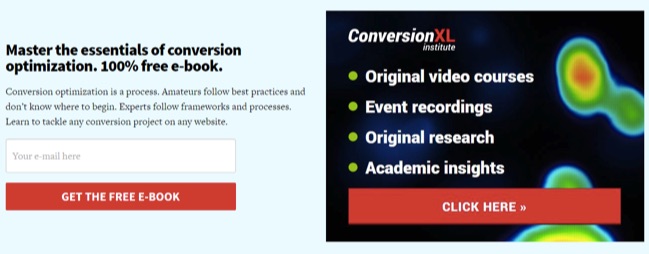
You can't just tell someone to “click” or “submit.” Your copy should use power words and actionable verbs, often personalized (“you”, “your”, “my”) to have the most impact. Here's a guide to writing CTAs.


The value proposition


Make sure your audience knows exactly what they're getting when they click. Your call to action should be explicitly clear about what comes next, or about what they're getting in exchange for taking an action.


conversion-xl-ctas


Placement in the funnel


A CTA is most effective when it's wholly relevant to the content it's placed in, as well as the user's intent. As such, it's best if it delivers the user to a dedicated landing page relevant to the stage of the buyer's journey, rather than a random website page.


For example, a CTA to a Contact Us page won't be as effective in gathering leads as a CTA that drives the reader to a landing page for a free download.


Likewise, you'd never create a call to action for a product demo (a bottom of the funnel CTA) at the bottom of a blog post when that blog post is providing top of the funnel content meant to drive awareness.


Hitting on all of these components is a critical part of a well-performing call to action. To simplify it, you can break any call to action down into two key concepts – Value and Relevance:


  • The copy of your CTA conveys value and relevance

  • The position of your CTA within the sales funnel reinforces relevance


Fitting your CTA to the Stages of the Sales Funnel


While most funnels will come in three stages, no two funnels are the same. The buyer's journey changes depending on your audience, the product or service, the industry, etc.


Some funnels are very short (B2C online retailers for example) while others are much longer. For example, an enterprise level SaaS like Salesforce isn't a quick purchase. There's often a much longer period of awareness and evaluation before a purchase is made.


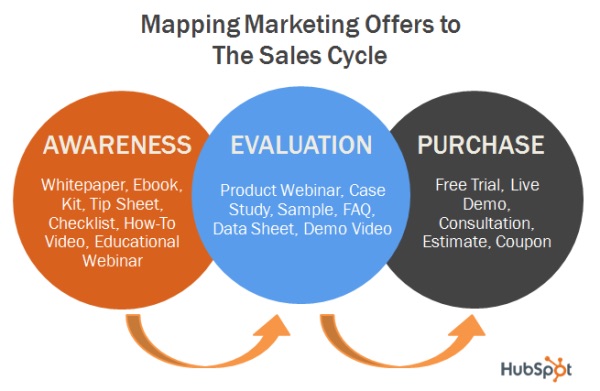
Let's take a look at a typical funnel and the types of content and calls to action at each stage:


hubspot-awareness-evaluation-purchase


Top of the Funnel


The top of the funnel is the awareness stage. You're not here to push or promote any specific product or service. Instead you're offering a broad range of knowledge intended to educate your audience.


They're looking for answers – sometimes specific, sometimes not so specific. Your job is to create content at this stage that captures their attention and provides them with answers.


At this early evaluation stage, marketers typically use long form blog content to grab referral and organic traffic and introduce a brand to the audience. Other types of content at this stage include:


  • eBooks and white papers

  • Reports

  • Infographics


Companies often put a great deal of their marketing efforts into producing a lot of top of the funnel content. And that's a good idea – this type of content marketing can generate 3 times as many leads as traditional outbound marketing, but costs 62% less than traditional marketing efforts.


Blogs are often the most popular; 79% of companies with an active blog report a positive ROI.


At this stage, your call to action needs to focus the attention of the audience. They're not yet a qualified lead or customer, and you don't want to push promotional CTAs or you risk driving them away.


Instead use personalized calls to action that promote continued engagement. This can include:


  • A CTA to drive engagement – “Share this post with your network” or “Leave a comment below with your thoughts”

  • A CTA that gathers info – “Click to get your free eBook” or “Download your free local marketing checklist”


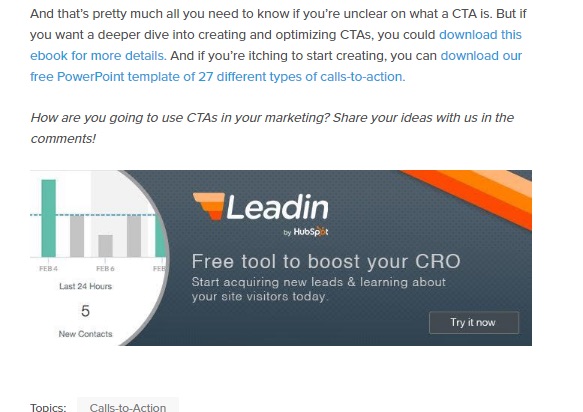
Check out this CTA that Hubspot places at the end of a blog post. It invites people to try out their new tool, with benefits-focused copy:


hubspot-leadin


Remember that the focus here should be on education and continued engagement, with the goal of moving visitors to the middle of the funnel (the evaluation phase).


Middle of the Funnel


The middle of your sales funnel is also known as the evaluation phase. At this point, your audience is aware of your knowledge and offerings. They're committed to finding a solution, but they don't quite know what that is yet. For now, they're simply researching and trying to understand all of the options that are available for solving their problem.


Your goal here is to continue to educate them while also positioning your solutions as the ideal choice.


At this stage, it's not uncommon to use email marketing, segmented by audience and intent, to build a relationship with the audience. Other types of content for the evaluation stage include:


  • Comparison white papers

  • Expert guides

  • Live interactions including webinars


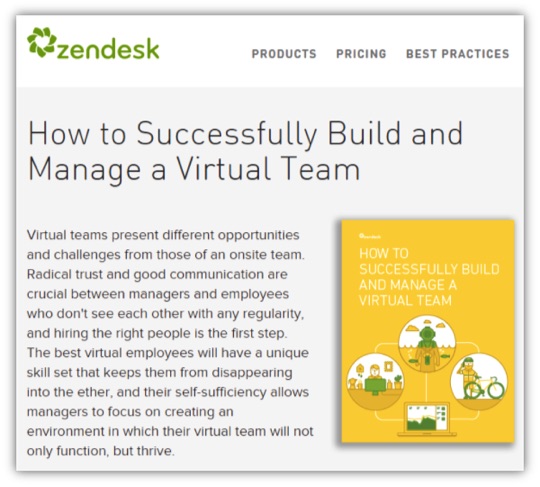
Here's an example of a white paper offer from Zendesk:


zendesk-build-manage-virtual-team


Calls to action in this phase are often extremely focused, with dedicated landing pages. HubSpot, for instance, increased subscribers by 128% in a 90 day period by using blog opt-in boxes on dedicated landing pages. Those CTAs can be made even more effective by narrowing the focus for your audience. As many as 16% of landing pages eliminate navigation to achieve this.


CTAs should focus on relevancy at this stage, highlighting the expert nature of educational information with a strong value proposition.


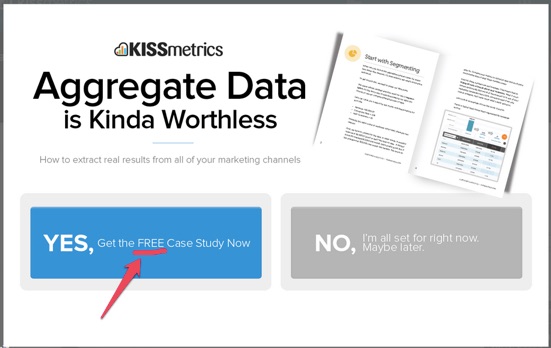
Here's a CTA shown to Kissmetrics highlighting the free case study they'll receive in exchange for an email address.


free-case-study-kissmetrics


Bottom of the Funnel


Just because you've moved your audience to the bottom of the funnel into the purchase phase doesn't mean you're going to close the lead. They're certainly ready to buy, and you want to ensure that they buy from you – but it's far from guaranteed.


Hopefully, at this point, you've mapped content and CTAs to effectively guide your audience through the lead nurturing process. According to HubSpot, nurtured leads produce on average a 20% lift in sales vs non-nurtured leads. Further research from Forrester has shown that companies that excel at lead nurturing can generate up to 50% more sales leads at 33% lower cost.


At this phase, you want to leverage content that persuades your audience to make a purchase. This can include:


  • Trial downloads

  • Demos

  • Infographics

  • Product literature or buyer guides

  • Further case studies


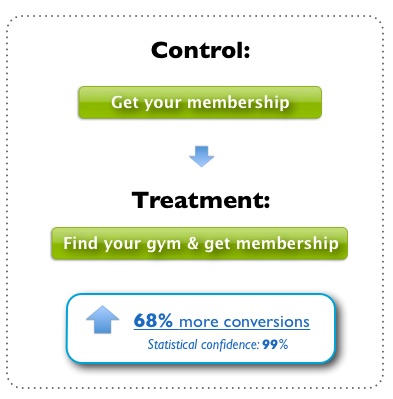
As a result, the most effective CTAs will be personalized based on relevancy and intent:


  • “Get your membership access now”

  • “Start your free trial today”

  • “Request your free evaluation now”


conversion-increase-cta-change
Image Source


Conclusion


Creating an effective call to action goes beyond design and copy. It has everything to do with aligning your offer and CTA with your sales funnel to ensure it's relevant to the audience's intent.


Don't stop once your CTAs are mapped appropriately, though.


Setup follow-up content that moves the target back to the middle of the funnel with an appropriate CTA to keep them engaged. Maintain the marriage with the customer and turn them into a lead-generating brand ambassador, using CTAs to inspire them to spread the word.


Do you make CTA placement and creation part of your documented content marketing strategy? Share your approach to CTAs with me in the comments.


About the Author: Andrew Raso is the co-founder and director of Online Marketing Gurus, a fast-growing, award-winning search company working with brands including HelloMolly, Baku Swimwear, and Forcast. Follow him on Twitter at @andrewraso1 or on LinkedIn.


Monday, 11 July 2016

12 Creative Ways Your Business Can Take Advantage of Snapchat

If you haven't already added Snapchat to your marketing efforts, you could be missing out on great business opportunities. Its image and video messaging system allows brands to engage with their customers in the moment. And now, with updates like payment processing and Stories, there are new ways to leverage Snapchat for your company.


That's why we asked 12 experienced entrepreneurs from Young Entrepreneur Council (YEC) the following question:


Q: What is one creative way entrepreneurs can use Snapchat?


1. Highlight Community Involvement


Ginger Jonrd snapchatWe use Snapchat to highlight what community and charity events we are attending. It's a great way to get the word out on what resources are available to people who might need them, and it lets people know what our company dedicates its time to. -Ginger JonesJones Therapy Services


2. Have Surprise Deals


 You could gamify a few deals with Snapchat using the time constraints. For example, post a photo with a hidden picture or message. On your other social media sites or through an email newsletter, let your followers know to add you on Snapchat and check your messages to find a hidden message and get a special deal. You can even play “Guess the Place,” and whoever guesses correctly wins a prize. -Jared BrownHubstaff


3. Make a Casual Connection


Andru Edwards snapchatThe great thing about Snapchat is that it allows your customers to get to know you on a more personal, less noisy level. Snapchat Stories can feature behind-the-scenes glimpses into your world, but you can just as easily connect oneonone through the regular platform. More entrepreneurs need to wake up to the power of Snapchat for businesses. -Andru EdwardsGear Live


4. Put Influencers to Work for You


Drew HendricksLike Twitter and Instagram, Snapchat has a growing group of influencers that your target audience is following and listening to. These influencers could be willing to share information about your product or service, helping you build credibility and new leads for business. -Drew HendricksButtercup



5. Tap Into the Millennial Network


Giuseppe StutoSnapchat is by far the most effective way to stay in touch with millennials, and this trend is not going anywhere. All ends of the millennial spectrum are obsessed with this method of communication, and it's becoming more and more prevalent with every month that goes by. If your business or product targets millennials, you need to establish a Snapchat audience to stay competitive. -Giuseppe StutoSmackHigh


6. Network


Nicholas HaaseThere is a lot less noise on Snapchat at the moment than any other channel. By reaching out and engaging in fun ways with people who otherwise would ignore my emails, tweets, LinkedIn messages, etc., I've been able to break through via Snapchat. From potential customers, VCs, journalists, and more, Snapchat has been my secret weapon for networking. -Nicholas HaaseStartup Drugz


7. Conduct Market Research


doreen-blochSnapchat is a fun, engaging social media platform where users are really open about their lives and experiences in the moment. This makes it an ideal platform for conducting market research, especially for consumer-facing products or services. When trying to better understand your audience or customer segment, explore and engage on Snapchat for an authentic view of your target market. -Doreen BlochPoshly Inc.


8. Offer a Behind-the-Scenes Glimpse


Lindsay PinchukWe're a curator of information and events for moms and just recently joined Snapchat. So far, we've been using it to show our audience behind-the-scenes glimpses into the preparation for our dozens of events and days off in new cities around the country. In the future, we plan to allow for some takeovers as well, especially as we work with and reach many moms-all whom would love some insight into the daily lives of others in their shoes. -Lindsay PinchukBump Club and Beyond


9. Get Creative With Your Content


Jonathan ShokrianWe've invested heavily in our Snapchat channel and have seen great results. We've hired actors to create two- to three-minute shows, launched a weekly series, and kept people entertained while highlighting our product. We've seen a 10 to 15 percent conversion rate from incoming traffic. -Jonathan ShokrianMeUndies Inc



10. Try Out the Snapchat Stories Feature


 A picture is worth a thousand words. Use yours to tell a story about your brand using the Snapchat Stories feature. You can post a few photos in a group to generate excitement for an upcoming event and/or show the outcome of a project you're wrapping up. If your business is in the professional services industry, consider a “day in the life” montage instead. -Nicole MunozStart Ranking Now


11. Use It as a Payment Method


Angela RuthSnapchat now allows payments to be made with other “Snapchatters,” so this might be a great way to pay freelancers that are working for you-plus you can include personalized messages that emphasize how much you appreciate their work. This can build rapport and motivate these virtual staff members to work harder, and they'll love that you pay them through their social media account. -Angela RuthDue


12. Give a Sneak Peek Before Official Releases


Peter BonacSnapchat should be used differently from other social media. At Mobiado, we use it to release information about our products before official releases. This plays to Snapchat's feature of having the photo and video only last a brief moment, building hype over our products. -Peter BonacBonac Innovation Corp.


The post 12 Creative Ways Your Business Can Take Advantage of Snapchat appeared first on AllBusiness.com

The post 12 Creative Ways Your Business Can Take Advantage of Snapchat appeared first on AllBusiness.com.


3 Steps to Put Customer Acquisition on Autopilot

Everyone's short on resources.


You got a tight budget. Limited staff.


But what's really in dire need, is more time.


There's only so many campaigns you can create, or issues to respond to, without working yet another weekend.


Simply keeping up is half the battle.


The good news is that some of the best marketing tactics can also be automated, allowing you to set-and-forget while the tools take care of the rest.


Here are three ways that time-strapped companies can better leverage their promotional efforts through using remarketing ads, marketing automation, and dynamic product ads.


Step #1. Remarketing for New Website Visitors


Only a tiny majority – like single digits tiny – are going to purchase when they hit your website.


Using powers of extreme deduction, that means MOST people hitting your website (like the other 90%+) aren't spending a dime.


Add to that, at least half of all customer interactions are now multi-event (and often multi-device) journeys. People rarely convert on their first visit, after seeing a PPC ad for the first time.


Instead, they might first find out who you are months in advance after seeing a display ad or clicking a referral link. They might have even done a quick search for a problem, looking for some basic information.


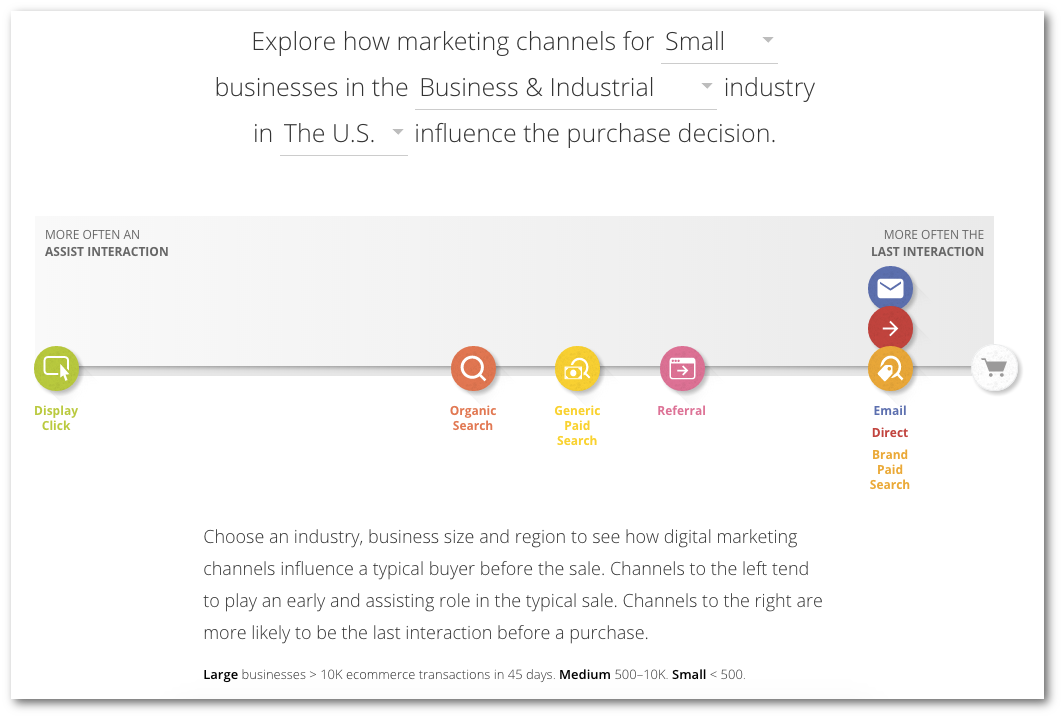
All that stuff happens before they start shopping around, evaluating their alternatives to purchase. (Google's Customer Journey to Online Purchase tool can replicate this for your own business.)


journey-to-online-purchase-google


This nonlinear process becomes disjointed if you have an extremely commercial website. One that focuses a lot of attention and pages of content about your products and services, with little else to offer those people not yet aware of a need for your stuff quite yet.


In other words, great stuff for people already close to the 'Last Interaction' highlighted above. Yet nothing for all the other ones who might be 'earlier' in the marketing funnel.


But what about… everyone else?


There's no Plan B. There's nothing for people who might be interested in what you have to offer, but aren't ready to convert just yet for whatever reason.


That's where remarketing can come in, giving people a reason to come back to your site with lesser offers (or micro conversions), nurturing them along until they're ready to make the ultimate decision.


Setting these up for the first time is fairly self-explanatory. You can create a new campaign directly in AdWords, make sure you've got the right tracking pixel in place, and then start work on the ad creative for all the different sizes Google offers.


I was going to show a few screenshots, but honestly that's all it takes. So here's your obligatory image instead:


taken-retargeted-meme
Image Source


Being so simple and easy to create, it's hard to believe that it's still an underused tactic. Especially with costs commonly ~46% less than standard advertising too. What's even more compelling, is that the more retargeting campaigns used, the more conversion rates go up.


Wait. Why?


It's a nudge; a gentle reminder that you're still there and have something that they need. (Not your product or service at this point necessarily, but a solution to their problem nonetheless.)


You can even try 'Super Remarketing', which is a tongue-in-cheek concept from Larry Kim that describes overlaying demographic and behavioral-based information from Facebook (or even Twitter) to your existing site visitors.


Starting with the people who visited your site in the last 30-60 days is a good start, because you should (hopefully) be fresh in their minds. However combining that with ad creative designed to match their demographic stuff (like their job titles) or behavioral (like their interests) could be an extremely powerful – and automate-able – way to drive new leads.


But what are you supposed to do with them?


Automate your follow-up too of course.


Step #2. Marketing Automation for New Leads


Most people here are familiar with marketing automation (and it's power to increase sales by almost 34%).


Yet most, like 85% of B2B marketers (!), are unhappy with their execution.


When done correctly (and combined with earlier efforts including remarketing ad campaigns), marketing automation is your best-bet for increasing lead generation on autopilot.


Here's how.


My company worked with a client who relied heavily on Google AdWords for lead generation. Sites like this generally perform well with direct-response advertising, because you're purposefully attracting people who're close to making a decision. But they also naturally had a huge percentage of people leaving the site without giving them anything.


We hypothesized that these people were leaving the landing pages and Quote Request form because they weren't quite ready to speak with a sales rep just yet. They were interested in what the company had to offer, but were still looking for basic information prior to making their ultimate decision.


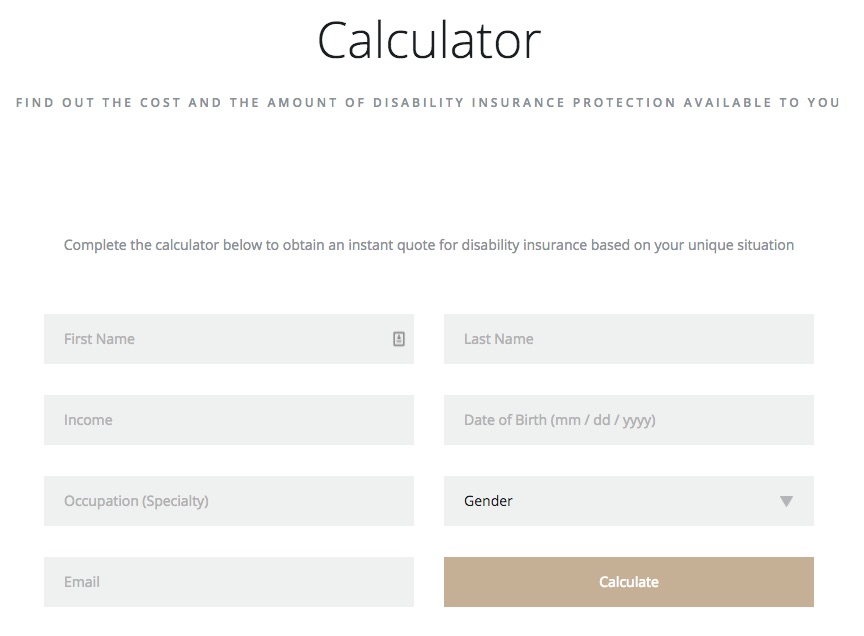
So we created a simple calculator that would provide them with a few fast facts (like what they're going to get and what it's going to cost), without the need to 'be sold'.


disability-insurance-calculator


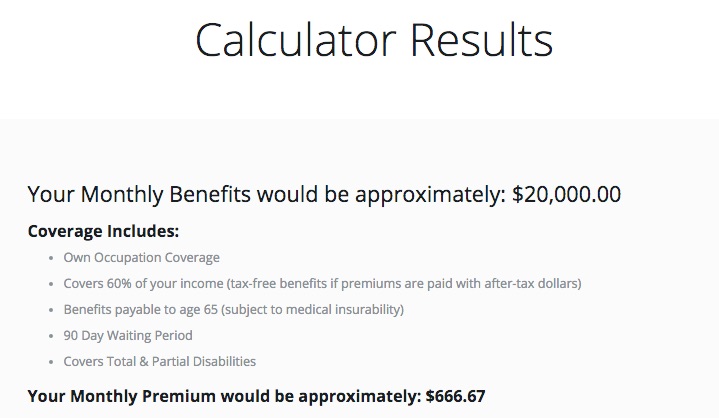
After entering their basic information, the person would receive customized results specific to them (while also entering an automated workflow, which we'll touch on in the next step).


disability-insurance-calculator-results


Now we have something interesting and compelling to promote with remarketing ads, targeting those people who were just on the website but didn't convert.


And best of all, we received some interesting information to set-up new automated email workflows.


Not just a name or email address, which doesn't give us much. But also more important qualifying information that's critical to determining if these people are good potential leads and how to prioritize them.


We can create not just a single, standard email workflow now, but a few sophisticated ones that combine some of a person's unique characteristics to truly personalize the context of each interaction.


(That's a fancy way of saying a person's more likely to open and click your email because it's better – more timely, relevant, and personal – than all of the other crap in their inbox.)


Most popular tools can run these campaigns for you. HubSpot is awesome (yet expensive). So I also recommend Autopilot and MailChimp for budget conscious companies.


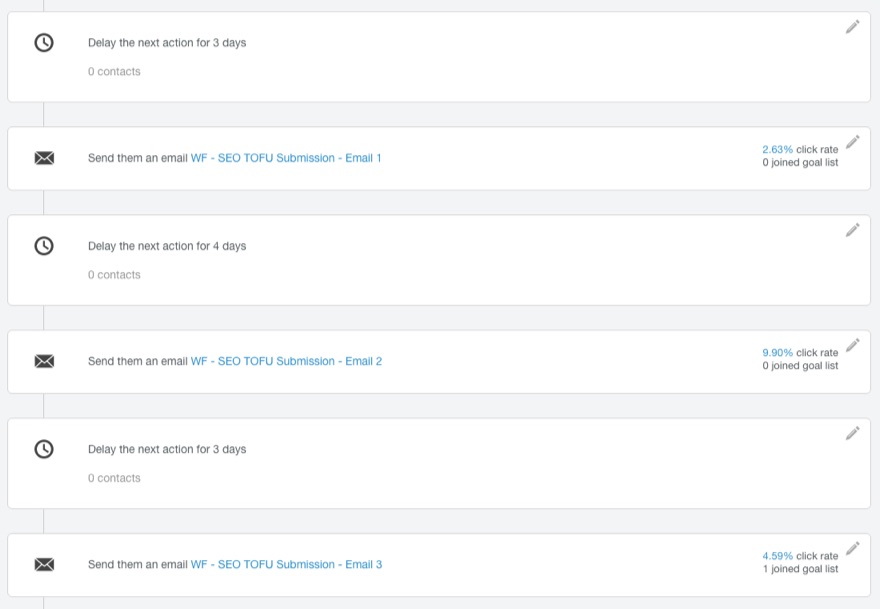
Next you can brainstorm or outline a series of emails to nurture these people over time. For example, pick an interval first (like every 2 days or every week). Then choose a sequence of message topics that will start with supporting their initial request, slowly building to soft sells or even hard sells if appropriate.


For example, if someone just used your calculator (or downloaded your eBook, attended your webinar, etc.), send them to the next logical step in your funnel.


Maybe that's a case study or a pricing page. It might even be directly to a product page that can deliver the result that your email promised.


Whatever the case, just create a simple cadence to start and repeat for a few days.


email-campaign-cadence


Once you've got the basic structure down, you can branch off based on how people do (or do NOT) interact with you.


For example:


  • Did they attend the webinar you linked to in Email 1? Remove them from this list and add them to another to make sure they attend it!

  • Did they purchase the product you described in Email 3? Remove them from this list and add them to a New Purchases one to (a) upsell or (b) get them to recommend you

  • Did they receive 10 emails but fail to even open them? Send them a break-up email unless they start responding.


As you can see, the possibilities are endless.


Start with the most obvious or basic site interaction. And then continue to build out overtime, adding in complexity where appropriate to completely automate how strangers are nurtured until they're ready to purchase.


Step #3. Dynamic Product Ads for Purchase-Ready Prospects


'Good' leads are ones that view your key pages.


They view your pricing pages, they view case study pages, and they view your product pages.


These people are checking you out; dipping a toe into the possibility of initiating a new relationship with you.


When these people leave your site, it's tragic. They were so close.


You can (and should) use marketing automation campaigns if possible to continue following-up with these people to get them back to your site (or on the phone).


You can (and should) also use remarketing campaigns to remind them of what they're missing.


Fortunately, you can also use remarketing on steroids with Facebook's Dynamic Product Ads.


In a banner blind world, where average click throughs are a dismal sub 1%, relevance and timing win.


These dynamic product ads are like a cross between marketing automation and remarketing ads, leveraging your product database and an ad 'template' to show people specific ads on Facebook for products they just viewed on your website recently.


Digital advertising automation is still in it's infancy, but this is pretty damn close.


For example, Jessica Alba's The Honest Company saw a 34% increase in click through rates. Which ain't bad. But it's even more impressive when they ALSO saw a 38% reduction in cost per purchase at the same damn time.


That's why those buzzwords like 'relevancy' and 'timing' are important. When done right, they = better results for less.


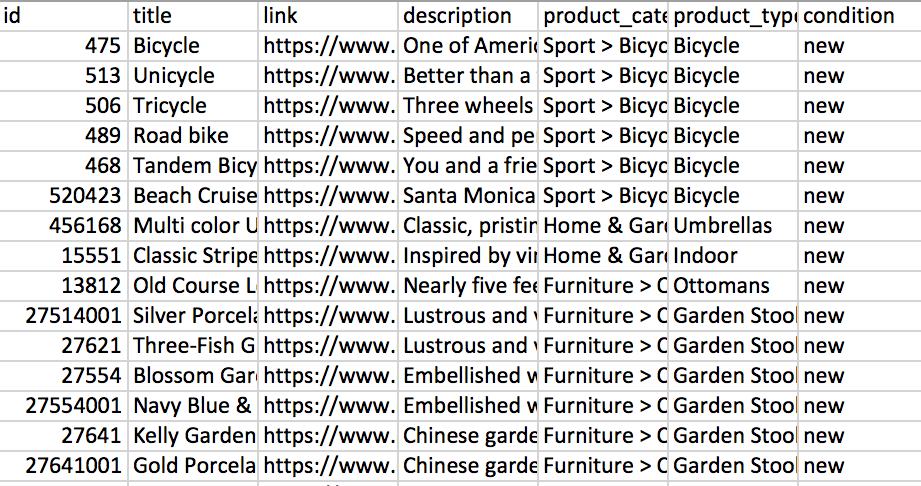
Get started by creating a product catalog in an XML or CSV file, similar to the one below (or simply use your Google Shopping product feed from Shopping campaigns).


product-catalog-spreadsheet
Image Source


Get yo' tracking pixels on fleek to track peeps who:


  • View Content

  • Add to Cart

  • Purchase


If you're keeping score at home, those are three different 'stages' you can personalize ads to now.


(The Pixel Helper Chrome Extension can help if you're having issues with setup.)


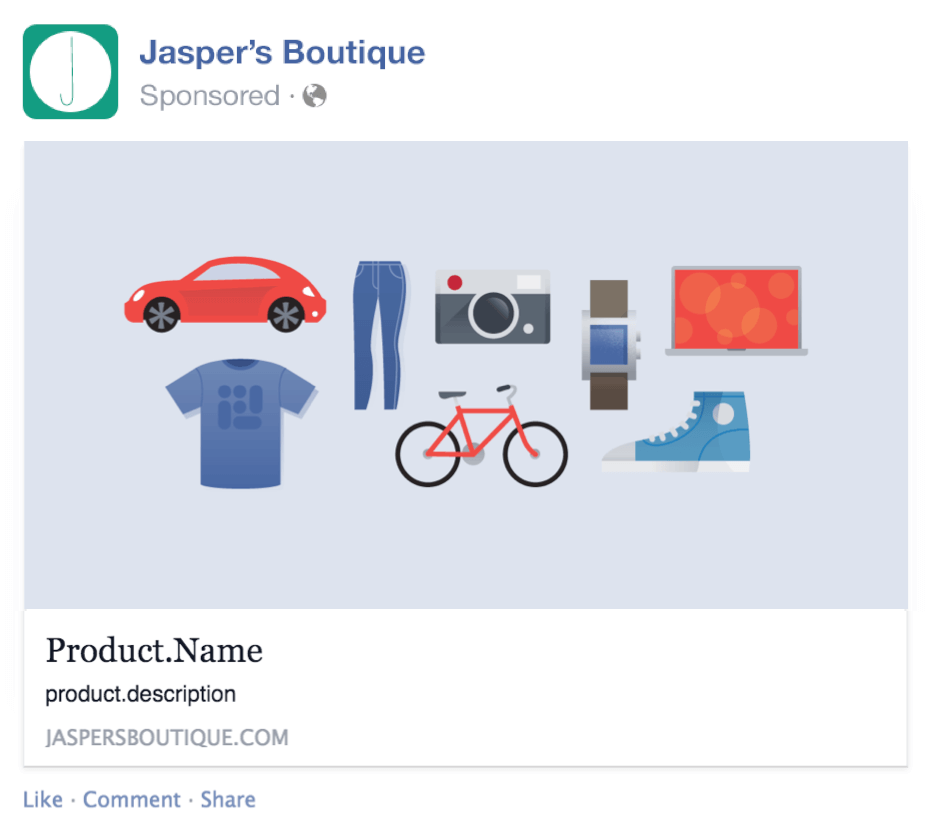
The next step is to begin setting up an standard ad 'template' that will be customized dynamically. Here's what that looks like:


standard-facebook-ad-template
Image Source


Once you've activated these campaigns, each ad will be customized with the content from your product feed based on whatever criteria each person meets (i.e. previously viewed content, added product to cart, etc.).


Now Let's Put it All Together


Standard remarketing campaigns with Google, marketing automation, and Facebook's Dynamic Product Ads are each incredibly powerful tools on their own.


They allow you to customize marketing messages on the fly, without the need for you (or your team) to personally do anything (besides monitor results and adjust over time).


But the REAL value is in integrating these three concepts at the same time, creating a seamless customer experience in a multi-channel world.


For example, cart abandonment strategies now take on a whole new meaning.


Sure, send the standard, “Hey, you forgot this product in your cart” email. But combine it with an automated ad of that specific product on Facebook. And support these two activities with branded messages as they browse around Google's omnipresent ad network.


Marketing tactics, in isolation, can provide incremental improvements. But together, they have the power to deliver significant benefits.


Especially when some of the most powerful can be set on autopilot too.


About the Author: Brad Smith is a founding partner at Codeless Interactive, a digital agency specializing in creating personalized customer experiences. Brad's blog also features more marketing thoughts, opinions and the occasional insight.