Marketers have been using “spray and pray” tactics for decades. The email equivalents are often called “blasts.” The idea: purchase a large list, push your message to the masses and hope some buckshot hits the target.
This form of email marketing is outdated and ineffective. It can backfire. Sending spam can tarnish your reputation and sever more relationships than it builds.
Email marketing that delivers results today reaches the right person with the right message to solve their immediate problem.
You aim more carefully. When a specific event or behavior occurs, a marketing automation system pulls the trigger and fires off an email. Conveniently, the practice has come to be known as “triggered” email.
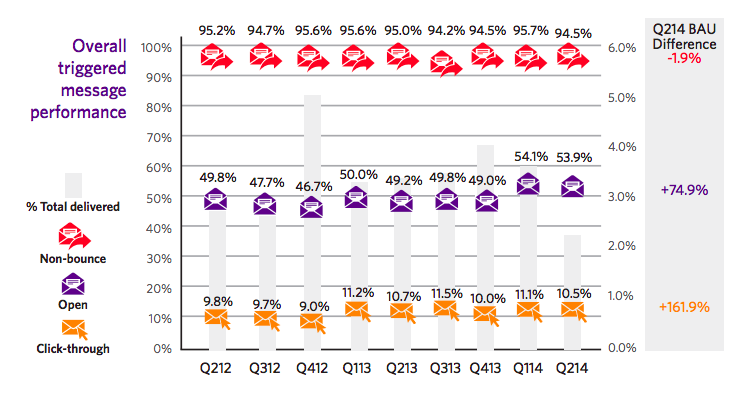
 An Epsilon study from 2014 reveals triggered email messages average 74.9% higher open rates and 161.9% higher click-through rates than traditional bulk messages. (Image Source)
More automation… a more personal touch?
Marketing experts claim you can achieve new levels of personalization through automation. It sounds ironic. A robotic approach increases the personal touch?
The reason it’s true is you don’t simply automate the process. You use automation to understand buyer intent and engage with prospects based on their interests.
Your database is the engine room. The more data you put in it the more personalization you’re able to extract. Your objective is to perpetually update individual records with preferences, demographic, and behavioral information.
One approach is to ask for the information. You encourage prospects to update their records. Subsequent interactions employ prepopulated or progressive forms where users can update and add to the information you’ve collected.
Another approach is to gather behavioral data automatically. Your marketing automation platform will track who did what so you can respond accordingly with email.
Each touch point can become increasingly relevant to the individual’s journey to make your marketing dramatically more timely.
77% of online shoppers say they’re more likely to buy from a retailer when its
emails are personal. 82% of web shoppers say they’d likely buy more items from a retailer if its emails were more personally relevant.
Source: Listrak-sponsored Harris Interactive survey
Throughout the rest of this post, I’ll present a variety of ways to use triggered email programs and show you examples of each.
The idea is to nurture your leads
A very small percentage of first-time visitors to your website will make a purchase, but if you offer something of value, they may reward you with their email address. Essentially, you gain permission to market to them.
Of course, if you proceed to try to slay them with a hard sell, they’re likely to unsubscribe immediately. The better approach is to nurture the lead.
Email lead nurture programs give you opportunities to remain on your prospects’ radar and potentially convert them to customers. The approach tends to work best when you’re gentle. In most cases, you’ll aim to educate prospects by making offers and/or delivering useful content to help increase interest.
With lead nurturing, you have a variety of options for personalization and/or segmentation. A basic approach might simply include sending a pre-scripted series of emails.
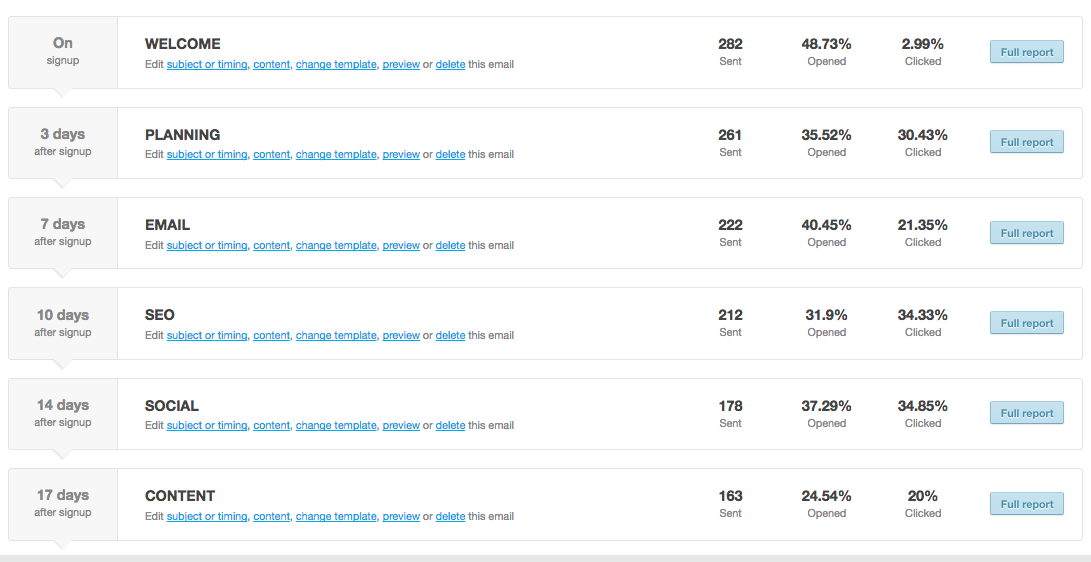
 I recently put a new autoresponder series in place. New subscribers get a simple 6-part introduction to some of the most important elements of digital marketing. They’re invited to download free resources for deeper dives and learn a little more about my content marketing consulting and copywriting services.
A more data-driven approach might prescribe a set of emails based on the prospect’s behavior. For example, a visitor who watched a video might be sent a piece of content that makes for a practical sequel.
It’s conceivable a prospect spent a large amount of time in a specific section of your site indicating interest in a product line. Your nurturing sequence might deliver a special offer for the product or some form of “Did you know…?”
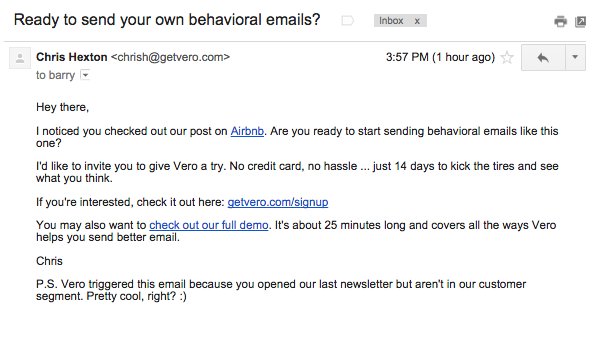
 There’s nothing real fancy about this example, but note how Chris (the sender) is wise to my behavior on his company’s blog. His data shows him I’ve checked out a specific post, so he responded with a few offers: give Vero a try or watch a 25-minute demo.
 Lead nurturing of the “help get started” variety can be an effective tactic. The marketer’s hypothesis: when prospects understand how easy it is to use the service, they are likely to try it.
Abandonment follow-up email
When you nearly make a sale on an ecommerce site it can unfold into a successful outcome. The scenario in play here: a known contact clicks into a form, places a product in the cart, or nearly completes some desired action. In other words, the prospect stopped short of buying.
Thanks to marketing automation and integration with tracking systems, you can respond via email. The message will be based on actions your prospect did or didn’t take.
Messages triggered by cart or form abandonment may work to strengthen engagement and inspire the recipient to make another move. Email in situations such as cart abandonment should employ a friendly tone and offer helpful assistance.
For example, if someone abandons a white paper sign-up, you might send a message offering related pieces of content or offer similar content in different formats (e.g., a video or slideshow).
 Note: (1) the fun tone and its attempt to be emotional, (2) the reminder that shipping is free and (3) the proactive call to action or “suggestive close.”
 This abandonment email suggests some urgency and includes an additional discount. Photos of the nearly purchased items attempt to create abandoner’s remorse.
 Adidas cleverly toys with the customer’s competitive spirit: he hates to lose. Clearly, they’d like Andrew (the recipient) to come back or call. See, he also has the option to order by phone 24/7. Smart.
Welcome program email
New subscribers are more likely to open your emails. Sending personalized welcome emails creates a connection with first-timers, and hopefully, goodwill. Handled adeptly, welcome emails help establish a relationship and build trust.
Your emails might educate recipients about your value proposition, ask them to tell you more about themselves, and provide resources and helpful information personalized to address their interests.
Depending on the business, many savvy marketers are even moving beyond welcome messages to activation or onboarding programs that guide the prospect or new customer going forward.
Say you offer a free product trial. Inevitably, some prospects will sign up but not start their trial. In this scenario, you might set up an email to trigger after “X” days. Its messages could be, “We noticed you haven’t done (desired action) yet,” and then:
- Here are the reasons you should try this out
- Here is a great resource to make it easy to get started
- Here’s a link if you want someone to call and assist you
 When a new customer opts-in at RealAge, a welcome email introduces him or her to their services. This email reminds the recipient he hasn’t completed the RealAge test and then offers a library of resources.
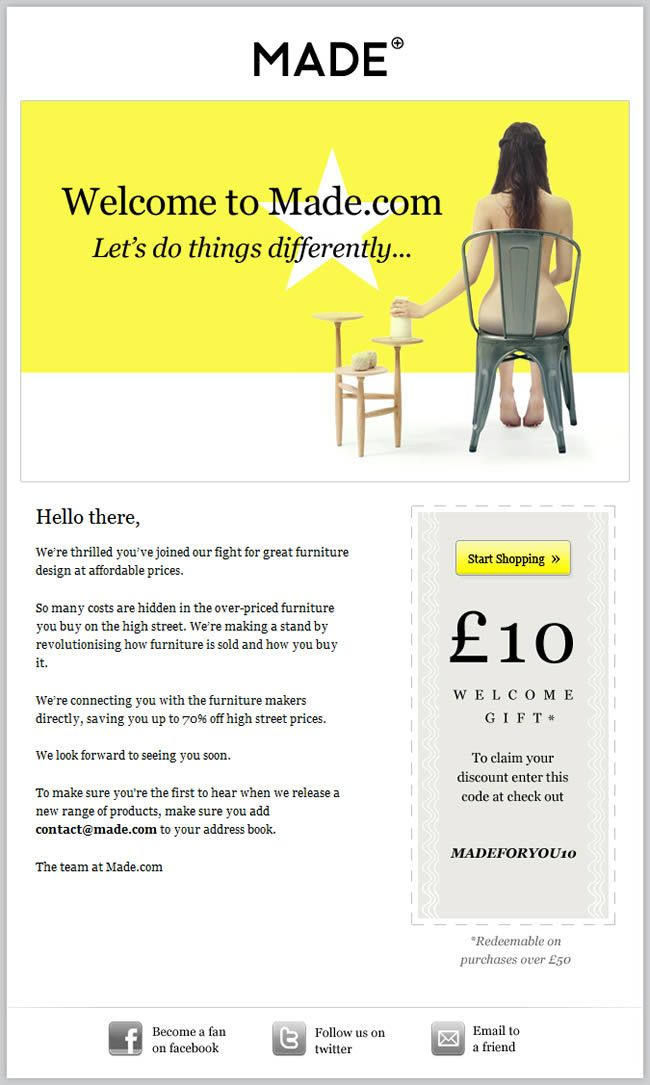
 Made delivers a welcome gift and tries its hand at a form of “cause” marketing by writing, “We’re thrilled you’ve joined our fight for great furniture design at affordable prices.”
Reviews and testimonials email
Asking for reviews is a nurturing tactic—and then some. When it works, you can collect content, which may prove valuable in marketing programs outside of email. Of course, this type of “ask” could have a psychological appeal too, demonstrating to customers you care about their opinions (and perhaps you’re confident they’ll like your products).
As you collect positive reviews, you might include them in your content to help drive conversions. Also, with help from your marketing automation platform, you can use dynamic content to populate emails with testimonials in line with the prospect’s interest.
Reviews aren’t always easy to get, so don’t be boring with your request. Inject personality into the email. You might also attempt to be helpful with links to: customer service information, how-tos, FAQs and so forth.
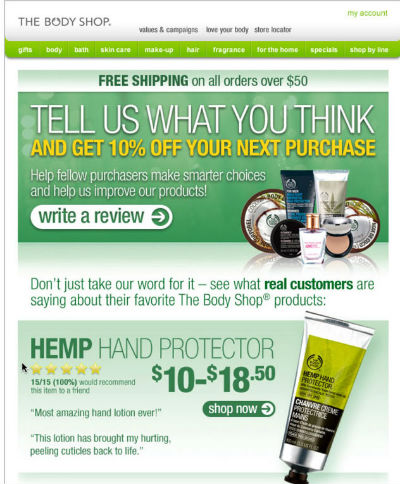
 A smart play from The Body Shop: while soliciting reviews, they (1) provide an incentive for doing so and (2) showcase reviews from other customers.
Special occasion email
Special occasions are ideal triggers for sending email. Of course, you can look at special occasions two ways.
The first and most obvious are your customers’ special occasions: birthdays, anniversaries, holidays or important milestones in their lives. Second, the occasion being celebrated could be your own—an anniversary for your company or for the customer’s use of your products and services.
Of course, you need to put notices such as these into proper perspective. The one-year anniversary of a customer running your software may not be perceived as special. Your challenge is to make it special.
Be creative. Commemorate the occasion in a special way with a gift or offer that is perceived to be worthy of celebration.
Have fun with emails such as these taking care to make the extra touch points complement your nurturing and retention efforts.
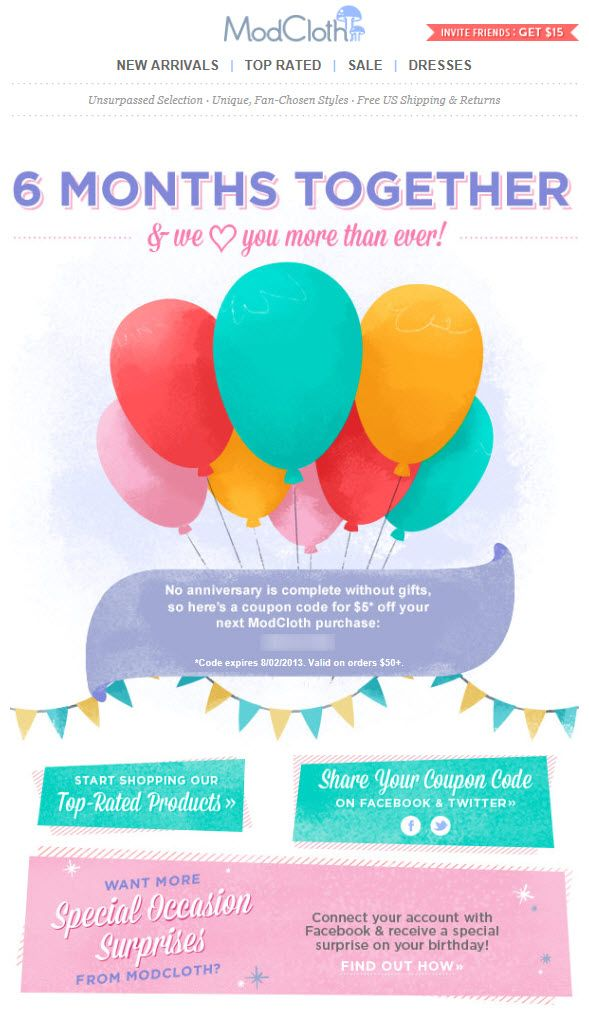
 At the six-month mark, ModCloth tells its customers they’re loved more than ever, marks the quasi-event with a coupon offer and encourages them to share the savings with friends via Facebook and Twitter.
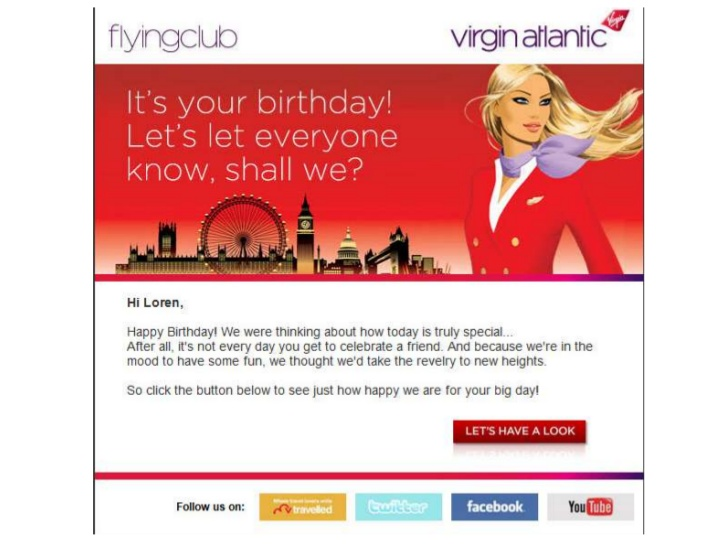
 Known for going “extra miles” in creative ways, Virgin Atlantic not only recognizes your birthday, it offers to help you “take the revelry to new heights.” I don’t know where you land by clicking the “Let’s Have a Look” button, but I’m guessing it’s high above an exotic destination.
You may have to ask for a date
In some cases, the nature of the business may make it simple for you collect birthdays and other special occasions. In others, you may have to ask for it. Consider trying:
- A progressive form approach
- A special request in welcome or nurture emails
- A survey
When asking for a birthdate or any type of personal information, explain to the subscriber they’ll be rewarded for complying.
Re-ordering email
Do you have a large product line or offer a multitude of optional services? Will customers need to replenish supplies at regular intervals or order per season?
If so, automating email appropriately can inspire additional sales, thereby increasing lifetime customer value. Consider some of the following ideas:
- Delivering new product updates to business clients (e.g. software)
- Seasonal product order reminders (e.g. calendars)
- Updates for items that were out of supply (e.g. clothing)
- Refill orders (e.g. foods, ink cartridges)
Sending seasonal messages enables you to maintain a more continuous dialogue with customers without creating additional work for sales people. It also provides a convenient opportunity to thank patrons for their business.
 Low on toner? Here, we’re not talking about laser printers, but a product from Annemarie Gianni. They claim if the toner spray has become a part of your everyday aromatherapy routine, your supply may need replenishment.
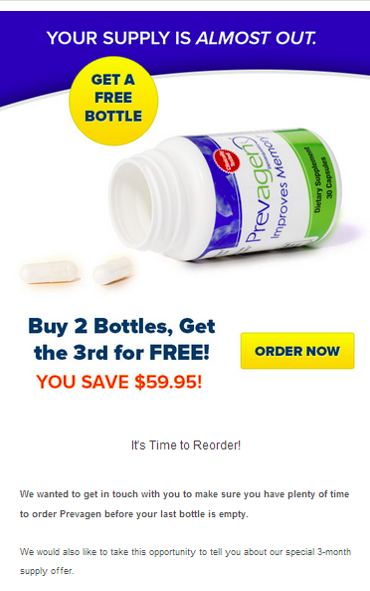
 This re-order email from Prevagen is sent 10 days before the item purchased is scheduled to run out. If the order is not placed, they send a reminder email 10 days later.
Smart ideas for more effective reminders
- Build replenishment emails around a standard purchase cycle
- Go a step further in personalization by calculating your customer’s average re-order timeframe
- A simple reminder may be effective for loyal customers
- Consider discounts if the customer does not re-order
- Includes details of what they purchased previously, a product image, reviews, and a URL for re-ordering
- If your product itself isn’t consumable, there may be parts or accessories that are
- Send your frequent buyers incentives to refer friends
- Deliver content to help readers understand the benefits of continuing to use your products
- Offer related products
- Personalize the messages creatively and in useful ways
Transactional email
Ecommerce or otherwise, you gathered an email address based on a transaction—even if customers merely traded their email for a document.
Savvy email marketers follow-up on transactions of every sort, be they order status receipts, service request updates, shipping notices or confirmations.
Understand, the timing of the delivery is critical. Your customer should never have to wait. The good news is your marketing automation platform enables you to trigger the emails immediately.
Don’t settle simply for a branded transaction message. Share some love in the form of content that delivers value, such as:
- Product usage tips
- Answers to frequently asked questions
- Delivery tracking information
- Links to community forums
- Invitations to connect via social networks
- Requests for feedback
Of course, you should focus on the transaction first, but you can also use the emails to cross-sell and upsell products and services. Set up your application to populate the emails with information specifically related to the buyer’s purchase and/or preferences.
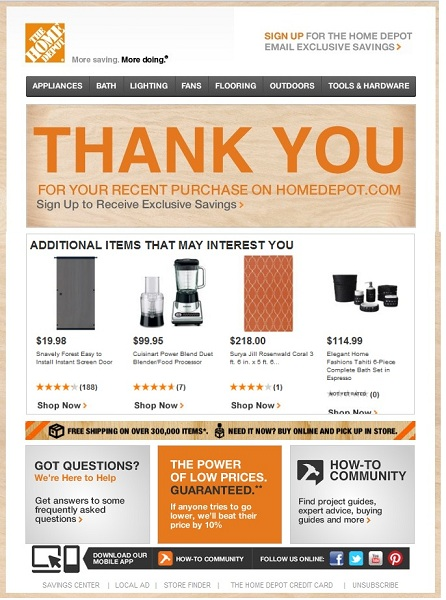
 Home Depot packs a lot of resources they believe to helpful in this thank you email including product suggestions, links to FAQs, a low price guarantee, a how-to community, and an invitation to download their mobile app.
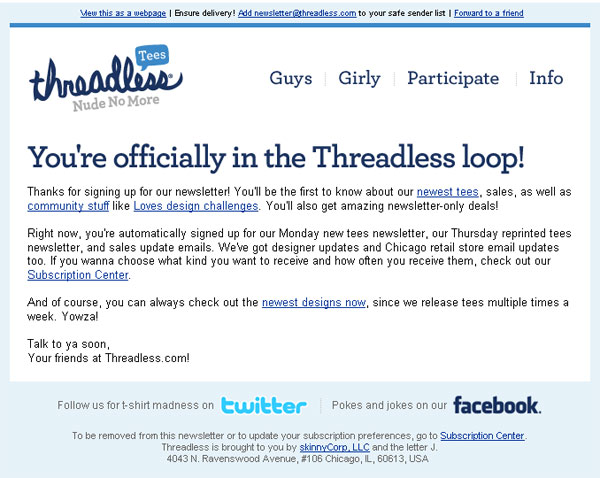
 Threadless treats an email for new subscribers as an opportunity to promote product, community stuff and “amazing newsletter only deals.”
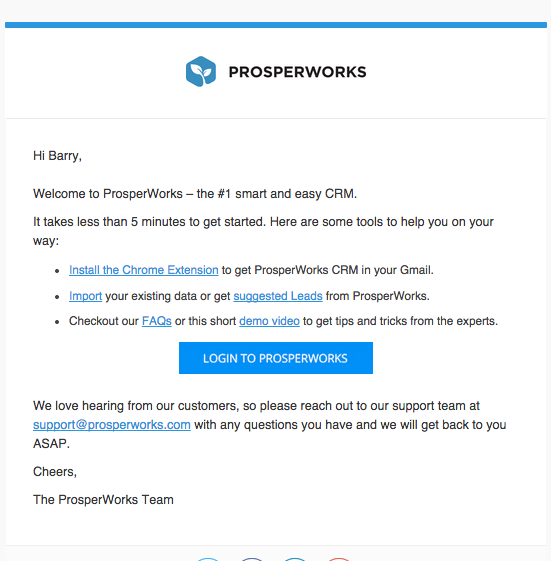
 The transaction here was merely a free trial. ProsperWorks is wise to recognize this and sent me a welcome email highlighting tools to help get me get going with their CRM solution.
Lifecycle email
Customers need different content at different times in the buying cycle. Consider segmenting campaigns relative to phases in the relationship with email based on the individual’s history with your company.
Messaging might change throughout a customer lifecycle.
- Interested prospects are sent welcome messages, educational content, or incentives to buy.
- Engaged prospects are sent invitations to events, targeted content based on website activity, price information, customer case studies.
- Lapsed or disengaged prospects are sent surveys, incentives to revisit website, promotions.
 Dropbox encourages users to install Dropbox on more computers and also lists the benefits you get by doing so.
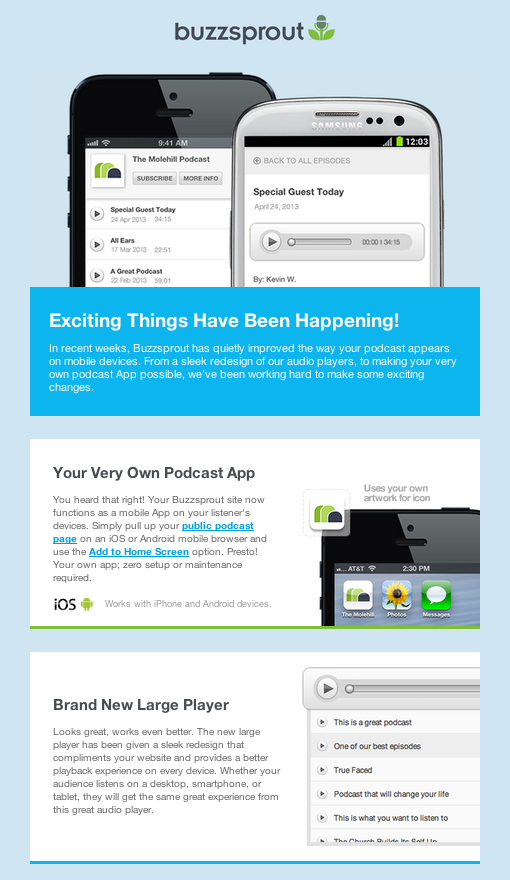
 BuzzSprout sent this email aiming to drive inactive users into action by informing them about design updates.
It may be time to pull the trigger
Triggered email continues to make-up a low percentage of overall email volume.
But even at a relatively low volume, well-conceived programs can make a significant mark on sales generated from email marketing.
Triggered campaigns can run on autopilot and continue to generate revenue over long periods of time. While you’ll need to invest in the initial setup of each email, once automated, triggered emails generate new levels of ROI.
About the Author: Barry Feldman operates Feldman Creative and provides clients content marketing strategies that rock and creative that rolls. Barry has recently been named a Top 40 Digital Strategist by Online Marketing Institute and one of 25 Social Media Marketing Experts You Need to Know by LinkedIn. Visit Feldman Creative and his blog, The Point.