Wednesday, 27 January 2016

10 Key Contracts for Small and Growing Businesses

In this article, I summarize 10 key contracts for small and growing businesses. These contracts need to be well thought out and well drafted and can be crucial to the success of a business.


Sample forms can be found in the Forms and Agreements section of AllBusiness.com.


Employment Offer Letters


One of the best ways to protect your business from legal liability and misunderstanding with an employee is to have an employment offer letter issued and sent to the prospective employee. The employee should then be required to sign it, evidencing the scope of the employment relationship between the parties.


A good employment offer letter covers the following points:


  • The particular job offer

  • The responsibilities of the job

  • The salary and the benefits

  • That the employment is “at will," meaning the employee can quite or the employer can terminate him or her at any time

  • That the employee is required to sign a Confidentiality and Invention Assignment Agreement (discussed below)

  • That the letter constitutes the entire agreement of the parties, and can only be amended in the future in writing, signed by the employer and the employee

  • That any disputes will be handled exclusively by confidential binding arbitration (other than certain designated types of disputes, such as those related to worker’s compensation)


Confidentiality and Invention Assignment Agreements


Employees have access to a company’s confidential information. Moreover, many businesses expect their employees to come up with ideas, products, business strategies, and inventions.


To make sure the employees keep the proprietary information of the company confidential, you should require them to sign a Confidentiality and Invention Assignment Agreement. This agreement deals with the confidentiality issue, but it can also provide that the ideas, business strategies, and other work product developed by the employee belong to the company, and not to the employee.


If you expect to have venture capitalists or other professional investors invest in your company, they will expect that you have these agreements in place for all of your employees.


Service Contracts


If your company provides professional services as opposed to selling a product, it needs to have its own good, standard form Services Contract (which can be labeled many things, including an Agreement for Professional Services). This type of agreement lays out the terms and conditions under which you provide services and specifically spells out your responsibilities and liabilities.


Having a good contract here is important. You want to avoid misunderstandings and undue liability. Ideally, this agreement gives you flexibility in completing the services, lists the fees for the job (and additional fees if you encounter unforeseen circumstances), and sets limitations on your liability (such as limiting that liability to the amount of the services fee).


Sales Contracts


Many businesses sell products, and therefore need a good Sales Contract. The Sales Contract lays out the price, terms, and conditions for the sale of goods, equipment, or other products. Of course, some businesses (like the corner grocery store) don’t need Sales Contracts, but if your products sell for significant dollars, then you likely need a Sales Contract.


The actual Sales Contract can take the form of fine print on an order form or an invoice, or it can be tailor-made for a particular sale. You always want to start with you own form of contract. The key terms in Sales Contracts include price, price adjustments in certain events, responsibility for taxes, payment and credit terms, warranties to be given, disclaimers of various warranties, and liability limitations.


Confidentiality Agreements


Numerous instances arise in which you want to share confidential or proprietary information with another party. You may want to show the information to get them interested in doing a deal with you, investing in your company, or working together on some strategic arrangement. Producing an agreement to prevent the other side from stealing or using your ideas is very important in these situations.


The Confidentiality Agreement (also referred to as a "Non-Disclosure Agreement" or "NDA") provides that the recipient of proprietary information holds the information in strict confidence and will only use the information for the purposes of evaluating whether or not to enter into a business relationship with you. The key to this agreement is that you should enter into the agreement before any disclosure.


A good Confidentiality Agreement lays out the recipient’s confidentiality obligations, the exclusions from the confidentiality (such as information already in the public domain), how long the confidentiality obligation lasts, limitations on the use  of the information, and the right of the disclosing party to seek injunctive relief to stop the other side from disclosing the information.


Web Site Terms of Use Agreement


Most growing businesses have established (or should establish) a Web site to market their company and their products. Essential to these Web sites is a Terms of Use Agreement, which is intended to be a contract between the Web site owner and the users of the site and any purchasers of goods or services from the site.


A good Terms of Use Agreement is essential for avoiding legal liability to the site owner. The well-drafted agreement includes: limitations on how the site can be used, copyright protection warnings, disclaimers, liability limitations, disclosure on the site’s privacy policy in dealing with customer information, jurisdiction where any disputes must be brought (ideally, the home town of the site owner), and much more.


Letters of Intent


A letter of intent can be a very advantageous and quick way to get momentum for a deal. The idea for a Letter of Intent is for the parties to get a “handshake” deal on the major points, and then move to creating definitive legal agreements.


You need to be very careful about what you want to  be binding or nonbinding in the letter. Most Letters of Intent are nonbinding and are merely expressions that the parties have a particular deal in mind and want to further negotiate to a definitive complete agreement. Letters of Intent can also be binding contracts, however, so be careful what you say in these letters.


Stock Purchase Agreements


Start-up and emerging businesses often need to raise capital to fund their business. They often do this by selling stock in the company.


Stock Purchase Agreements are the vehicle where stock sales can be effected. Such agreements can run from a few pages to 50 or more, depending on the investors and the complexity of the deal.


In most agreements, you need to carefully lay out the following: the type of the stock sold, the price and number of shares, the representations and warranties of the investors, the representations and warranties of the company, the conditions to closing, the rights of the investors, and potentially much more. This is an agreement on which you typically need advice from an experienced corporate counsel.


Leases


A business lease for office or retail space is often one of the most significant contracts for a business. The starting place for most lease negotiations is the landlords allegedly “standard” lease, which tends to be incredibly one-sided in favor of the landlord.


Because the lease can constitute a major commitment for the business, you have to watch out for all the “gotchas.” Most important, you have to ensure that:


  • The space fits your needs.

  • The uses the landlord permits for the space are broad enough for your business.

  • The lease term is sufficient, with a right to extend if possible.

  • The economic terms are competitive.

  • The lease clearly spells out the landlord's obligations.

  • You have some flexibility in assigning or subletting the lease.

  • There is a limitation on pass-through operating expense and tax increases.


Loan Agreements


Many businesses enter Loan Agreements with banks or financial institutions and simply sign the lender’s “standard” form. The standard form tends to be very one-sided in favor of the lender, with various restrictions on the borrower.


The borrower under a Loan Agreement needs to fully understand (and negotiate better terms than those contained in the standard form) a number of key issues, including the following:


  • The total cost of the loan

  • The payment schedule

  • The right to prepay the loan without penalty

  • The flexibility on use of the loan proceeds

  • The right to cure defaults

  • The appropriate representations and warranties of the borrower

  • The covenants that can trigger a default


To download samples of these important business contracts and other forms, contracts, and checklists, visit the Forms and Agreements section of AllBusiness.com.


Copyright © 2016 by Richard Harroch. All Rights Reserved.


The post 10 Key Contracts for Small and Growing Businesses appeared first on AllBusiness.com

The post 10 Key Contracts for Small and Growing Businesses appeared first on AllBusiness.com.


Why Your Team Can’t Afford to Ignore the Data

A Teradata survey unveiled that 87% of marketers see data as the most underused asset in their cohorts, and 50% desire to extend the use of big data to support their digital marketing efforts.


However, ecommerce marketers are still experiencing difficulty with gaining insights from analytics. They struggle with integrating data into their everyday operations, like competitor analysis, branding strategies, and sales techniques.


Instead of suffering from analysis paralysis, marketing teams should focus on the bigger picture. Major gains are made when marketers concentrate on creating a better customer experience.


So, stop disregarding the data. Move forward by sharpening the following four key areas:


1. Monitor the Competition


Data gives SaaS teams an inside track of how to strategically outdo the competition. With keyword tools, you can measure your methods amongst other market leaders.


SEMrush monitors your competitors’ strategies in display advertising, organic and paid search, and link building. Knowing the competition’s unique keywords will help you discover unknown search terms.


Moreover, by improving your content with new keywords, there’s a greater chance to emerge in the SERP next to your competitors.


keyword-competition-research


Image Source


Social data also offers an inside track of how competitors interact with customers. Platforms like Rival IQ and Mention can help you size up the competition.


rival-iq-Twitter-Engagement


Image Source


For example, on Twitter, observe other brands’ mentions, followers, and engagement rates. Know when they outperform you, and vice versa. Then, analyze the content promoted.


What content stands out? How many times was it promoted? How did customers respond?


The purpose is not to mimic your competitors but to learn from their successes and failures. If a particular tweet does well for them, it may have a similar result for your business.


Keep the following points in mind when measuring your brand’s presence:


  • Identify insights that can contribute to your plan.

  • Learn what and when to post to produce more engagement.

  • Pinpoint substantial spikes in impressions.

  • Distinguish between what’s working and what’s not.


Mold your strategy with benchmarks, and build marketing campaigns that outwit your competitors.


2. Craft a Personalized Brand Message


Data helps ecommerce marketers create customized buyer personas. Knowing your audience means more personalized messages to segmented groups.


Forrester’s report on Competitive Strategy in the Age of the Consumer emphasizes moving away from consumer historical data. Rather, focus on the here and now.


Try conducting customer surveys, and use open-ended questions. That way, you gain actionable insight beyond the constraints of yes/no questions.


The goal is to understand customer behavior, including the roadblocks that hinder them from making a purchase. So, seek outside the usual interests and needs, and aim for actions and reactions.


Conversion copywriter Jennifer Havice suggests asking these survey questions:


  • When did you realize you needed a product/service like ours?

  • What problem does our product/service solve in your life?

  • What doubts or hesitations did you have before buying?


Your team also may want to gather data from phone interviews. While time-consuming, you will capture specific keywords from your customers. And that may be worth your efforts.


Just be mindful that these customer interviews aren’t sales calls. Instead, listen attentively.


“This is an opportunity to gather symptoms and a prospective customer’s perspective on their needs with respect to a specific problem or capability,” says Sean Murphy, CEO of SKMurphy.


In addition, enlist aid from your online community managers. These folks are pros at finding the most important conversations. Your community forums could uncover new clues about your consumers.


It’s up to brands to offer experiences that cater to their customers. To do so, businesses must look at the real-time data to match customer motivations with personalized products.


Get inside your customer’s heads. Create accurate buyer personas.


3. Acquire Sales Leads


Want to fill your sales pipeline with qualified leads? Use data to produce targeted lead generation campaigns.


But in order to do that, sales and marketing teams must be aligned. A common issue amongst these departments is disagreement about lead qualification. Without a set definition, some organizations witness a stunt in their growth.


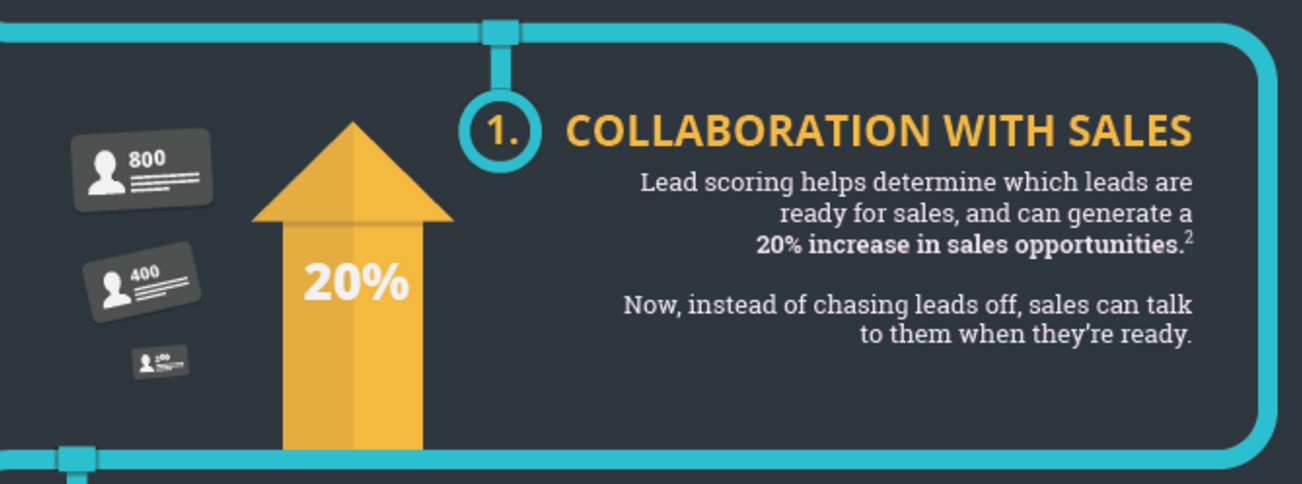
Research tells us that “highly aligned organizations achieved an average of 32% year-over-year revenue growth – while their less aligned competitors saw a 7% decrease in revenue.”


collaboration-with-Sales


Image Source


Marketing and sales centers around lead quality. So, to start a rewarding partnership, use consumer behavior data.


Marketing automation tools were essentially created for this purpose. Work with sales to select which leads deserve a follow up. The data will determine which prospects need to be nurtured and handed to the sales team.


The key is to eliminate missed opportunities. The collaboration should help both teams address the right leads at the right time.


Also, remember to clean your databases. Archive or delete prospects that don’t meet the lead qualification criteria.


Quality trumps quantity. Three super-qualified leads will always surpass 20 disinterested leads.


Set up your parameters. Then, filter for things like:


  • Fake email addresses and phone numbers,

  • Information-seeking job titles, like “student,” and

  • Low annual revenues.


Failure to properly process data is one reason companies don’t generate more leads. Be better. Move data to the forefront to boost sales leads.


4. Retain More Customers


Data identifies holes in the customer experience that may lead to high churn rates. Extend your customer lifetime value by predicting consumer behavior patterns.


By analyzing data, marketers learn their customers’ needs and preferences. Leverage those insights to understand why customers discontinue their services or try other brands.


Is there a disconnect in customer service? Or is your onboarding process complicated? Look for patterns and discover the reasons for your churn issues.


Researchers found that “96% of unhappy customers don’t complain; however, 91% of those will simply leave and never come back.” That’s why it’s so important for your team to be proactive.


Keep an open line of communication between your company and customers. This means promptly addressing concerns and following conversations via social media.


Effective data-gathering doesn’t have to be difficult. Below is an example of how new users sign up for Pusher. The company received a 16% reply rate.


pusher-signup


Image Source


The real challenge begins when your customers start responding. How will your team correct mistakes? Will you add more value to your services?


Incorporate customer comments into your retention strategy. Find new ways to deliver on your promises, like initiating a rewards program.


Examine the data points that increase your churn rates. Then, develop programs to exceed customer expectations. Build a brand loyal customer base.


Heed the Data


Data is your friend. Shying away from analytics will do more harm than good.


Use keyword tools to monitor your competitors. Develop customer surveys to help with buyer personas, and align marketing and sales to create more qualified leads.


Data is valuable. Think twice before you ignore it.


About the Author: Shayla Price lives at the intersection of digital marketing, technology and social responsibility. Connect with her on Twitter @shaylaprice.


Tuesday, 26 January 2016

How to Use Talent Analytics in Your Business

By Jeff Furst


Big data is a big success in the world of HR. From helping businesses determine the quality of hires to predicting which employees are higher quit risks, big data and talent analytics are benefiting small and large organizations everywhere.


Despite its popularity and effectiveness, Randstad’s 2015 Talent Trends Report,  a survey of 350 global HR leaders, found that 44 percent of organizations are not using talent analytics as part of their talent strategy and workforce planning process.


Why not? Larger organizations may have the time and internal resources to devote to these kind of initiatives, but small and medium-sized business don’t know where to start.


If you want to take advantage of everything talent analytics has to offer your business, here are five steps to get started:


Step 1: Do your research.


You wouldn’t buy a car without doing your research first, would you?


Well, you shouldn’t dive into talent analytics without doing a little reading, either. It’s best to start with basic resources that cover how talent analytics can help your business, what analytics are best for understanding your organization, and how to measure success with your talent analytics initiatives. Some great resources include:


Step 2: Establish your maturity level.


Building an effective talent analytics strategy is a journey, and every journey has to start somewhere.


If you’re reading this, then you probably fall into what Bersin by Deloitte calls the “Reactive, Operational Reporting” level of its maturity model. You may have some data to analyze, but it is isolated and difficult to understand. Since most organizations fit into this description, the important thing is to determine exactly where your business fits in.


Has your HR department already started keeping track of traditional metrics like time-to-hire and cost-per-hire, or are you completely new to the game? Do you keep track of where you source new hires, or do you just find candidates and forget about it?


Think about exactly how “new” to data your business is to help determine exactly what you’re looking for from your talent analytics strategy.


Step 3: Develop your strategic plan.


You need a plan. Talent analytics can help you do so many different things, but you shouldn’t try to get them all done at once. Consider where you are maturity-wise and where you want to be after year one, year two, and beyond.


This is where you get specific and determine what data you want to use, how you want to use it, and how you’re going to implement your strategy. Think about what key performance indicators (KPIs) you want to measure to build a talent analytics strategy around those metrics.


Step 4: Build your data governance foundation.


Before you actually implement your talent analytics strategy, it’s important to establish guidelines and governing bodies to manage your efforts. Consider the following questions:


  • Who is in charge of monitoring success?

  • How will your organization approach ethical issues regarding its data use?

  • Who will ensure your talent analytics strategy is implemented ethically?

  • Who will be the point person with any third-party talent analytics support you may employ?


By implementing strict guidelines and transparent data quality standards, you’re building a strong foundation for talent analytics success.


Step 5: Record your baseline and get started.


Once you’ve mapped out your strategic plan, determined your KPIs, and built your foundation, take a snapshot of your business’s current status to compare against every three months. This snapshot will provide critical insight into the performance of your talent analytics strategy over time.


Obviously, your KPIs and other HR metrics are important for this benchmark, but don’t forget to take a baseline of business metrics as well. Including things like total expenses, total revenue, and revenue-per-employee will help you understand how your talent analytics strategy is affecting your business performance long-term.


When you’re a small or medium business, talent analytics can be daunting, but the benefits are worth the effort.


About the Author


Post by: Jeff Furst


Jeff Furst is the founder, president and CEO of FurstPerson, a provider of job candidate assessment tests, web-based hiring systems, and analytics for companies that hire frontline service, support, and sales employees. Connect with Jeff and FurstPerson on LinkedIn and Twitter.


Company: FurstPerson

Website: www.furstperson.com

Connect with me on Twitter and LinkedIn.


The post How to Use Talent Analytics in Your Business appeared first on AllBusiness.com

The post How to Use Talent Analytics in Your Business appeared first on AllBusiness.com.


How I Got 1.7 Million Pin Views to My E-commerce Pinterest Account in 2015

Visual content isn’t the future of content marketing… it’s here now. And Pinterest is currently one of the top social media channels for visual content.


Shareaholic published a study that showed Pinterest as the #2 social media traffic referrer behind only Facebook driving more than 5x as much traffic as many referrers as Twitter.


Pinterest isn’t just for arts & crafts, clothes and recipes. It’s relevant to more niches than most people realize, including niches like real estate and even online marketing.


In fact, the two most shared posts on the Kissmetrics blog get most of their shares from Pinterest. Check it out:


Last year, my e-commerce Pinterest account generated over 1.7 million views and I’m getting close to 10,000 followers. My account is also ranked consistently in the top 2 for the competitive term “baby shower” and my boards and pins are also ranked for other related keywords.


The best part is that I typically only spend just a few minutes a day on Pinterest and it’s kind of fun.


Want to know how to grow your presence on Pinterest? Here are some tips.


1. My #1 Tip for Growing Your Pinterest Presence


The easiest thing you can do to grow your presence on Pinterest is to get into the habit of pinning consistently. While this tip may seem simple, it’s where most people fail with social media marketing.


Pinning consistently will allow you to grow your views and followers over time, similar to how blogging consistently will send you more and more long tail SEO traffic over time.


It also keeps your followers engaged and it only takes a few minutes each day.


My Pinterest account outranks a lot of bigger players including established brands like Huggies. The simple reason I was able to outrank them was because my account has a higher level of engagement since I pin regularly.


A couple of other things:

-If you’ve been reading about Pinterest, then you’ve probably heard that the ideal time to pin is in the evening.


However, ideal pinning times are a distant second concern now that Pinterest has implemented Smart Feed algorithm, which displays pins to users long after they have been pinned.


– Although I try to log into Pinterest each day, there have been periods of several days where I didn’t check it.


It’s okay to miss a day ever so often, but pins can now be scheduled with Buffer. If you want to stay active on Pinterest, there’s really no excuse not to.


Consistency is the key to succeeding with so many things and although it seems like common advice, many people that aren’t successful are failing simply because they aren’t consistent. Identify the barriers that are preventing you from being consistent and eliminate them.


2. Follow Other Like-Minded Pinterest Users


Following other Pinterest users is another tactic that can help you grow your own following.


When you follow someone on Pinterest, by default, Pinterest will send an email notification letting them know that they have a new follower. Some people will follow you back if they find you interesting.


You can view these followers by finding similar pinners and then clicking on their followers tab.


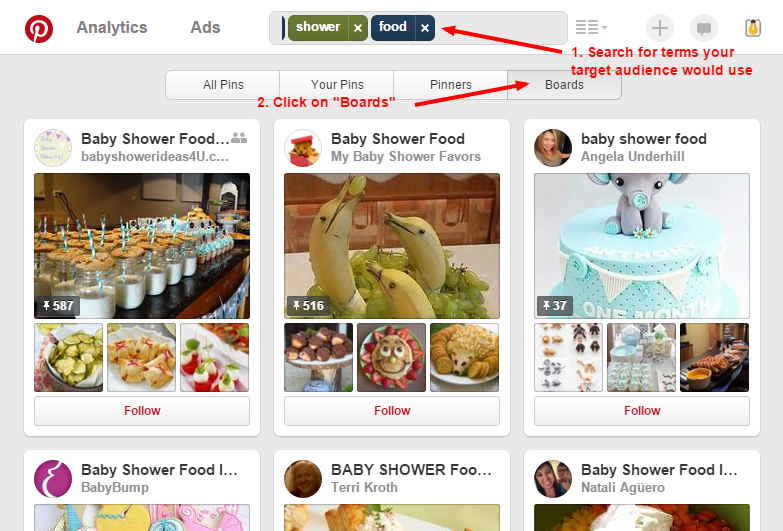
You can also use Pinterest search to find people that have created boards and pins pertaining to your topic of interest. In this example, I search for the term “baby shower food” and then click “boards”:


pinterest-board-search


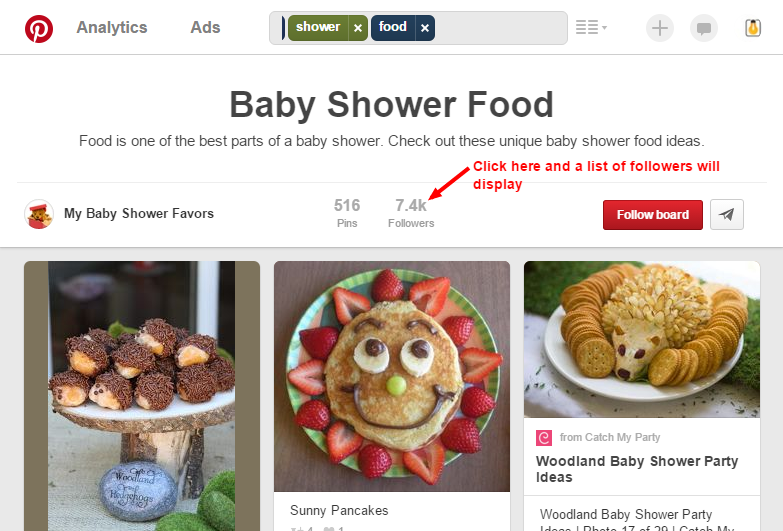
Then I can click on any board that I want to take a closer look at. When viewing the individual board, I can click on “followers” to view the board’s followers and then I can click the “follow” button next to each person I want to follow.


pinterest-board-followers


One huge benefit of following a good number of like-minded people is that you can see what visual content is popular in your niche. Finding content to re-pin also becomes easier if you are following other users that pin similar images.


3. Optimize Your Boards and Pins for Search


Another important thing you should spend time on is optimizing your boards and pins for Pinterest search. Users can search for boards, pins and other users using Pinterest’s search bar so ranking well for your keywords can be helpful.


If you’ve done SEO, then you’ll be glad to hear that optimizing for Pinterest is much easier than optimizing for Google. It mostly involves keyword research and incorporating those keywords into your boards and pins.


Google Keyword Planner can be a good starting point, but you should also do keyword research on Pinterest. Here are the steps I take:


Step 1. Start typing your target keywords into Pinterest search


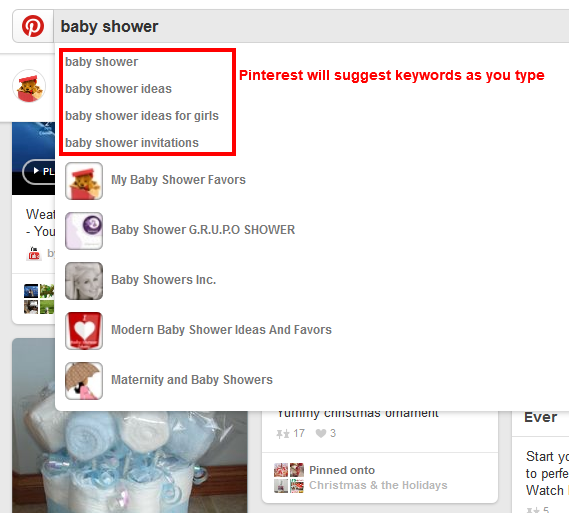
Pinterest will suggest keywords that other people have searched for. These keywords can be good target keywords to include in your boards and pins.


pinterest-keyword-suggest


Step 2. Check the search results to see what boards and pins show up


Do the boards that show up have a lot of followers? Are the other boards that are ranking targeting that keyword phrase?


If the answer is yes to these questions, then you may want to create a board for that keyword phrase.


You don’t have to go crazy over keywords for your pins. Rankings for pins can change daily and most of the search traffic from pins will often come from long tail keywords.


Pinterest tries to keep pins fresh based on what is popular and getting re-pinned and favorited. But you should still try to incorporate some keywords from time to time so that your pins have a chance of coming up for pin searches.


Step 3. Engagement is important, so stay active


If people are pinning images from your boards, then Pinterest will rank those boards higher. You don’t have to add new pins to every board every day, but try to pin new images to boards regularly.


4. Focus on Creating a Valuable Resource for Your Target Audience


One common mistake that people make on Pinterest is only pinning their own stuff. Be sure to take the time to follow other pinners and pin images from other people that your audience might be interested in.


Identify your target audience and focus on creating a useful resource for them by creating boards that they will find interesting. Update those boards with regular content.


Taking this approach will allow you to grow your Pinterest following faster than if you only pin your own stuff.


5. Pay Attention to Seasonality & Trends


Be sure to also pay attention to seasonality and trends. If you are active on Pinterest regularly, you may notice people pinning different images based on trends and seasons.


For example, when Halloween approaches, people in the party-planning niche will start pinning Halloween related images.


When I first noticed this trend, I created a Halloween board and started pinning Halloween related recipes and images to it.


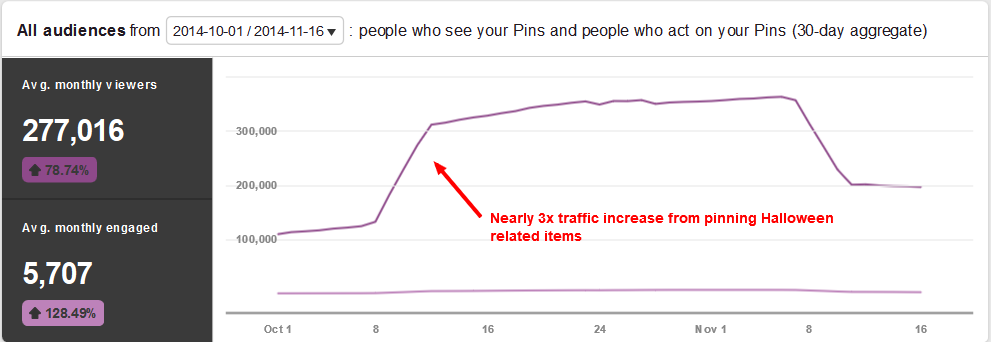
You can view your analytics by going to the Pinterest analytics tool or by clicking on the “Analytics” link on the top left in the header area. Here’s a screenshot of the traffic increase to my Pinterest account after I started my Halloween board in 2014:


pinterest-traffic-halloween-boost


I noticed that my other competitors didn’t change their pinning activity during the holidays. Don’t make that mistake!


Conclusion


To sum it up, Pinterest is an important social media channel and being active on it consistently is key to growing your Pinterest views and followers, even if it is just a few minutes a day.


Connect with other like-minded users, do your keyword research and pay attention to trends and seasonality. And most importantly, focus on creating a useful resource for your followers.


E-commerce isn’t something I focused on heavily in 2015, but in the future, it makes sense to create more visual content on my e-commerce blog so that more of the traffic from Pinterest will end up going to my website.


I’ve spent much less time on my Pinterest account for Small Business Ideas Blog, but I noticed an uptick in traffic to my account from infographics getting pinned by other Pinterest users.


Here’s a screenshot of my Pinterest analytics for that account:


pinterest-view-increase


So what do you think? Is Pinterest an important part of your marketing plan?


About the Author: Brian Lang is the founder of Small Business Ideas Blog, where he shares tips and ideas for business and marketing. Feel free to download his free resource, 50+ Free Tools to Market Your Business and read his content marketing guide.


Monday, 25 January 2016

How Pairing Personalization & Automation Can Skyrocket Email Conversions

Email inboxes are noisy–and are even more competitive than you might think. The average email user has an inbox made up of about 50% newsletters and 20% social network updates according to Microsoft.


So when a you’re working to stand out from the raucous crowd that’s competing for a user’s attention within the inbox environment, it’s no longer enough to send one-size-fits-all email messages—you need the one-two punch of sending the right personalized message at the right time.


That means harnessing the power of two different features within email: Personalization and automation. Here are some practical tips for getting started.


Personalizing Email Messages


Many businesses and organizations have fallen into the habit of sending mass emails that don’t utilize personalization (like including the recipient’s first name in the subject line.)


But Experian recently reported that implementing this minor change had a dramatic effect on open rates:


experian-report-open-rates


Image Source


Across almost every industry studied, including the recipient’s name in the email subject line increased open rates–some by as much as 42%. Other research echoed the success of using a recipient’s first name in the subject line, reporting that emails with personalized subject lines are 26% more likely to be opened.


The shocking part is that researchers also found only 35% of marketers are leveraging personalized subject lines.


So, what gives? Is personalizing a subject line confusing? It’s actually pretty simple. As long as you’ve collected a first name from those who opt-in to your email list, personalization takes seconds. Most email providers (like Campaign Monitor, MailChimp, AWeber, etc.) enable you to insert a recipient’s first name by inserting a custom field into the subject line.


For example: If you were using Campaign Monitor and wanted to personalize your subject line, you’d use [firstname, fallback=] as pictured below:


campaign-monitor-subject-line-personalization


And that’s it. With this simple step, every email recipient will see his/her name appear within the subject line, like in this example from Ipsy:


subject-line-personalization


You can also use this same format to include the recipient's first name within the message body, which ups the personalization just a little bit more, as seen in this email from Poshmark:


poshmark-email


By simply enabling an existing feature on your email platform, you can boost open rates–which is the first step toward increased conversions.


Personalization via Segmentation


The realm of email personalization extends beyond the subject line, too. Aside from having a human element, personalized messages are also highly relevant for recipients–which is a major pain point for about three-fourths of email account owners. Research shows that as many as 74% of online consumers are frustrated by messages that aren’t relevant and don’t fit their interests, which can happen as a side effect of unsegmented email lists that help categorize subscribers.


Along with relevancy, segmented lists also have a slew of other positive effects for email marketing. The DMA reported that segmented at targeted emails generate 58% of all revenue, and that some markets have noted a 760% increase in revenue from segmented campaigns.


And then there’s data from the Lyris Annual Email Optimizer Report:


email-segmentation-results


The report shows that segmentation also helps boost open rates, drives conversions, and overall increases the quality of communication–making for successful emails that feel tailor-made for each unique recipient.


So how do you go about segmenting your lists?


Step 1: Make a Plan for Segmentation


Every business has different objectives for their email marketing campaigns, but think about the ways in which you currently use email messaging, and how you’d ideally like to use it in the future. From here, you can start to break down a mass list into smaller, more relevant lists and map out your plan for segmentation.


Think about sorting contacts by:


  • Demographics (gender, age, job title, geographic location)

  • Purchase type (specific product categories)

  • General interests (user-indicated topical interests, like special events)


These are just a few ideas to get your mental wheels turning, but think about how you can break down an existing list into more specific categories. Moving forward, you can then enable user-selected sorting capabilities (like the ability to opt-in to different segments of your list for specific types of communication.)


Need more inspiration? See how BuzzFeed uses email segmentation.


Step 2: Build Segments


Next, it’s time to start segmenting your list within your email platform. Some email platforms (again, we’ll use Campaign Monitor as an example) will allow you to build segments based on rules and parameters you set.


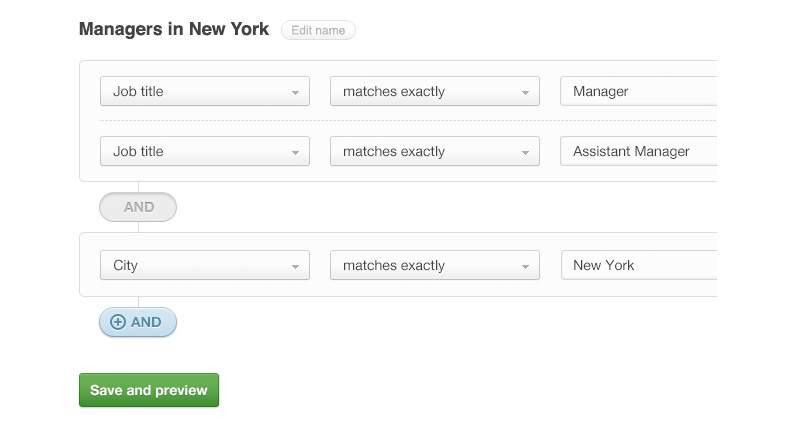
Here’s what it looks like to build different segments on their platform:


segments-in-email


Image Source


In the example, you can see how you could build out a specific segment that includes managers in New York via parameters that require the title of Manager or Assistant Manage who reside/work in New York.


You can create as few or as many different segments as you like, but each new segment should have a conversion-oriented purpose.


Note: If you want to create detailed segments, you’ll need to collect more detailed information from subscribers during opt-in. Add a few extra fields (like job title, address, etc.) that go beyond name and email address to get the data you need in order to properly segment.


Step 3: Send Accordingly


Once you’ve created your various segments, you can begin launching more specific email campaigns that align with the interests of your various lists.


Here’s an example of what that might look like: Imagine you own a retail business that specializes in outdoor sporting equipment. Rather than sending one-size-fits all emails that promote all of your products to a single list, you create segments based around promoting specific types of equipment (like fishing gear, baseball equipment, etc.)


general-email-list-versus


Through website opt-ins and online purchase tracking, you can now send highly relevant information about your specific products to people who’ve are most likely to be interested in that information.


Now that you know how to leverage personalization and segmentation to send the right message to the right email subscribers, let’s look at how you can use automation to send those messages at exactly the right times.


Automating Email Messages


Automated emails enable you to communicate with the right person with the right message at the right time (without having to keep track of each subscriber one by one.)


And they’re proven to be successful tools for boosting conversions, too. Experian research found that automated transactional emails have 8x more opens and clicks than any other type of email–and they can generate 6x more revenue. And along with the pure convenience factor it offers, email automation is proven to drive conversion rates by as much as 50% for B2C marketers.


Because of this, more and more companies are hopping on board with automation: it’s used by 82% of B2B and B2C companies, and revenue for marketing automation systems increased by 60% in 2014.


So how can you use email automation?


Many email marketing platforms already have automation features built in (although more often than not, they’re a paid feature.)


Automated emails can:


  1. Act as workflows that auto-send on a schedule (like after a customer makes a purchase)

  2. Auto-send when certain actions have been completed by a user or at a designated point in time (like when a user hasn’t made a purchase in 30 days)

  3. Act as an onboarding series (for use with new customers or new team members)


You can have multiple workflows running at the same time, so think about what different objectives you can accomplish within different series.


How to Set Up Email Automation


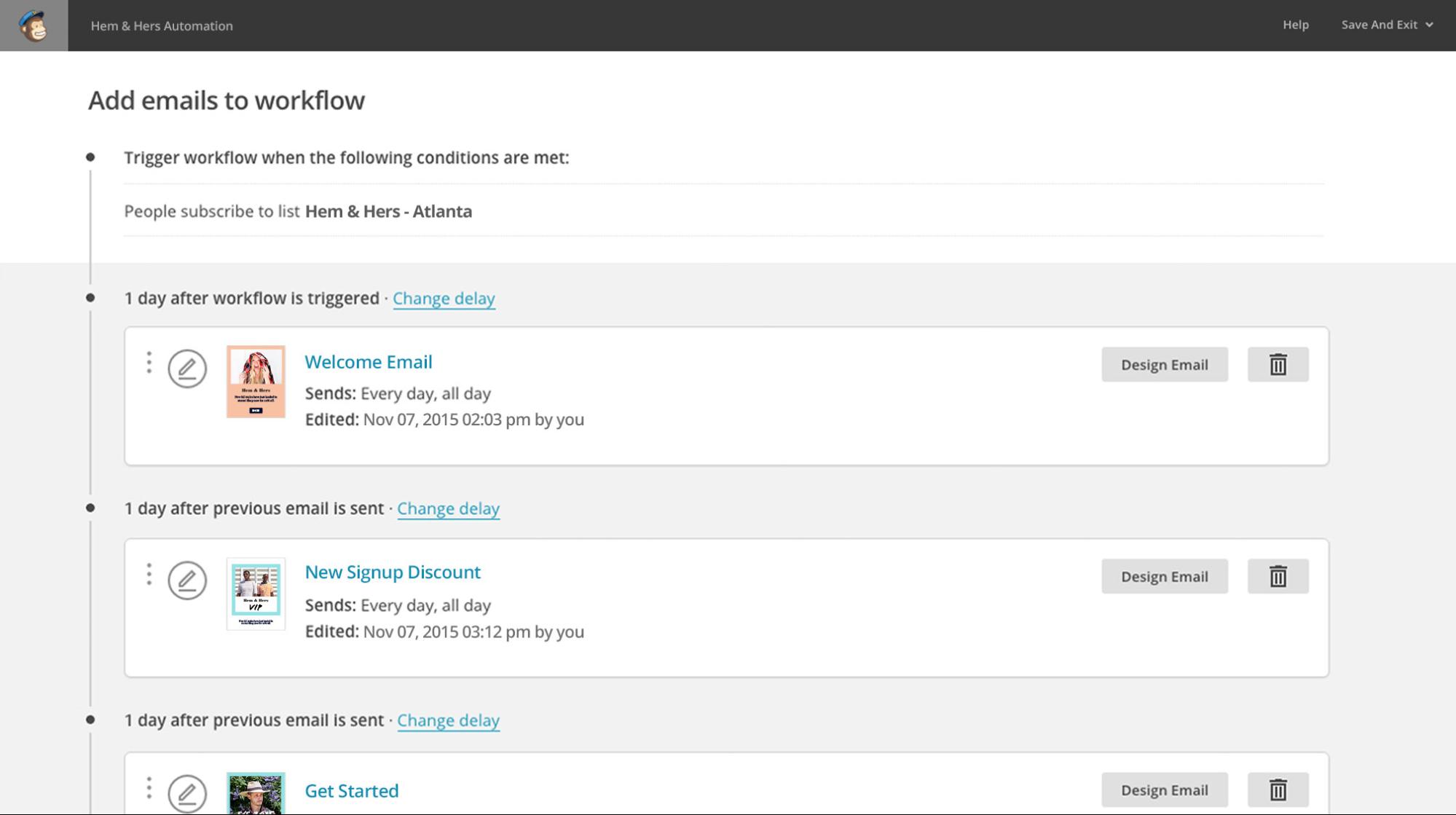
You can set up email automation for a variety of purposes, but let’s look at what it would look like using MailChimp:


mailchimp-email-workflow


Image Source


Step 1: Choose Your Trigger


Using MailChimp, you can set up a workflow that triggers based on an action you select. In this example, the workflow is triggered when someone subscribes to a specific email list, but other triggers might be:


  • When a customer celebrates his/her one-year anniversary of a subscription service

  • When a purchase is made

  • When a customer hasn’t visited the website within X days


From there, you’ll launch an email sequence that drives the recipient through a series of emails that all work together toward a conversion (like an item purchase.)


Step 2: Create Your Email Workflow


Next, put together a series of 3-8 (or more, if you want) that keep the conversation with your subscriber going. In the example, you’ll see that in the example, they’ve created:


  • A welcome email

  • A new signup discount email

  • A getting started email


All of these messages help you stay in touch with the customer while encouraging them to take further action or to re-engage with you.


In your workflow, you can do things like:


  • Showcase other offerings your business has

  • Offer a discount or coupon code to encourage repeat purchases

  • Highlight helpful resources, like how-tos or interesting blog content

  • Leverage visual assets, like a lookbook or video


The goal of these on-going message series is for you to keep reminding your customer of the value you can provide and to keep your brand top-of-mind–so think about what you need to say to accomplish that.


Need more on this part? Read more on outbound email automation tactics here.


Step 3: Schedule Your Timing


Once your email series is ready, you’ll want to map out when these messages will send, and which recipients will receive them. Space out your messages so that they are not overwhelming, but on a timetable that maintains relevancy.


mailchimp-scheduling-segmentation


Image Source


In the example, you’ll see how MailChimp lets you determine when automated messages will send and which segments will receive messages. You’ll want to test different send times to see which pattern is most effective for your audience.


Step 4: Don’t Forget Transactional Emails


Emails that send automatically after a customer completes an action are also part of your automated email strategy–so make sure you are optimizing them with clever copy and smart design. Studies show that messages about order confirmation and shipping confirmation have some of the highest open rates of all.


transactional-emails-data


Image Source


Many of these types of messages only include a standard message with order details, but with such high open rates, you should put these automated messages to work, too.


One of the beloved examples of a solid transactional email is this shipping confirmation email from CDBaby, which says:


cd-baby-shipping-confirmation-email


Image Source


See how fun that is? Rather than just saying, “Thanks for your order” this email puts an interesting, lovable spin on what might be an otherwise boring message. Write copy that makes your message memorable for readers.


Step 5: Watch Conversion Rates Soar


Once your workflows go live, keep an eye on metrics like open rate and click-through rate to see how effective your automated campaigns are–and monitor how your conversion rate improves.


Just remember: Automation doesn’t mean set-it-and-forget it. You need to constantly make tweaks and improve based on subscriber feedback and A/B testing–just like with any other email you’d send.


Tools for Execution


The final question in this equation, then, is: What email platforms can I use to harness the power of both personalization and automation? Here’s a brief summary of a few options–but there are many, many more you can look into as well.


Campaign Monitor

This platform has a whole gallery of mobile-friendly templates you can customize, as well as lots of helpful resources for all aspects of email marketing. Thanks to built-in metrics and multiple integrations, you can study campaign success and make email marketing a seamless part of your operation.


Price: $9-49/month


Hubspot

Hubspot offers a full-service solution for marketers with everything from email, to CRM, to social media management, and more. If you’re looking for a one-stop-shop for all of your online marketing efforts, this is powerful option with a training system built right in.


Price: $200-2,400/month


MailChimp

Using MailChimp, you can take full advantage of a variety of different email tools, like A/B testing, automation, and more. Create custom templates or use their free options to build and send customized emails. Here you’ll find lots of teaching resources, helpful integrations, mobile-friendly designs, and advanced metrics for studying the success of your campaigns.


Price: $25 and up, based on number of subscribers


AWeber

AWeber prides itself on its integration with other apps, its suite of advanced tools, and self-hosted opt-in forms. Again, tons of free guides to help you get started and webinars that enable you to get the most out of this platform.


Price: $19 and up, based on number of subscribers


Constant Contact

One of the long-standing figures in the email marketing industry, this platform touts ease of use. Here, you can take advantage of templates, learn how to improve email marketing efforts, and get access to 24/7 support.


Price: $20 and up, based on number of subscribers


Again, these five options are just the tip of the iceberg when it comes to your options for sending email, so look around and see which interface and tools best fit your needs. The bottom line is that you need to find an email marketing service that works with your budget and covers all of your needs for both personalization and automation.


Personalization + Automation = More Conversions


The numbers don’t lie–a combination of personalized email marketing and automated messaging are a surefire way for you to increase the success of your campaigns. Follow the steps for personalizing email, segment your lists, and put automated and triggered emails to work for your business.


About the Author: Kaleigh Moore is a social media consultant and copywriter who helps SaaS companies craft intelligent content with a charming human element. Visit her website or follow her on Twitter.


5 Tips for Launching a Career in Business Coaching

In many careers there comes a point where pivoting is necessary or desirable. For successful business professionals, one of the more natural pivots occurs when people move away from practicing business and start coaching or consulting others.


This transition can be refreshing and exciting, but you’ll want to keep the following points in mind:


1. Establish a Mission Statement


Any successful career in business coaching starts with defined goal setting. And at the heart of goal setting is personal reflection. You need to sit down and be honest with yourself in regards to why you’re making this career move and what you want the outcome to be. In particular, you need to be capable of answering the following questions:


  • Why do I want to be a business coach?

  • How would I best describe my approach to coaching?

  • How long do I hope to be a business coach?

  • What results am I aiming for as a business coach?


By answering these questions, you’ll develop a concrete mission statement. The results may surprise you, but they’ll be accurate and straightforward.


For example, after answering the questions, your mission statement may look like this: "To be a low-cost business coach for the next five to ten years with the intentions of helping local small business owners thrive in the midst of large scale corporate competition." This mission statement presents a targeted goal that will guide you to make specific choices and decisions.


On the other hand, if you hadn't answered the questions, your non-verbalized mission statement might instead look like this: "To be a profitable business coach for a few years." A vague statement like this provides very little guidance.


2. Implement a Business Model


Once you have your mission statement and goals in place, you can focus on establishing a business model that compliments these objectives. As a consultant, your business model will essentially consist of two main components.


For starters, you will need a business model for your practice that explains your pricing strategy, lead generation techniques, and plans for future growth. Secondly, you will need a business model for how you’ll help your clients scale their own businesses. Let’s discuss the latter for a moment.


Most business coaches choose a standard model and then make their own tweaks and adjustments. One common framework is the GROW Model (Goal, Reality, Obstacles, and Way Forward). This model was introduced in the 1980s and is a systematic way of looking at business problem solving. You may also want to consider the SMART Model (Specific, Measurable, Attainable, Realistic, and Time-Bound), another commonly-used model.


After identifying a model to use, you can establish consistency and give your business a solid foundation to build upon. When viewed through the lens of your mission statement, you’ll have a clear understanding of where you’re headed.


3. Attach Your Name to Intellectual Property


While your initial focus should be on finding clients and offering them exceptional coaching, you need to start thinking about the bigger picture. Many business coaches use their coaching firms as catalysts for additional business endeavors. Take Michael Port as an example. He turned his successful coaching stint into a much more lucrative career by creating comprehensive intellectual property.


The beauty of his situation is that each aspect of his business feeds the other. His coaching experiences lead to more speaking and writing opportunities, while these opportunities simultaneously help him land more clients. It’s a beneficial two-way road.


You may not have time to write a book or develop a curriculum when you’re just starting out, but it’s smart to begin brainstorming. Think of ideas for books, programs, courses, webinars, and speaking topics. Then keep these in the back of your mind as you invest in your clients.


4. Find the Right Clients


Being successful in business coaching is all about finding the right clients. If you cast your net too wide, you’ll waste a lot of time on clients that don’t align with your goals. If your reach is too narrow, you’ll wind up without any clients at all. The key is to identify a niche and heavily target it. The more clients you get in the same niche, the easier your job will be.


5. Leverage Your Experience


The final tip is to leverage your past experiences. When choosing a niche, it’s a good idea to focus on a topic or issue that comes natural to you. For example, if your past career was in HR, it may be natural to work with clients on developing leadership. This organic crossover will make you better at what you do.


Success Lies in the Details


If there were a magic formula for business coaching success, everyone would become a business coach. The best thing you can do is soak up as much information as possible from reliable sources. Pick bits and pieces from that advice and then develop a strong plan of attack. In the coaching world, success lies in the details.


The post 5 Tips for Launching a Career in Business Coaching appeared first on AllBusiness.com

The post 5 Tips for Launching a Career in Business Coaching appeared first on AllBusiness.com.