Wednesday, 26 October 2016

5 Online Holiday Shopping Trends You're Not Prepared For (Yet!)

It's not even November yet and here we are, already talking about holiday shopping trends. Too soon? Not at all. The truth is, the more foresight you can have to prepare for what will be the biggest shopping season, the more you can adapt to customers' habits and be ready to adjust to meet their needs and exceed their expectations.


Just how big will the 2016 holiday shopping season be? Let's take a look:


Holiday shopping between November and December is expected to reach nearly $700 billion. Consumer confidence is higher and 41% Of people surveyed plan on spending more on gifts this year than they did last year – a 10 billion increase in total sales from this time last year.


What's more, the emphasis on traditional shopping days like Black Friday and online-only Cyber Monday are lessening – especially because transactions can happen anywhere at any time thanks to the rise of mobile. So what kinds of trends should you prepare for this year and how can you get started?


1. Before the Shopping Begins: “I Need Some Ideas!”


Shopping for gifts is supposed to be a time of fun, relaxation and entertainment. Instead, as many of us can attest to, it's nerve-wracking, frustrating and stressful. According to Google's own research, there are three moments that the customer goes through before they ultimately make a purchase:


  1. The “I Need Some Ideas” moment

  2. The “Which One's Best” moment and the

  3. “I Want to Buy It” moment.


We'll get to all of these shortly, but as you might expect, how you handle the first two will ultimately determine whether or not you are rewarded with the last one. Also, depending on your industry, you may see a larger percentage of your target audience heading to YouTube for ideas:
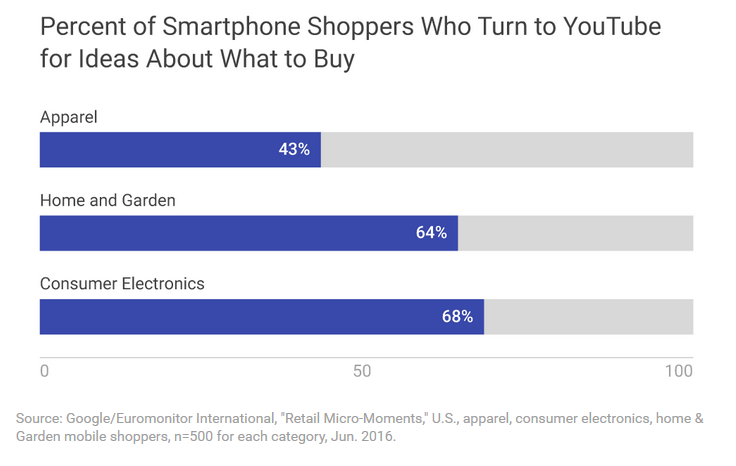

smartphone-buyers-turn-to-youtube
(Image Source)


Gift guides are a huge presence online, and around 70% of the time, these kinds of videos are watched on mobile devices. Want to know how big of a presence online gift guide videos are? In the time people spent viewing them on YouTube last holiday season, you could watch “It's a Wonderful Life” well over 300,000 times.


Google calls these types of searches “micro moments” – essentially “being there” for a customer when, where and how they need you.


2. The Importance of “Micro Moments”


If you think micro moments are simply a customer going through the stages of AttentionInterestDesireAction, you'd be doing a huge disservice to what's actually involved in the process. Google took a look at one shopper's behavior to determine precisely how they interacted with various digital touch-points once they decided to do a basic search. Here's what they found:
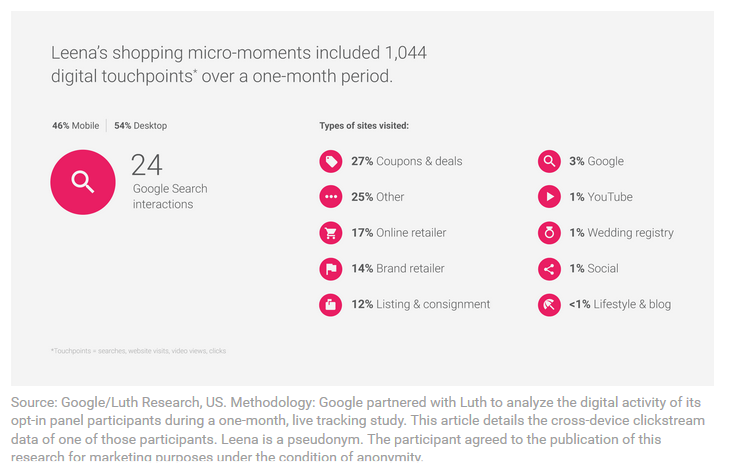

shopping-micro-moments-digital-touchpoints
(Image Source)


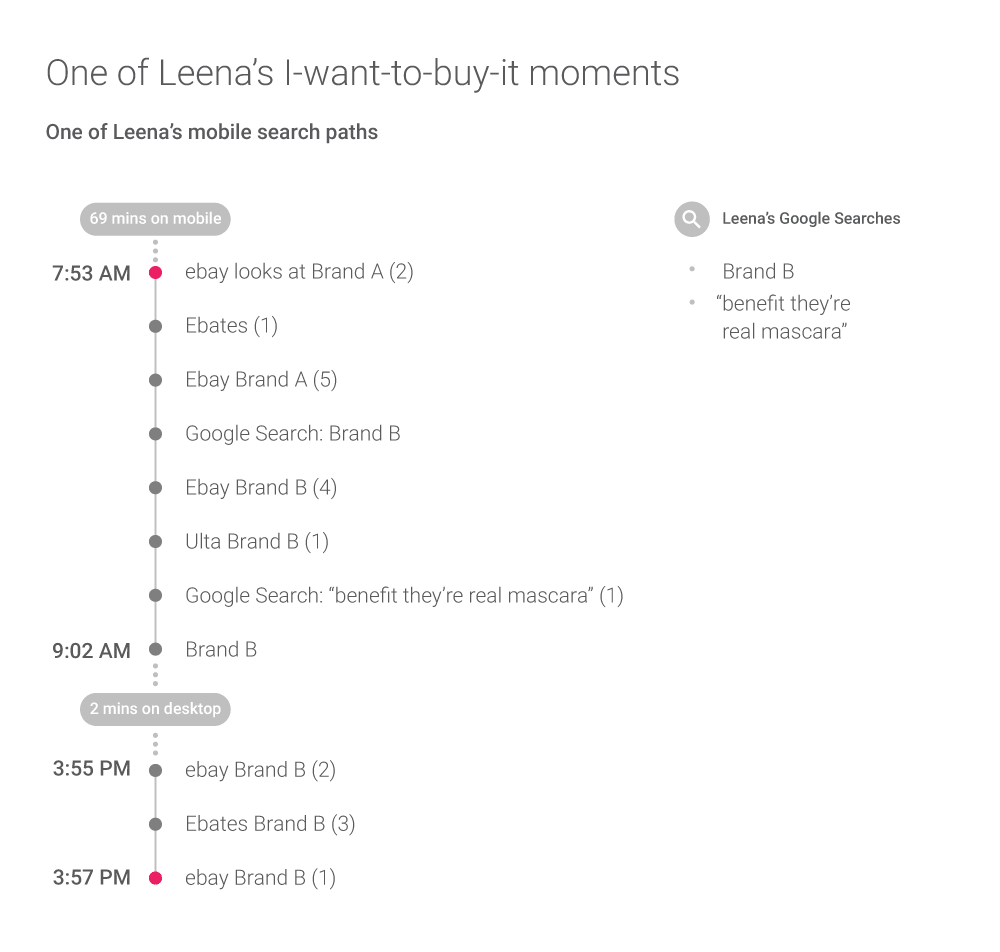
In this case, the shopper was Leena (a pseudonym), a 32 year old married woman from Washington state who looks for discounts and specials online. As you can see from the chart above, in a one month time period she hit over 1,000 digital touch-points. In taking a closer look at her search query, we can focus on a micro-moment. Leena had run out of mascara and was looking for an alternative to her regular brand.


She had narrowed down her decision to two choices. Then, her mobile search went like this:

shopping-moments-journey
(Image Source)


So as you can see, even on mobile devices, it's not a “once and done” process. It's a lot of back and forth, a lot of different devices, searches and comparisons being made.


3. Shoppers Ask: “How Will I Buy This?”


If you sell tangible goods, you may be worried that the holiday season is all about showrooming – trying on a product in your store, only to actually buy it on Amazon. But the truth is, whether you're serving customers locally or you're letting them shop on mobile (or both), the stores that offer the most convenience are the ones that ultimately get the sale. It is, in short, “frictionless shopping” – being there for the customer, right when, where and how they need you.

90-percent-smartphone-users
(Image Source)


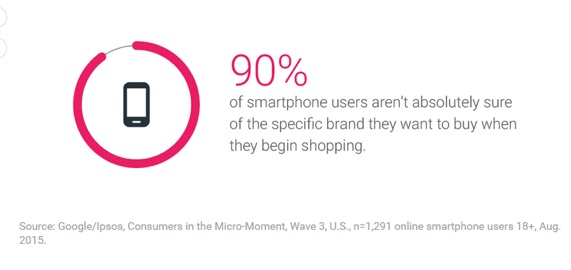
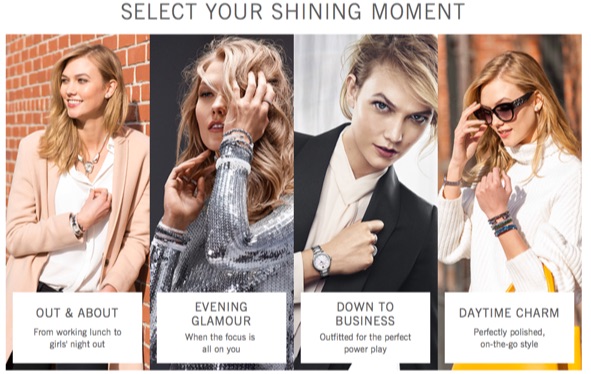
Contrary to popular belief, most of them don't even know what particular brand of item they want, which is why you need to be there during those micro-moments to help guide their decision: not in an overly sales-pressuring way, but in a helpful, convenient way. Google's own micro-moment inspiration guide shows how major brands like Swarovski crystal and catalog retailer Williams Sonoma do just that, by way of their online Style Finder (how to accessorize depending on the occasion) and rich media presentations of products respectively.

select-your-shining-moment-style-finder
Helping customers make buying decisions will be key this holiday season and beyond.


Free shipping is the biggest conversion booster we all know about. But “buy it online and pick it up in store” is another big one. Having multiple ways to get the product is great, but having multiple ways to pay for it is even better. Having the ability to not only accept credit cards, but Paypal and mobile pay systems like Android and Apple Pay are going to get you more conversions than sticking to a single system.


4. Consumers Only Want the Best

consumers-want-the-best
(Image Source)


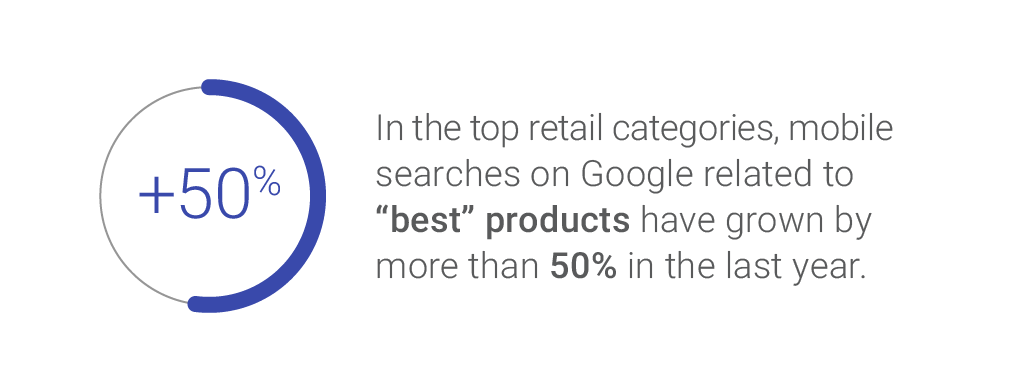
When buying online, you can't (yet) feel, try on or gauge the quality of a product. That's when shoppers are seeking out reviews and ratings – but even those can be bought. These days, consumers are shopping smarter by looking for the “best” of whatever gift they have in mind. Google reports that shopping queries with “best” have increased 50% in the last year. But simply claiming your product is the best isn't enough to win people over. Instead, show them.


For example, you could talk about what goes into making it or the features that truly make it stand out from the competition. What ingredients or qualities does it have that competitors tend to “cheap out” on? What makes your version worth their time and attention (and ultimately their wallets) and perhaps more importantly – are those differences the kinds of things that customers actually care about?


5. The Power of Cross-Device Targeting


As you can see from the touchpoint illustration above, there are a lot of back-and-forth choices to be made from mobile to desktop to mobile again. Throw in other items like TVs, gaming consoles, on-demand streaming, tablets and smart watches, and you get what marketers are calling the “multi-screen explosion”. Cookies just aren't enough to satisfy the hunger to glean info on customers anymore, so ad networks are ramping up their work on letting companies target customers across devices. Call it cross-device or multi-channel or omni-channel – it's changing the way we'll be shopping this holiday season.


But make no mistake – consumers are keen on privacy. There's a delicate balance between being personalized and convenient, and being too “in your face” with the messaging. Smart companies looking to reap the benefits of the holiday shopping season know that the best way to leverage upcoming trends is to hone in on customer behavior and preferences without that creepy stalker vibe.


In short, it means keeping customers (gently) informed, helping to guide them where possible and making things exceedingly convenient while providing the best possible experience as a whole. Sound like a tall order to fill? It is – and being able to juggle it across multiple customers and devices is no small feat. However, you can do wonders with this information by looking beyond the trend and brainstorming ways to turn your own products into the kind of convenient, accessible, relevant and engaging items that people won't hesitate to buy – for others, as well as themselves.


About the Author: Sherice Jacob helps business owners improve website design and increase conversion rates through compelling copywriting, user-friendly design and smart analytics analysis. Learn more at iElectrify.com and download your free web copy tune-up and conversion checklist today!


Your Selling Success Depends on Doing This One Simple Thing

Over the course of your sales career, you will be hearing many different ideas to help you sell. While some of these ideas will be cumbersome and complicated, I recommend that you choose the ones that take you back to basics. Doing this will ensure you're on the right path to sales success.


Your sales process should include asking for referrals.


Do you think your selling would be much easier if your customers believed all the wonderful things you could say about your products and service? Of course it would. Customers who trust you and believe in you will be more likely to buy from you.


So where is the disconnect? Too many salespeople are the ones doing the talking about how wonderful they are. The sales basic is that when other people say good things about you, they are more believable than if you say the same things. From an influence standpoint, your prospects and customers understand that you have something to gain by selling something; your customers have nothing to gain when they say the exact same thing. That's why they are more believable.


Too many salespeople work very hard to make the sale. They work even harder to deliver customer satisfaction and delight. That's the end of their sales process. That's a big mistake. Sales professionals should get back to sales basics and leverage their good work and use it to sell.


Modify your sales process to include one more step. Be sure you are asking for referrals to other customers when you realize that you have a pleased customer. However, understand that not all customers will immediately offer recommendations; the good news is that you have just created a shorter sales cycle if they do. That referral comes to you with built-in trust from the customer making the referral.


Be flexible about the length of your presentations.


How many sales calls go exactly as you planned them? I'm guessing that you have encountered something unpredicted in many of them-and that's all right. Meetings often get changed today because of time pressures that many customers face. Salespeople have to be flexible to meet this challenge.


Be sure to always indicate how much time you'll need for your sales calls when you make appointments. This way your customers can block out the time you need on their calendars. However, be prepared just in case your clients' calendar changes. How can you do this? You prepare different versions of your presentation.


You should already know how long your basic presentation takes during a first sales call, a second meeting, and at later sales calls. Prepare your opening question and additional questions you will ask to uncover customer needs, problems, and wants. For example, if you need 30 minutes to conduct an effective first meeting, take that same 30-minute presentation and turn it into a 15-minute meeting, a 10-minute meeting, a 5-minute meeting and if need be, a 1-minute meeting.


Would you be able to make those time adjustments at your next meeting? Most salespeople would not be able to. If you're unable to make a time adjustment at a sales meeting, the only alternative would be to come back another time-and you've just lengthened your sales cycle.


The post Your Selling Success Depends on Doing This One Simple Thing appeared first on AllBusiness.com

The post Your Selling Success Depends on Doing This One Simple Thing appeared first on AllBusiness.com. Click for more information about Maura Schreier-Fleming.


Tuesday, 25 October 2016

Want to Project Confidence in the Workplace? Don't Make These 5 Communication Mistakes

By Marissa Russell


In the world of business, appearing insecure to clients, colleagues, and superiors is the kiss of death. People want to do business with those who project confidence, and they shirk away from those who second guess themselves.


It is important, therefore, to ensure that we are not subconsciously apologizing for our power in the way we communicate with others. Here are five communication mistakes that make you seem inexperienced and insecure:


1. Negotiating with people over decisions that should be final. Going back and forth with people when you've made a decision brands you as someone who can't make forward progress without unanimous approval. Once you have determined the wisest choice to make, your decision is not a negotiation–it is a verdict.


It is perfectly fine for people to have a lively dialogue during a brainstorming session, but after you've made a final decision, don't continue to engage in back and forth arguments with people who do not respect your decision. By refusing to engage in unnecessary negotiations, you will over time teach people to respect your authority.


2. Apologizing for things you shouldn't be ashamed of. There is no need to apologize for asking questions, holding others accountable for inappropriate behavior, being nervous, or other things that do not warrant repentance. Apologizing for minutiae makes you look insecure and on edge. Ask yourself if you are truly remorseful for what you have done, or if you are saying “sorry” to brace yourself from backlash. Only apologize for things that you feel guilty for. Don't use apologies as a shield to protect you from criticism.


3. Minimizing the value of your statements. “I just think…” “I kind of feel like…” “I could be wrong, but…” Minimizers are used in sentences when people fear that they will sound arrogant or harsh, and want to soften the authoritative tone of the statement. Minimizers are problematic since they weaken your point before anyone even has a chance to challenge it. Instead, confidently stand by what you say. You can always correct yourself later if you realize that your statement was inaccurate.


4. Offering to clarify statements that don't require clarification. “Do you know what I mean?” or “Did that make any sense?” When you anticipate that you are appearing inarticulate to others, you undercut the validity of the point you are trying to make. The sad part is that these questions are often tagged along to statements that make perfect sense and need no further clarification. If what you have said is difficult to comprehend, let the person you are speaking to tell you that. Make your point with confidence, and leave the responsibility of getting further clarification on the listener.


5. Rushing to respond. Insecure people hurry to respond to others because they live in fear that they are not important enough for anyone to patiently wait on their response. Rushing to respond to people puts you at a greater risk for putting your foot in your mouth, unintentionally interrupting someone, and looking anxious. Wait at least two seconds before responding to questions or statements. It affords you the opportunity to prevent embarrassing verbal blunders and it also positions you as an authoritative person who is unintimidated by silence.


These communication mistakes are small, yet significant. Insecurity is omnipresent in today's world, so you will instantly stand out as a cut above the rest by correcting these mistakes and projecting confidence in the way you speak.


About the Author


Post by: Marissa Russell


Marissa Russell is a Certified Life Coach who helps high-achieving career women find fulfillment beyond their professional lives. To check out her services, please visit www.thehighachievingwoman.com. You can also like her Facebook page.


Company: The High Achieving Woman

Website: www.thehighachievingwoman.com

Connect with me on Facebook and LinkedIn.


The post Want to Project Confidence in the Workplace? Don't Make These 5 Communication Mistakes appeared first on AllBusiness.com

The post Want to Project Confidence in the Workplace? Don't Make These 5 Communication Mistakes appeared first on AllBusiness.com. Click for more information about Guest Post.


How to Create Customers for Life with the Perfect Onboarding Sequence (Regardless of Industry)

Paid search is often the biggest driver of new customers.


Largely because people are typing in exactly what they're looking for.


But.


These aren't necessarily the most profitable customers you've got. Especially not in the beginning.


Your repeat ones are.


'Retention' is often associated with ninja-like email growth hacks. But it's much more than that.


Proper 'retention' and onboarding starts the minute someone sets foot on your site, and their interaction can influence the rest of their experience over the next few hours, days, or weeks.


Here's how.


How “Loyalty Economics” Works


Everyone says that repeat customers are more profitable than new ones.


Supposedly some book, Marketing Metrics, says that repeat customers have a 60-70% chance of converting.


At least, that's what every blog post says when you Google 'repeat customer vs. new customer' (I personally haven't read it).


But what about a real study?


Waaaaaaay back in 1990, while most startup founders were still in diapers, Bain & Company partnered with Harvard Business School (ever heard of 'em?) to analyze the, “costs and revenues derived from serving customers over their entire purchasing life cycle”.


When you translate that from Academia to English, you get, “how much repeat customers are worth vs. new ones”.


Originally published in a F-ing paper magazine, the study was groundbreaking in that it finally declared that “increasing customer retention rates by 5% increases profits by 25% to 95%”.


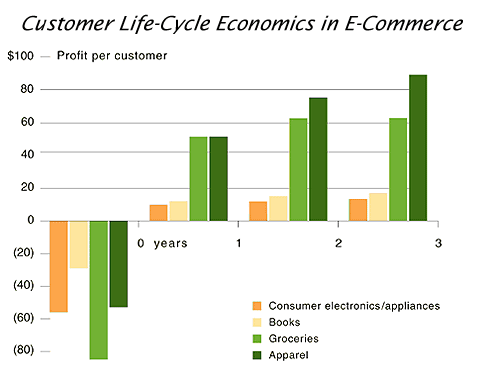
Basically it showed, empirically, that new customers are often unprofitable for the first few years based on high costs of acquisition (both hard and soft), and it's only later with repeat ones do they become profitable.


A decade later (so we're still talking back in 2000 at this point), Harvard revisited the study to now include online purchases. Not only did those same 'loyalty economics' patterns show up, but the differences were also “greatly exaggerated online”.


For example, companies only online (as opposed to both online and brick and mortar) usually had to spend 20-40% more on new customer acquisition.


customer-life-cycle-economics-in-ecommerce
(Image Source)


These studies gave widespread notoriety to 'retention marketing', as a theory, and in practice, that shows up almost everywhere online today.


And it's important to note that we aren't just some trendy, hipster, mobile SaaS apps either. But all industries.


For example, online grocers typically had to retain customers for 18 months to break-even after a $80 customer acquisition cost.


spending-growth-impact-bain
(Image Source)


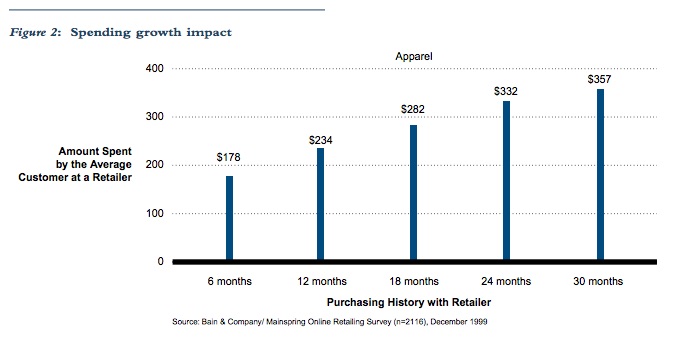
Bain looked at many different retailers, from consumer electronics to apparel and appliances, finding the same exact patterns pop up.


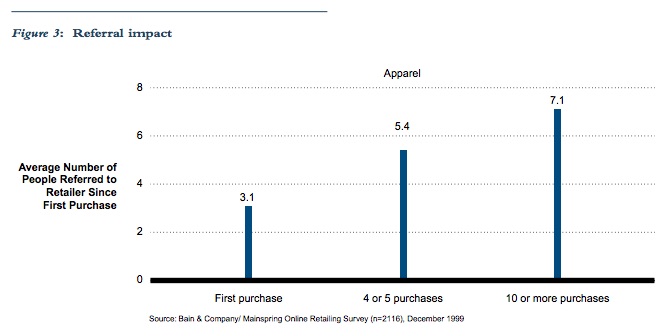
Not only were repeat customers worth more than new ones, but that repeat ones also were more likely to refer you to new customers (thereby dragging down your cost of acquisition on those new people as well).


referral-impact-bain
(Image Source)


Former eBay CEO, Meg Whitman, said at the time that, “more than half of its customers are referrals”. And that because word of mouth was so much, they “spent less than $10 to acquire a customer”.


Fast forward to today, and the same exact trends emerge.


Adobe found that repeat customers are 9x more likely to convert (compared to new customers who haven't purchase prior).


And Sweet Tooth Rewards found that repeat customers have a 54% chance of purchasing again (compared with a 27% chance of new customers).


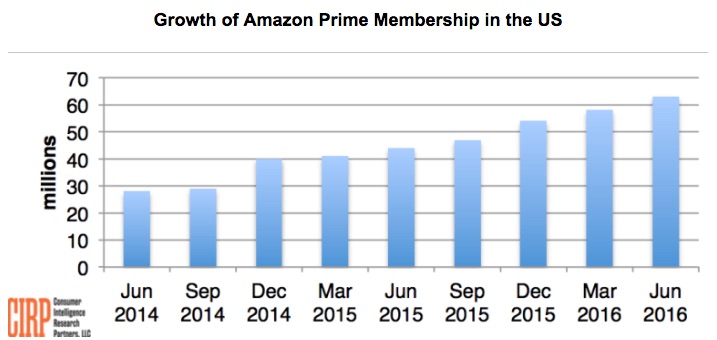
Or, ask Amazon.


Prime members will spend $75 billion this year alone.


On average each year, they spend about $1,200 compared with around $500 for non-Prime members.


growth-of-prime-membership-in-united-states
(Image Source)


Now that we've beat the issue to death, here's the rub:


If repeat customers are worth more, less price sensitive, and more often to refer than new customers…


… Why do we spend 12% of marketing budgets on retention?


(And probably less of our attention?)


1. Define Success Milestones


Before Dave McClure was an uber-accelerator extraordinaire, he wrote incredibly insightful, humorlessly punctuated and often NSFW blog posts.


One of these clever, punchy posts quickly morphed into startup metrics; becoming a simple analytical framework alternative to the ever-increasing complex dashboards found in most startups today.


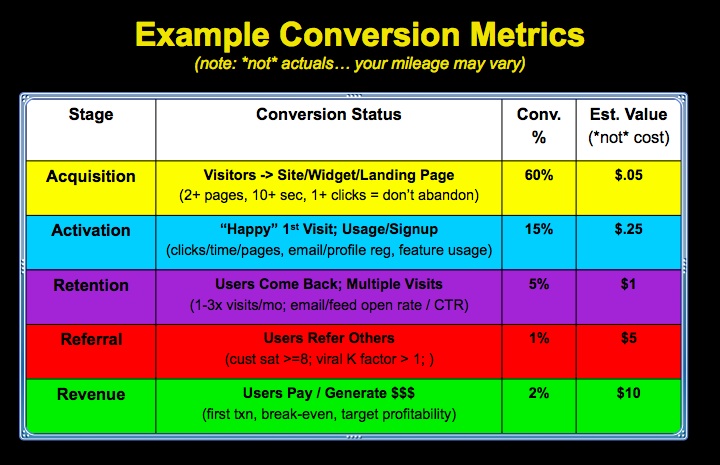
The premise was simple: pick a few key metrics for each funnel stage to illustrate when it's been met.


One specifically, Activation, focused on making sure people had a “happy-first experience” that's required before any retention could happen.


Get ready to literally travel back in time, as this next image is embedded directly from Flickr.


Startup Metrics: Example Conversion Dashboard (AARRR!)


“Activation” is similar to “customer centric success milestones” from Lincoln Murphy, in that you're shooting for a few key moments when things to start to click for a customer.


For example, in a recent blog post, Lincoln uses an example someone starting an online store and defines a few of the possibilities, such as:


  1. Creating the store

  2. Adding logo, designs, etc.

  3. Setting up a payment gateway

  4. Creating new products.

  5. … You get the picture.


The idea is to identify (and eventually instrument) key activities on your site or inside your app that will later be used for forces of good (like follow up), but for now can be signs of success (or problems) that either help (or hurt) people's customer experience (and thus, your conversions).


For example, the other day I was looking for a hotel. They had a nice suite, and I clicked on 'show room amenities' to see exactly what it looked like.


Instead of, oh – I dunno, pictures, video, or diagrams, I was met with this:


hotel-room-amenities-list-on-website


A huge wall of text, featuring an overwhelming amount of bullet points that does nothing to (a) communicate their value, but more importantly (b) help a potential customer achieve that 'happy first experience' of View Rooms –> Decide to Search Dates.


Those little micro-interactions are critical, because it mimics our unconscious browsing behavior that leads us to say, “Yes! Tell me more…” vs. “Eh, let's keep looking”.


Design, and more specifically UX, is supposed to guide those interactions; giving customers what they want most while also steering them towards your ultimate business objectives.


For example, if you were to hit the back button (don't do it now!) or go back to the Kissmetrics product pages, you'll notice the 'next steps' for customers are clearly highlighted, with primary actions featured visually while secondary ones are more subtle.


kissmetrics-analytics-conversion-product-page-september-2016


Providing clear paths through your site (or app) is the first step towards getting a customer generated, or a free trial to become sticky – prior to any retention taking place. And you do that by not making people think.


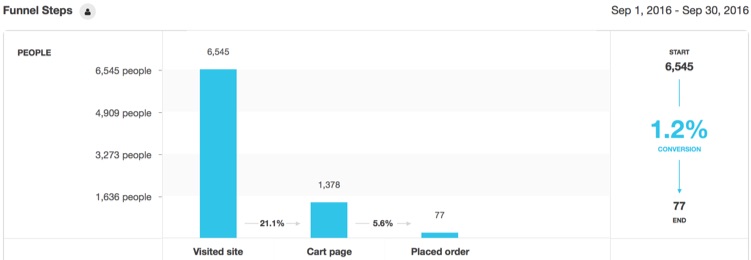
You can even instrument these 'customer success milestones' in your funnel, giving a more nuanced view of actionable steps that you can make better marketing decisions around (like, “Hey – why are all those people dropping off between Cart –> Order?!”)


For example, here's how a typical eCommerce funnel can be set up, where people visit the site, view products, add to cart, start the checkout process, and eventually place order.


ecommerce-funnel-new-kissmetrics-funnel


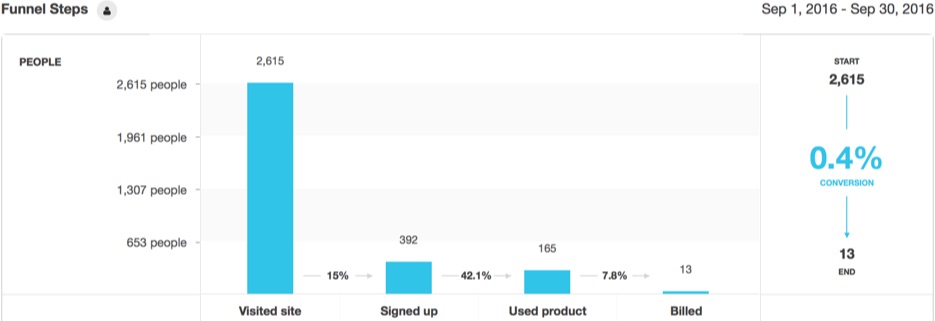
SaaS apps, while different, aren't really all that different at all. You still have people coming to a site, doing some initial browsing of key pages, signing up for a free trial, actually using the product for a bit before entering their billing info and hitting Upgrade if all looks good.


saas-funnel-new-kissmetrics-funnel


Now that you've got the major steps or milestones outlined, you can begin to dig into the details to uncover gaps inside or out of your product.


2. Map Your Customer Lifecycle


It's slightly depressing to think that around half of your free trial users will sign up, use it one time, and then never come back again – dropping your app fast like the worst of one night stands.


And while these 'onboarding' techniques (or statistics in this case) are often associated with SaaS products, it's important to realize that it's no different for how people starting shopping on an eComm site, only to bounce (like 67% of them). Or start punching in their travel dates for a hotel, without ever completing the booking (81% of them).


(It's also important to note that you can't do some of the 'classic onboarding' stuff like event-based messaging – which we'll discuss in the third part below – until these first two are sorted out.)


The only saving grace is that you can increase conversions without A/B testing by making changes to how people look for, find, and complete these 'milestones' you've just identified.


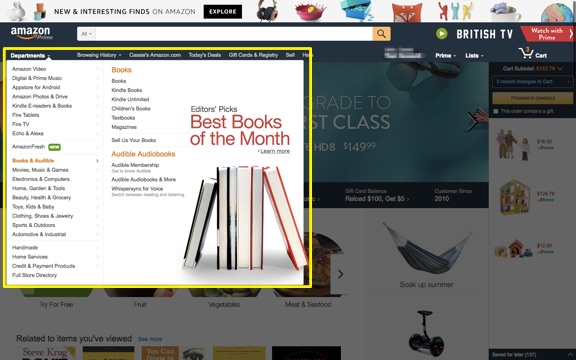
One simple method is to identify friction points as people attempt to navigate the treachery (that is your sitemap) and hit each milestone.


For example, friction points can be at the very start of a customer interaction, when they're simply trying to find a product to add to cart.


amazon-departments-dropdown


But they're more commonly in the middle of an interaction, when they're trying to find specific things but your site is making it impossible.


For example, below is a basic Heatmap analysis showing a service-based site's portfolio of work.


no-clicks-heatmap


Notice something missing?


The freaking clicks! It's a virtual ghost town, with basically ZERO focused clicks and page interactions.


There is a hover animation (that you obviously can't pick up on an analysis like this), but for whatever reason it's not doing its job in getting people to click and view the portfolio examples (which is a critical step to them hitting the Contact Us button and reaching out).


Again – these principles apply inside an app as well as outside on the marketing site.


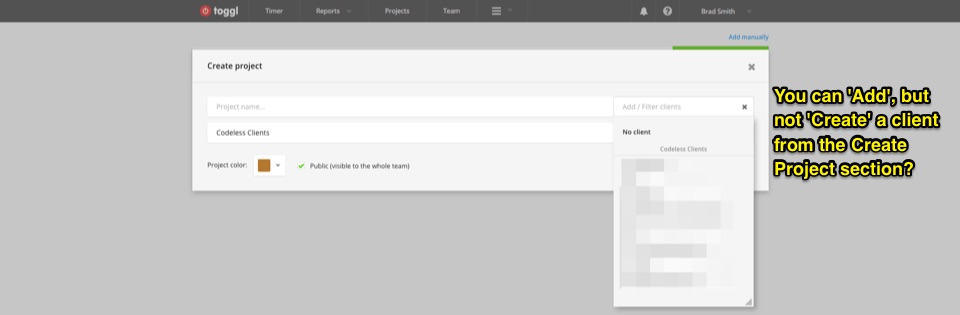
For example: Toggl. Awesome product. Insanely simple time tracking. Even the least technical people enjoy it.


Until, that is, when you're about to log time against a new project and you need to setup a new client.


toggl-create-project


And you see… nothing? You can create a project here, but no Client (even though the label tells you to Add a Client).


(This also reminds me of Google Hangouts. Which you can tell was built by engineers. Because while using the product is great, starting one is another nightmare entirely.)


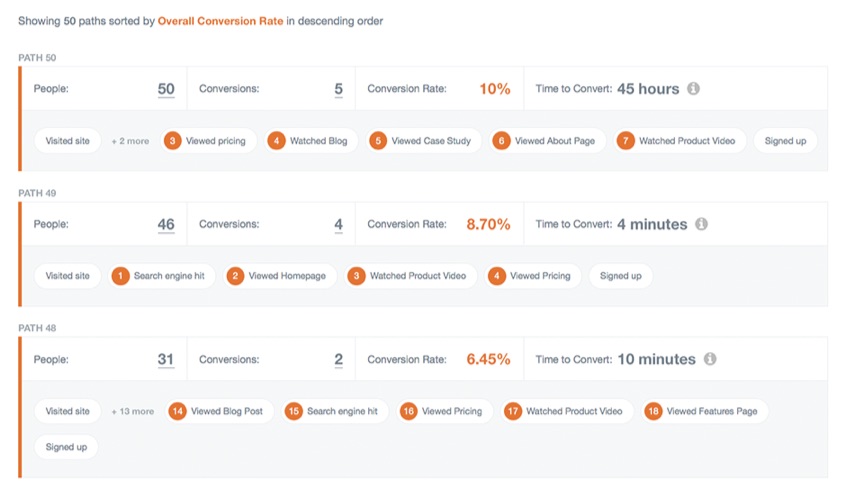
A path report comes in handy here, allowing you to dig deeper into the customer journey and pinpoint where some problem areas exist.


Segmenting your converters vs. non-converters, and then analyzing differences in their path or journey, is one way to surface these issues.


path-report-tracking-conversion-rate


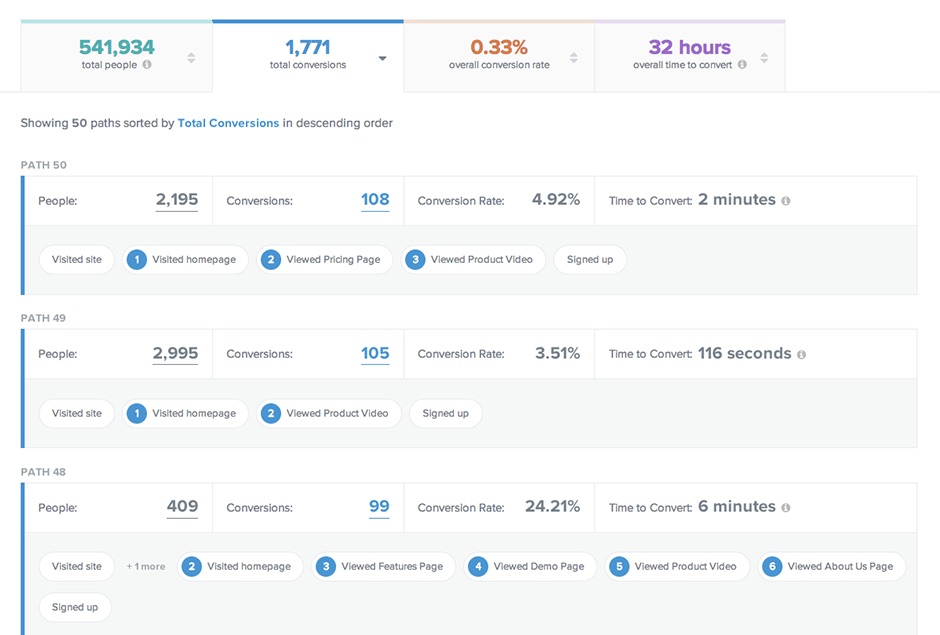
As an added bonus, path reports can also give you better attribution metrics because they'll pick up all the stuff that happens during (not just before and after) a complete customer journey. You can track this stuff back to which (and how) your marketing channels (and thus, budget + resources) influence each step.


path-report-total-conversions


3. Event-Based Messaging


Now, it's time for the good stuff.


The drip email campaigns to new trial-ers. The shopping cart abandonment. The in-app notifications. Heck, even the picking up the phone!


The key distinction here though, is that your outbound messaging and communication should now be tied to the milestones and path events you just identified (as opposed to static, time-based autoresponders.)


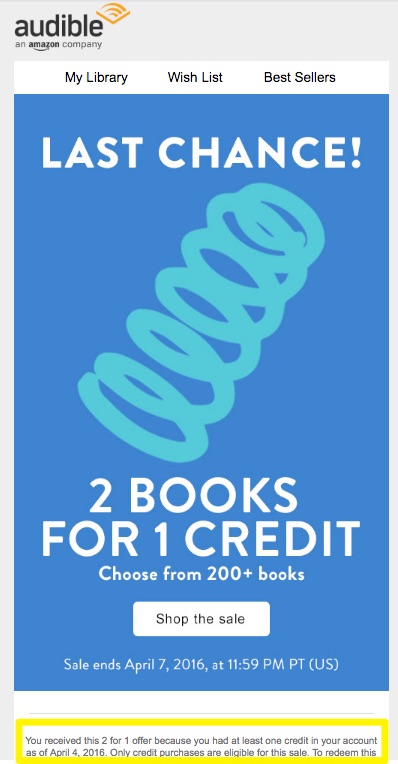
For example, Audible recently emailed me this promotion.


The design is fine (although image-heavy). The offer is good. And the Cialdini-esque urgency is great!


audible-promotional-email


The key here is segmentation. The fine print says I'm receiving this because I have unused credits in my account (as of a certain date).


Unused credits = not using the product.


Not using the product = about to churn.


So they're proactively targeting based on events to inspire (or dictate) action they want taken.


(Don't worry Audible – got some travel coming up that will take care of those credits.)


Good email workflows can deliver similar results, spinning off new sequences of communication based on actions an individual might take on your website (or even another channel).


For example, many subscribers and leads often go dormant (see the stats at the beginning of the last section). So you can 'win them back' by getting a little extra details about what they're into or looking for, and then tailoring your own messaging accordingly.


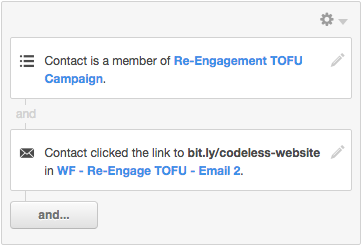
Below, I'm trying to pull out all people who're implicitly answering this question by clicking on a specific 'website' link (as opposed to another topic that was provided, like marketing automation).


re-engage-tofu-email-drip


Now you have the trigger, which should kick off or refine the next communication they see.


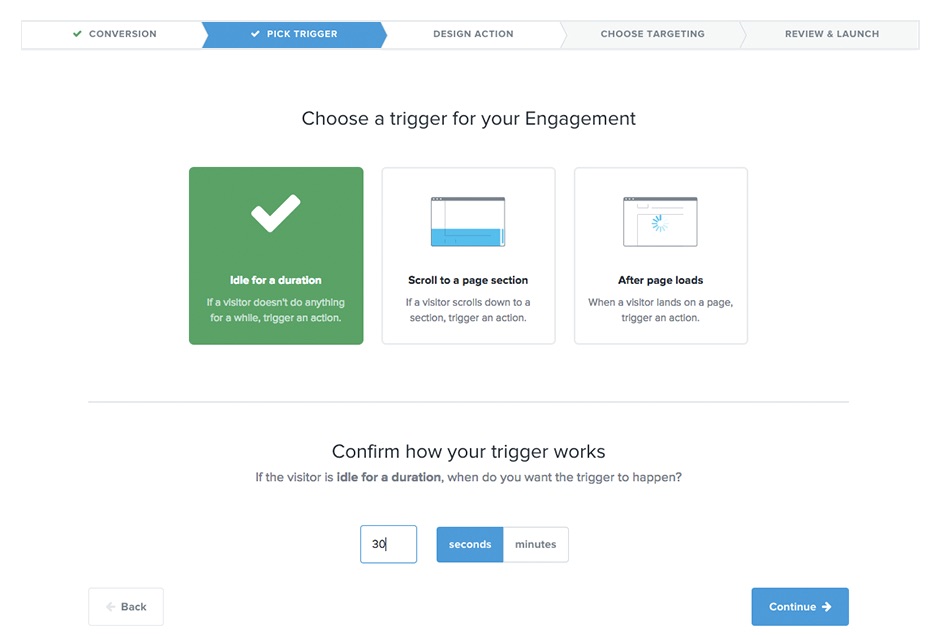
Let's say someone's on-site (or in-app) and not moving. They got distracted and went somewhere else for a few minutes (physically, or a new browser tab). But you don't want them to bounce.


As the stats show, there's a good chance they're bouncing and not coming back to (1) complete the purchase, (2) modify their account in your app, (3) leave a booking process, or (4) don't fill out your long service-based opt-in.


The first step is to identify the trigger, or the idleness in this case, based mostly on time (in seconds or minutes).


You can then throw up a lightbox message to catch their attention, provide a recommendation, offer a promotion or incentive, etc.


kissmetrics-engage-pick-trigger


You can also customize the location of the message they're seeing based on importance or priority as well. So while a complete lightbox might be appropriate for an almost bouncing visitor, a simple bumper in the lower right hand side or basic notification might be enough for loyal people already working diligently inside your app.


kissmetrics-engage-design-action


Conclusion


Research studies conducted over several decades all show that repeat customers are the most profitable and most likely to refer you someone new.


Brand new customers on the other hand, are also shown to be unprofitable for a period of time because of their high costs of acquisition.


All that, and yet we still dedicate so little time and money behind retention strategies as opposed to new acquisition.


This problem is pervasive in most industries – not just SaaS – where online buyer's typically hit website bottlenecks while trying to give you money.


Until these friction points and paths are smoothed out, it's impossible to start running sophisticated retention strategies.


Because the most effective communication or messaging strategies are heavily reliant on specific actions people just did (or didn't take) – and not some arbitrary method like time.


The tactics are the easy part. Where to place a link or what pop-up style to use. It's just a Google away.


The hard part, is figuring out what to Google in the first place. And that comes back to your customer's (not your) milestones.


About the Author: Brad Smith is a founding partner at Codeless Interactive, a digital agency specializing in creating personalized customer experiences. Brad's blog also features more marketing thoughts, opinions and the occasional insight.


Monday, 24 October 2016

How to Make Money With Your Business Blog

No matter how popular your blog is, it won't make money if you don't monetize it. And even a well-designed and monetized blog can't make money if you don't know how to promote it. Too many recent posts on this topic have failed to point out that what works for the rich and famous is unlikely to work for your small business.


When Neil Patel writes about how to create a blog and mentions that his site earns over $1 million dollars a year, I hope people realize that even when he did this with a brand-new blog, he is still the well-respected, world-famous Neil Patel. I'd like to see some stats on how well a brand-new site launch would do if his name weren't on it and couldn't spend four figures a month promoting it.


Definitely read Neil's post and others to get information on how to monetize and promote your blog, but be clear on what will work for your business versus what only works if you are already famous or have very deep pockets to buy traffic.


First Define Your Goals


Before you set your goals and choose how to monetize and promote your blog, first rein in any unreasonable expectations.


How to Monetize and Promote Your Business Blog


The blogs with the most traffic are not blogs dedicated to building non-advertising revenue. For example, a blog connected to a business is not going to outearn a site that publishes celebrity gossip and photos of half-dressed women appealing to the masses.


Even the major business sites are using Outbrain and Taboola ads that feature click-bait titles and titillating photos to make money. But does your business want half-clothed people in ads on your site? I suspect not. Be clear on what the purpose of your business blog is; it is likely that having it earn a million dollars from ads is not it.


Video Thumbnail

Marketing Plan: How to Get Started


Your business blog may not generate an income separate from your business, and that is fine. Its purpose may be to capture leads or encourage sales; it may be to provide support to existing clients. Making money by getting clicks on racy photos may be far from your goal, so don't expect to turn your blog into PerezHilton.


Methods of Monetizing


The major blogs primarily earn income through various types of advertising and sponsored content. Neil Patel's site generates leads for his marketing programs and high-dollar consulting services.


Mom blogs primarily sell no-followed, sponsored posts to big brands that may pay them $500 to $1000+ per post. They may also sell products they create such as webinars, training courses, e-books, and membership sites. See the details on how a mom blogger makes money in “The Truth About How Freelancers Make Money While Sleeping.”


Small business blogs are typically monetized by adding links to what they sell, and lead generation forms. Unlike the huge blogs that sell ads, it is not advisable for most businesses to put outgoing ads on their blogs or sites. You don't want to be sending your potential buyers off your site–you want to keep them around to purchase what you sell.


The post How to Make Money With Your Business Blog appeared first on AllBusiness.com

The post How to Make Money With Your Business Blog appeared first on AllBusiness.com. Click for more information about Gail Gardner.